
Master Your LinkedIn Profile View to Boost Visibility
Unlock the power of your LinkedIn profile view data. Learn who sees your profile and how to use that insight to attract recruiters, leads, and connections.
Think of your ‘Who’s Viewed Your Profile’ page as less of a vanity metric and more of a professional radar. It’s a direct line of sight into who’s taking an interest in your career, skills, and background. This is where you can spot recruiters, potential clients, and key industry players before they even reach out.
Understanding Your LinkedIn Profile View Analytics
The analytics behind your profile views are essentially your personal career dashboard. This data reveals the job titles, industries, and companies of people curious about you. Getting a handle on this information is the first real step in turning those passive glances into meaningful conversations and opportunities. It’s your best indicator of whether your profile is hitting the mark with the right audience.
You can find this data right on your main profile page. Look for a private-to-you section called “Analytics & tools,” usually just below your headline. Clicking on “Profile views” opens up the full dashboard. There, you’ll see a chart tracking your view trends over the last 90 days and a list of your recent visitors.
Free vs. Premium Viewer Information
Now, what you actually get to see is a classic tale of two tiers: Free vs. Premium.
With a free account, LinkedIn gives you just a small sample—typically the last five people who stopped by your profile. And if someone is browsing in private mode, they’ll just show up as an “Anonymous LinkedIn Member,” giving you zero details, regardless of your account type.
Premium users, on the other hand, get the full guest list. You can see everyone who has viewed your profile in the past 90 days (minus the anonymous folks, of course). For anyone actively job hunting, generating leads, or building a network, this level of visibility is a massive advantage.
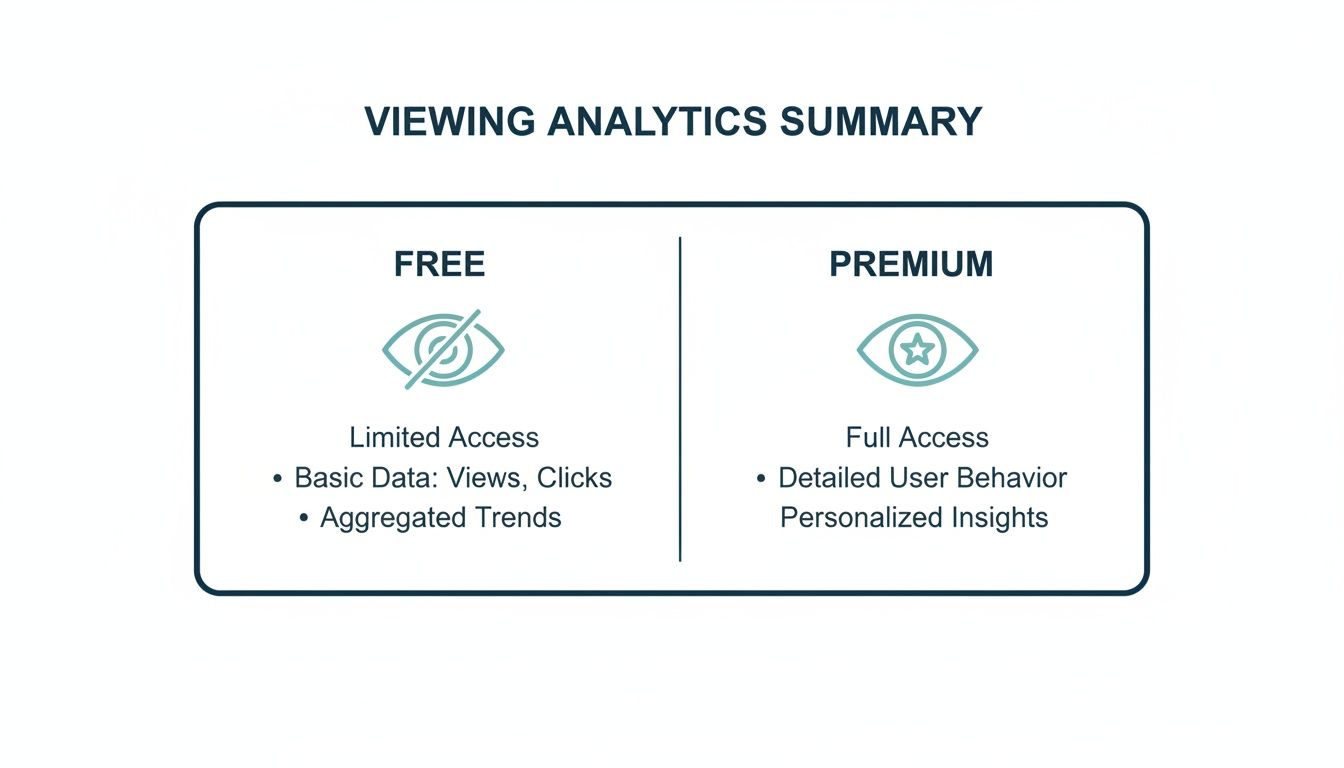
As you can tell, a Premium subscription turns your analytics from a simple curiosity into a powerful tool for strategic networking.
To make it even clearer, here’s a quick breakdown of what you get with each account type.
LinkedIn Account Types and Viewer Information
This table compares the profile view information available to Free and Premium users, which should help you figure out if an upgrade makes sense for your goals.
| Feature | Free Account Access | Premium Account Access |
|---|---|---|
| Viewer List | Shows the last 5 viewers | Shows all viewers from the past 90 days |
| Viewer Details | Limited info (name, headline, company) for the last 5 | Full profile details for all non-anonymous viewers |
| “Who’s Viewed Your Profile” Chart | 90-day trend chart | 90-day trend chart with more detailed insights |
| Keyword Insights | No access | See the keywords viewers used to find you in search |
| Anonymous Viewers | Displayed as “Anonymous LinkedIn Member” | Displayed as “Anonymous LinkedIn Member” |
| Viewing Profiles in Private Mode | Can browse anonymously, but lose access to your own viewer list | Can browse anonymously and still see your complete viewer list |
Ultimately, if you’re serious about using LinkedIn for growth, the detailed insights from a Premium account are hard to pass up.
Decoding Viewer Insights
Beyond just who viewed your profile, the real gold is in understanding how they found you. The dashboard handily breaks this down, showing you if people discovered you through:
- LinkedIn Search: This is a great sign that your profile is optimised with the right keywords for your field.
- Your Profile: Someone clicked on your name directly, maybe from a comment you left, a post you shared, or a mutual connection’s page.
- Homepage Feed: A viewer saw your content—a post, an article, a comment—and it was compelling enough for them to click through.
- Company Page: They stumbled upon your profile via your current or past employer’s LinkedIn page.
The bottom line: This “How they found you” data is incredibly useful. If most of your views are coming from search, your keyword strategy is clearly paying off. If they’re coming from the homepage feed, your content is resonating and sparking curiosity. By analysing these sources, you can double down on what’s working. For an even deeper dive, you might want to learn how to export data from LinkedIn Analytics to Excel.
How to Optimise Your Profile to Attract Quality Views
Analysing your LinkedIn profile view data is a great start, but it’s only half the story. The real work begins when you start actively shaping who finds you. The goal isn’t just to get more views, but better ones—from recruiters at your dream company, ideal clients, or influential peers in your industry. This is about turning your profile from a passive digital CV into a strategic magnet for the right opportunities.
A powerful profile makes a great first impression, and that happens the moment someone lands on your page. Your profile photo, banner image, and headline are the first things anyone sees. They need to work together to convey professionalism and clearly state your value in a matter of seconds.

This initial visual hook has to be backed up by keyword-rich text that ensures you actually show up in the right searches to begin with.
Craft a Headline That Works Like SEO
Your headline is arguably the most critical piece of real estate on your entire profile. It follows your name everywhere on LinkedIn—in search results, when you comment on posts, and in connection requests. Instead of just listing your current job title, think of it as your 220-character elevator pitch.
A strong headline should do a few things well:
- Include your target role or expertise. For instance, instead of “Software Engineer,” try something like “Senior Software Engineer | Backend Development & Cloud Architecture | AWS Certified.”
- State your value proposition. A marketer might use, “Helping B2B SaaS Companies Drive Growth Through Strategic Content Marketing.”
- Incorporate relevant keywords. Put yourself in the shoes of a recruiter or client. What terms would they use to find someone like you?
By optimising your headline, you immediately increase the odds of getting a relevant LinkedIn profile view. You can also dive deeper with our detailed guide for more powerful LinkedIn headline tips.
Tell Your Story in the About Section
Your ‘About’ section is where you get to move beyond just keywords and tell a compelling story. This is your chance to connect with viewers on a more human level. It’s a mistake to just list your skills here; instead, weave them into a narrative about your professional journey, what you’re passionate about, and the specific problems you solve.
To make it easy to read, try structuring it this way:
- Start with a strong hook. Summarise who you are and what you do in the first two or three lines. That’s all that’s visible before a user has to click “see more.”
- Detail your expertise. Briefly explain your core skills and how you’ve used them to get results. Bullet points are great for highlighting key accomplishments.
- End with a call to action. Don’t leave them hanging! Tell people what you want them to do next, whether it’s inviting them to connect, checking out your portfolio, or sending you a message about a potential collaboration.
Integrate Keywords Throughout Your Profile
To really maximise your visibility, you need to strategically place keywords throughout your entire profile, not just in the headline. Think about your core skills and the language your industry uses.
Your profile should be seeded with the terms that hiring managers and clients are searching for. This ensures you’re discoverable not just for your job title, but for the specific value you bring.
Here’s where to sprinkle them in:
- Experience Section: Don’t just list job duties. Describe your accomplishments using action verbs and relevant keywords. Wherever possible, quantify your results with numbers (e.g., “Increased organic traffic by 45% by optimising landing pages for core SEO keywords”).
- Skills Section: Aim to add at least five core skills and then get your connections to endorse them. LinkedIn’s algorithm gives more weight to endorsed skills, which can give your profile a nice boost in search rankings.
- Featured Section: This is perfect for adding links to articles, projects, or presentations that showcase your expertise. It not only provides solid proof of your abilities but also gives you another place to include relevant terms in the descriptions.
Craft a Content Strategy That Gets You Noticed
An optimised profile is your digital handshake, but it’s a static one. To really pull the right people in and see your LinkedIn profile view numbers climb, you need a dynamic content strategy. It’s what turns you from just another face in the crowd into a recognised voice in your industry—someone whose insights make people curious enough to click your name and learn more.
When you post high-value content regularly, you’re sending a clear signal to the LinkedIn algorithm that you’re an active, engaged member. In return, the algorithm shows your posts—and by extension, your profile—to more people. Think of it as leaving a trail of professional breadcrumbs that leads your ideal audience straight to your doorstep.
Beat the Blank Page Syndrome
Let’s be honest: one of the biggest challenges is figuring out what to post. Staring at that blinking cursor on a blank screen can be intimidating. This is exactly where modern tools can make a world of difference. AI-powered assistants like Postline.ai are built to help you smash through writer’s block and generate ideas that actually connect with the people you want to reach.
Instead of guessing what might land, you can use it to find fresh angles on familiar topics or uncover new conversations your audience is having. It’s all about working smarter, not harder, to keep your presence consistent and powerful.
Build Authority With Timely, Fact-Based Insights
Generic advice is forgettable. To truly stand out, your content needs to be valuable, timely, and credible. This is where weaving real-time research into your posts becomes a game-changer. For instance, with a tool like Postline.ai, you can pull in current data or recent articles to give your arguments some real teeth.
Imagine you’re a marketing consultant. You could post a generic “content is king” message, or you could generate a post referencing a brand-new study on consumer behaviour. The second option instantly adds weight and authority to your perspective. Which one do you think gets more clicks?
By grounding your content in facts and current events, you shift from simply sharing opinions to providing genuine thought leadership. This builds trust and makes viewers see you as a go-to expert in your field.
This kind of credibility is especially vital in a crowded market. Take Germany, for example, where LinkedIn’s user base grew to a massive 17.52 million by the end of 2023. That’s a huge, engaged audience looking for sharp insights, creating a massive opportunity for professionals to expand their reach. You can dig into these numbers in DataReportal’s analysis of LinkedIn’s user trends in Germany.
Stay Consistent With Smart Scheduling
Posting whenever you remember to is a recipe for going nowhere. A successful content strategy is built on consistency—showing up in your audience’s feed regularly. But that doesn’t mean you need to be glued to LinkedIn, writing posts every single day.
Using a scheduler is the most efficient way to manage your content. Block out a bit of time each week to plan, write, and schedule all your posts in one go. This ensures you maintain a steady drumbeat of content, keeping you top-of-mind with your network even when you’re swamped with other work. Our guide on building a winning LinkedIn content strategy can walk you through how to plan your calendar effectively.
Turning Profile Viewers into Real Opportunities
Every single LinkedIn profile view is more than a vanity metric; it’s a conversation starter. When someone takes the time to check you out, you’ve got a warm lead. Instead of blasting them with a generic sales pitch, you can turn that flicker of curiosity into a genuine connection. The trick is to act quickly, but also thoughtfully.
Before you do anything, take two minutes to scan their profile. What’s your common ground? Look for shared connections, old workplaces, the same university, or even similar interests you can see from their recent activity. This tiny bit of homework is what separates a cold, easily ignored message from a personalised invitation that actually gets a response.

This tactic works particularly well in busy professional circles. Take Germany’s LinkedIn scene in 2023. The 25-34 age group was by far the largest, with 8.8 million users in December alone. This is a massive group of ambitious professionals actively looking for new insights and contacts, making them prime candidates for a well-timed message after they’ve viewed your profile. You can dig deeper into LinkedIn’s user demographics in Germany.
Crafting the Perfect Outreach Message
Once you’ve spotted a point of connection, it’s time to write your message. You want to come across as friendly and acknowledge they viewed your profile without sounding creepy or intrusive.
Here are a few ideas you can adapt:
- For a shared industry connection: “Hi [Name], I noticed you viewed my profile and saw we’re both in the [Your Industry] space. I’m always keen to connect with fellow professionals. Looking forward to seeing your posts.”
- For a potential client: “Hi [Name], thanks for stopping by my profile. I see you work at [Their Company], and I’m impressed with your work in [Their Field]. If you’re ever exploring [Your Service], I’d be happy to chat.”
- When you have a mutual connection: “Hi [Name], I saw you checked out my profile. I also noticed we both know [Mutual Connection’s Name]. It would be great to connect.”
Key takeaway: Keep your message short, professional, and make it about them. Referencing the profile view provides context, but it’s the personal touch that makes the invitation feel authentic and respectful.
Starting a Meaningful Dialogue
Getting them to click “Accept” is only half the battle. The real value is in what comes next. Once you’re connected, send a quick thank-you note to open the door for an actual conversation.
It could be as simple as: “Thanks for connecting, [Name]. I was just reading your latest post on [Topic] and found your perspective really interesting. How have you found…?” This immediately shows you’re paying attention and are genuinely interested in their work, not just another number in your network.
This is how you transform a simple LinkedIn profile view into a valuable professional relationship. If you’re looking for more inspiration on that first message, our guide on how to reach out to someone with a mutual connection on LinkedIn has you covered.
Advanced Tactics to Maximize Your Profile Visibility
Alright, so you’ve got an optimised profile and a content plan that’s humming along. Now it’s time to shift gears from the fundamentals to some pro-level strategies. This is all about proactive engagement and positioning yourself as a genuine thought leader, which is what really drives high-quality LinkedIn profile views.
It’s one thing to be on the platform; it’s another to be seen in the right places by the right people.
One of the most powerful, yet often overlooked, methods is strategic commenting. Forget dropping a generic “Great post!” on an influencer’s content. Instead, aim to add real value. Ask a thoughtful question that deepens the conversation, offer a respectful counterpoint, or share a personal experience that relates to their topic.
Suddenly, your insightful comment isn’t just seen by the original poster—it’s exposed to their entire audience. You’re effectively borrowing their reach to create your own opportunity.
Another fantastic tactic is to become an active, contributing member of niche LinkedIn Groups. Think of these as curated communities where your ideal clients, peers, and connections are already hanging out.
Find and Engage in Relevant Groups
Don’t just spray and pray by joining dozens of groups. Be selective. Find the ones where genuine, meaningful conversations are actually happening. Search for groups tied to your industry, specific role, or professional interests.
Once you’re in, resist the urge to immediately self-promote. That’s the quickest way to get ignored. Instead, focus on contributing.
- Share your expertise freely. When someone posts a question you can answer, jump in with a detailed, genuinely helpful response.
- Start your own conversations. Post an interesting question or a unique take on a recent industry development to get people talking.
- Connect with active members. After a great back-and-forth with someone in a group discussion, send them a personalised connection request that mentions your interaction.
This approach subtly establishes you as a helpful expert. People will naturally become curious and click through to your profile to learn more. To get the most out of these interactions, it helps to have a deep understanding of the main LinkedIn platform itself, as this knowledge is the foundation for any effective engagement strategy.
Establish Authority with Articles and Live Video
LinkedIn gives you more than just short-form posts to work with. Publishing long-form articles or going Live are two brilliant ways to cement your authority. An article lets you dive deep into a subject, showcasing your expertise in a way a quick post simply can’t. It also becomes a permanent asset on your profile, a go-to piece that proves you know your stuff.
Going Live is definitely more of a commitment, but it offers an unmatched level of direct engagement with your audience. You can host a Q&A, interview another expert in your field, or do a live presentation on a trending topic. That real-time interaction forges a much stronger sense of community and trust.
Sure, these advanced methods take more effort, but the payoff is huge. They transform your presence from that of a passive participant to a recognised leader in your space, attracting high-value profile views from people who are already invested in what you have to say.
Common Questions About LinkedIn Profile Views
Let’s be honest, figuring out the nuts and bolts of LinkedIn profile views can feel a bit like reading tea leaves. The numbers are there, but what they actually mean isn’t always obvious. Let’s tackle some of the most frequent questions I hear and clear up the confusion.
Why Can’t I See Everyone Who’s Viewed My Profile?
This is probably the most common point of frustration. Your dashboard proudly announces ten new views, but when you click, you can only put a name to two of them. What gives?
The short answer is: privacy settings. When someone decides to browse LinkedIn in Private Mode, their visit is logged as a number, but their identity is completely hidden. All you’ll see is “Anonymous LinkedIn Member” – no name, no headline, nothing. This is the same whether you have a free or a Premium account.
There’s also a middle ground. If a viewer uses a “semi-private” setting, you might get a vague clue, like “Someone in the Marketing industry” or “Consultant at a tech company.” Ultimately, they are in complete control of how much information you see about them.
Does Viewing Someone’s Profile Always Send a Notification?
Now, let’s flip the coin. When you look at someone else’s profile, the same rules apply to you. Whether they get a notification with your name on it is entirely down to the settings you’ve chosen. LinkedIn gives you three ways to browse.
Here’s a quick look at your options and how you appear to others:
- Public (Your name and headline): This is the default. The person you view gets a notification showing your picture, name, and headline. It’s a great, subtle way to signal interest or make a connection.
- Semi-Private (Private profile characteristics): This option shares a general description, like “Sales Manager from Berlin.” It gives a bit of context without revealing who you are.
- Private Mode (Anonymous LinkedIn Member): You’re a ghost. They’ll know their profile was viewed, but they will have absolutely no clue it was you.
You can switch between these modes anytime you like. Just head to “Settings & Privacy” and look for the “Visibility” tab.
How Can I Get More Views Without Paying for Premium?
You absolutely do not need to open your wallet to get more eyes on your profile. The most powerful strategies are free; they just require a bit of consistency and smart effort. As we’ve discussed, the key is to stop thinking of your profile as a static CV and start treating it as a dynamic hub for your professional brand.
You don’t need to pay to play. The best way to attract organic, high-quality views is by consistently providing value to your network and optimising your profile to be discoverable.
This really comes down to regularly sharing insightful content, weaving relevant keywords throughout your headline and ‘About’ section, and jumping into conversations with thoughtful comments. Every single one of these actions puts your name in front of people and gives them a compelling reason to check you out.
Ready to create compelling content that drives more profile views, without the writer’s block? With Postline.ai, you can generate polished, insightful posts in minutes, complete with real-time research to establish your authority. Start turning your ideas into standout content and attract the right audience today at https://postline.ai.

Run every client pipeline in one place
Give each LinkedIn profile its own voice, calendar, approval flow, and analytics. Start in minutes.
Start free trial