
The Ultimate LinkedIn Post Inspector Your Guide to Perfect Posts
Unlock higher engagement with our complete guide to the LinkedIn post inspector. Learn how to analyse, optimise, and perfect your content for maximum reach.
Ever wondered what a LinkedIn Post Inspector actually is? At its core, it’s LinkedIn’s own official tool that lets you see a preview of how a link will look before you hit “Post”. This is your chance to make sure the title, image, and description all show up exactly as you intended.
Think of it as the final pre-flight check for your content. It helps you catch and fix those awkward broken links or unprofessional-looking previews that can seriously kill your engagement before your post even gets off the ground.
Why Every LinkedIn Post Needs a Pre-Flight Check

You’d never expect a pilot to skip their pre-flight checks before taking off, right? The risk would be unthinkable. Well, publishing a LinkedIn post without giving it a final once-over is the digital version of that—a small, avoidable mistake that can stop your content from ever reaching its audience.
On a platform buzzing with millions of professionals, just posting and hoping for the best isn’t a strategy; it’s a recipe for being ignored.
The idea of a “LinkedIn post inspector” is really about more than a single tool; it’s a fundamental shift in mindset. It’s about moving from being a passive content creator to becoming a strategic publisher who fine-tunes every element for maximum impact. This final inspection is your last chance to make sure your message is clear, your formatting is clean, and you’re giving the algorithm every reason to show your post to more people.
Taking just 60 seconds for a pre-publish review is the difference between hoping for engagement and actually building it. It’s a simple habit that separates amateur posters from seasoned professionals.
The Real Cost of Skipping the Inspection
So, what really happens if you just skip this step and post anyway? The fallout can be a lot more damaging than you’d think, quietly undermining all your hard work.
- Broken Previews: Sharing a link that pulls the wrong image or, even worse, shows a “Cannot display preview” error instantly makes you look sloppy and hurts your credibility.
- Reduced Click-Throughs: Let’s be honest, nobody wants to click on a messy or broken-looking link. An unappealing preview will sink your click-through rate.
- Wasted Effort: You can spend hours creating a fantastic article or landing page, but if the preview is glitched, all that effort goes down the drain because no one will see it.
A quick, methodical check is one of the easiest ways to boost your post’s visibility and impact. By diving into different LinkedIn post analytics, you’ll see a clear connection between a polished presentation and better performance. Adopting an inspector mindset isn’t just a “nice-to-have”; it’s an essential step for any professional who wants to cut through the noise and get real results.
Deconstructing the Anatomy of a High-Performing Post

To really get into the inspector mindset, you need to understand what a brilliant post looks like under the bonnet. Think of yourself as a mechanic looking at a high-performance engine. Every single part has a job to do, and they all need to work in perfect harmony to get the best results. A post that goes viral isn’t just a stroke of luck; it’s a well-oiled machine built for engagement.
When you start breaking down the individual components, you shift from just guessing what might work to following a deliberate, repeatable strategy. This is how you become your own expert inspector, spotting potential issues and making crucial tweaks long before you hit that “Post” button.
The Unmissable Hook
Your first couple of lines are the most valuable real estate in your entire post. This is your hook, and it has one single, crucial job: to stop the scroll. If it doesn’t grab someone’s attention immediately, the rest of your amazing content might as well not exist.
A hook that really works usually does one of these three things:
- Asks a provocative question: “What if everything you’ve been told about networking is flat-out wrong?”
- Makes a bold or counterintuitive statement: “I stopped answering all my emails for a week. Here’s what happened.”
- Kicks off with a relatable story: “I completely bombed my first big presentation.”
The Body Built for Skimming
Okay, you’ve grabbed their attention. Now you have to keep it. The main body of your post needs to be incredibly easy to read, especially on mobile, which is where most people will see it. Nothing makes a reader bail faster than a giant, intimidating wall of text.
To inspect your post for readability, ask yourself these questions:
- Are my paragraphs short? Stick to one or two sentences, max.
- Is there enough white space? Use blank lines to let your ideas breathe.
- Could I use lists or bullet points here to make complex info easier to digest?
The goal isn’t just to be understood; it’s to be impossible to misunderstand. Clean formatting shows respect for your reader’s time, and that’s a huge factor in convincing them to stick around.
The Clear and Compelling CTA
Every single post needs a purpose. Your call-to-action (CTA) is where you tell your reader what to do next. A wishy-washy CTA like “Let me know your thoughts” is usually too weak to get anyone to actually do anything.
Instead, get specific. Ask a direct question that ties back to your post, or prompt a very clear action. Something like, “What’s the #1 tool in your stack you couldn’t live without?” is far more likely to get a response. Your CTA should feel like the natural, satisfying end to the conversation you just started. This is a massive part of understanding what makes a good LinkedIn post so effective.
The Right Hashtags and Tone
The final inspection is all about your hashtags and overall tone. Are the hashtags you’ve chosen genuinely relevant and specific? Using three to five well-picked tags is so much better than slapping on ten generic ones. They’re there to categorise your content and help the right people find it.
Your tone also needs to be consistent with your personal brand. Are you witty, deeply analytical, or more inspirational? Whatever it is, sticking to it builds trust and makes you recognisable. A great final check is to read your post out loud. Does it actually sound like something you would say? This little step ensures your post feels authentic, which is the foundation of building a real connection with your network.
Choosing Your Inspector Toolkit: Manual Checks vs. AI Tools
Alright, when it comes to giving your LinkedIn posts a final once-over before they go live, you’ve got two main ways to go about it. You can either roll up your sleeves and do it the old-fashioned way—manually—or you can let technology do the heavy lifting with an automated tool. Neither one is necessarily better; in fact, the real pros know how to blend both.
Let’s break down what each approach looks like in practice.
The Art of the Manual Spot-Check
The manual inspection is all about using your own experience and intuition. It’s the classic “creator’s eye” approach, where you rely on your gut to catch the things a machine just can’t. Think of it as proofreading for feel and flow, not just typos.
A few tried-and-true manual checks will never go out of style.
First, read your post out loud. Seriously. This is a game-changer. If a sentence feels clunky or awkward to say, you can bet it will be even worse for someone to read. It’s the quickest way to find phrases that don’t sound like a real person talking.
Next, always preview it on your phone. The vast majority of people will be scrolling through LinkedIn on a mobile device. That beautifully formatted post you crafted on your desktop can easily turn into a dreaded “wall of text” on a smaller screen.
Finally, get a second pair of eyes on it. Ask a colleague or a friend to give it a quick read. After staring at the same words for a while, you become blind to your own mistakes and confusing points. A fresh perspective can immediately tell you if your message is actually landing the way you intended.
The Power of an AI-Powered Assistant
While manual checks are brilliant for catching nuance, they aren’t always the most efficient. This is where an automated LinkedIn post inspector comes into play, and it’s where platforms like Postline.ai really shine.
Think of these tools as a tireless assistant that’s been trained on what makes a LinkedIn post work. Postline.ai’s AI Post Editor and LinkedIn Formatter are built to automatically scan your content for the essentials: a magnetic hook, short and scannable paragraphs, and a compelling call-to-action.
They don’t just guess; they analyse your post’s structure against the patterns of thousands of successful posts. It takes the guesswork out of formatting and helps you build on a proven foundation.
This is a glimpse of how clean and straightforward the Postline.ai editor is—designed to make generating, editing, and inspecting your content a seamless process.
This kind of automation can dramatically speed up your workflow. You can learn more about how these tools work in our guide to finding the best LinkedIn post generator.
Manual vs. Automated Post Inspection
So, which path should you choose? It’s not really an either/or question. The smartest approach is to combine the strengths of both. Here’s a quick comparison to help you see where each method shines.
| Feature | Manual Inspection | Automated Inspection (e.g., Postline.ai) | Best Use Case |
|---|---|---|---|
| Speed | Slow, requires focused effort. | Nearly instant, checks are done in seconds. | Use automated tools for initial drafts and quick checks. |
| Consistency | Can vary based on mood or time of day. | Highly consistent, applies the same rules every time. | Automated is best for maintaining brand formatting standards. |
| Nuance & Tone | Excellent. Human intuition is key for authenticity. | Limited. AI can’t fully grasp subtle human emotion. | Manual review is essential for finalising tone and voice. |
| Data-Driven Insights | Relies on personal experience and observation. | Based on analysis of thousands of successful posts. | Use AI to optimise structure and calls-to-action. |
| Effort | High mental effort required for deep analysis. | Minimal effort, just click a button. | Let AI handle the tedious formatting and structural checks. |
Ultimately, a hybrid workflow gives you the best of both worlds.
Let an AI tool handle 80% of the heavy lifting—the structure, the formatting, the basic checks. It’s fast, consistent, and data-backed. Then, you can dedicate your energy to the final 20%: the human touch. That’s where you refine the tone, inject your personality, and ensure the post genuinely connects with your audience.
Inspecting Your Post for True Audience Resonance

You can have a technically perfect post—great hook, flawless grammar, perfect formatting—but if it doesn’t connect with your audience, it’s just noise. It’s like a beautifully tuned instrument playing to an empty theatre.
The most critical check you can make, using that LinkedIn post inspector mindset, is to ask if your content truly resonates. This is where you switch your thinking from, “What do I want to say?” to the far more powerful question, “What does my audience actually need to hear?”
This isn’t about simply proofreading. It’s about getting under the hood of your message to see if it genuinely addresses your network’s pain points, professional goals, and real-world interests. A post that solves a problem or starts a good conversation will always, always outperform one that just shouts about your own wins.
To get this right, you first need to get a handle on audience analysis. It’s the groundwork that allows you to build content that feels like a personal, valuable message to the very people you want to reach.
Creating Your Audience Checklist
Before you hit that “Post” button, put your draft through a quick but effective “Audience-First Checklist.” Think of it as your final quality check to make sure your content is built for connection, not just for broadcasting.
Your checklist should be built around a few sharp questions:
- Does this offer real value? Will someone learn something new, feel inspired, or see things from a different angle after reading this?
- Does this hit on a genuine pain point? Is this a problem my connections are wrestling with right now in their careers?
- Does this kick off a conversation they want to join? Is the topic relevant enough to make someone stop scrolling and type out a comment?
- Does this sound like a real person talking? Have I cut out the corporate-speak and used an authentic voice?
A self-serving post talks at your audience. A resonant post talks with them. The difference is felt in every comment, share, and new connection you make.
This whole process gets much easier when you lean on platform insights. For instance, knowing who you’re talking to helps you calibrate the tone and complexity of your post. In Germany, the 25-34 age group is a huge force on LinkedIn, with 7.8 million users. If you’re in B2B, that’s likely a core part of your audience. Understanding their career stage and what keeps them up at night is a form of proactive post inspection.
From Self-Serving to Audience-Centric
Let’s look at the difference with a simple example: a post about a new project. A self-serving post might read, “Excited to announce we launched our new software.” It’s an announcement, sure, but it’s not much of a conversation starter.
Now, let’s reframe it to be audience-centric: “We just launched new software to help marketers solve the tedious task of tracking campaign ROI. What’s your biggest time-drain when it comes to reporting?”
See the difference? The second version instantly calls out a pain point, hints at a solution, and asks a direct question to pull people in. This deeper level of inspection ensures your content doesn’t just get seen—it gets felt. You can dive deeper into understanding your target viewers in our article on LinkedIn audience insights.
How AI Can Become Your Personal Post Inspector
Manually checking every single detail of a post works, but let’s be honest—it’s a massive time sink. What if you had an expert looking over your shoulder, inspecting every draft instantly? That’s exactly where AI-powered platforms like Postline.ai come in, acting as your personal, on-demand LinkedIn post inspector.
Think of it less as a simple writing tool and more as a complete optimisation partner. It handles all the tedious checks automatically, so you can pour your energy into your core message and overall strategy. It’s not about losing your voice; it’s about making sure that voice is heard loud and clear, backed by data.
The AI-Powered Inspection Journey
Picture this: you start with just a rough idea, a single spark. An AI assistant can help you take that spark and guide it through a full inspection process, all the way to a polished, scheduled post. Each feature is built to examine a different part of your content, checking its quality and potential to make an impact.
Here’s a breakdown of how Postline.ai’s features work together as a multi-point inspection system:
- AI Post Generator: This is your first quality check. It makes sure your initial draft is built on a solid foundation—a structure proven to perform well, complete with a strong hook and clear formatting from the get-go.
- Learns Your Voice: This feature is all about authenticity. By learning from your past content, it ensures the tone, phrasing, and style stay true to you. No more generic, robotic-sounding posts.
- Online Research: This is your credibility inspector. It finds and pulls in fresh data and reliable sources to support your points, making sure your content is both timely and trustworthy.
- LinkedIn Formatter: This is the final structural review. It automatically tweaks the post for maximum readability, using short paragraphs, white space, and clear calls-to-action to make sure it looks great, especially on mobile.
The screenshot below gives you a glimpse of the Postline.ai interface, where you generate, edit, and inspect your posts before they go live.
The whole layout is designed to make the inspection process feel effortless, putting all the powerful editing and formatting tools exactly where you need them.
Connecting with a Growing Audience
Having an AI inspector becomes even more critical when you consider the sheer size of the audience on professional networks. For example, LinkedIn’s own advertising data revealed that at the start of 2025, the platform had 21.0 million members in Germany alone. That figure represents 29.8% of the adult population—a huge, engaged audience that you need to connect with properly. You can explore more of LinkedIn’s growth statistics for Germany at datareportal.com.
By automating all the technical and structural checks, an AI post inspector frees you up to concentrate on what really matters: creating content that genuinely connects with this vast professional audience.
This entire journey, from a simple idea to a fully inspected post, shows how an AI assistant can save you a ton of time while simultaneously raising the bar for your content. It’s a systematic way to make sure every post you publish is ready for engagement, helping you stand out and make a real impact.
Integrating the Inspector Mindset into Your Workflow
Think of the “inspector mindset” less as a tool and more as a final, critical habit you build into your creative process. It’s that last look-over that takes a post from “good enough” to genuinely polished, giving every piece of content its best shot at making an impact.
This isn’t about adding another tedious task to your plate. It’s about making this check a natural part of how you create. For instance, you could integrate speech to text into your daily workflow to get your initial thoughts down quickly, then use the inspector phase to refine and structure them for maximum effect.
A smooth workflow makes all the difference. The journey from a raw idea to a perfectly formatted post should feel seamless and intentional.
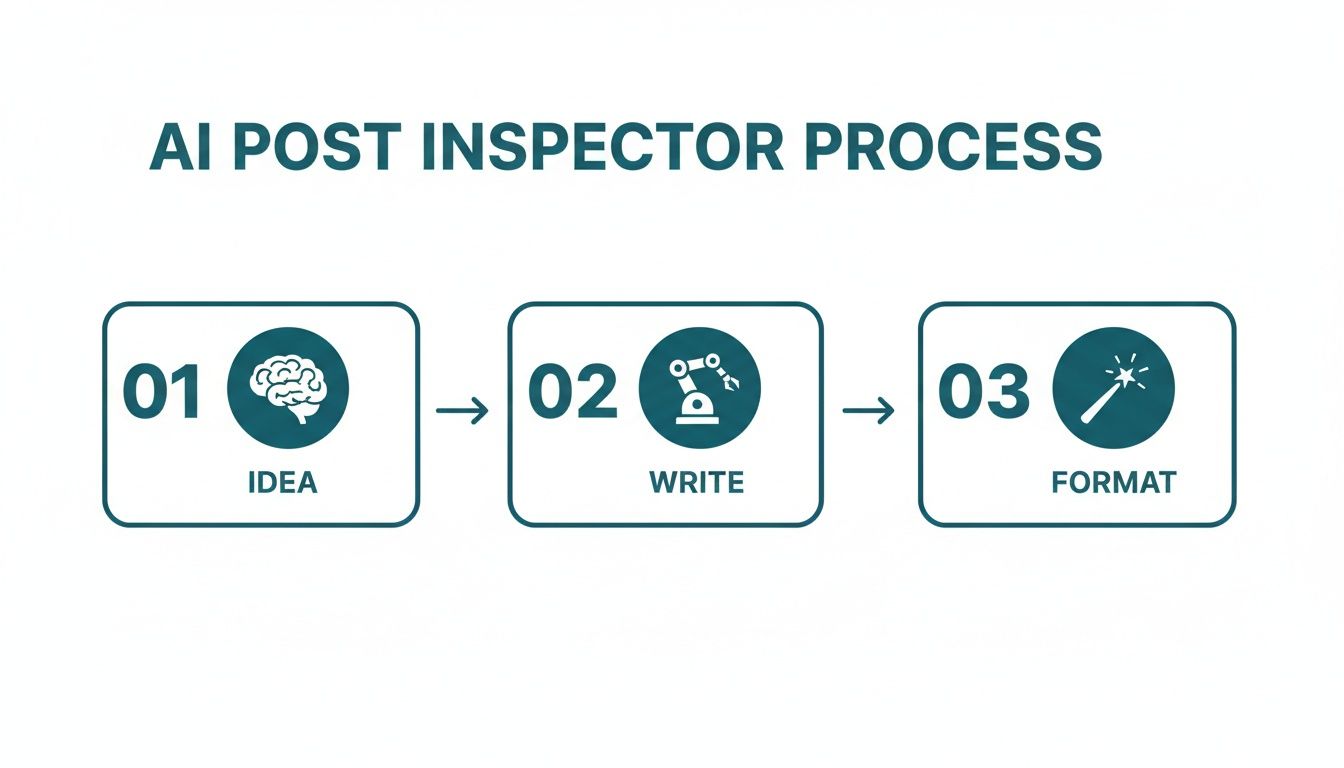
The idea here is simple: each step logically flows into the next, so quality is baked in from the very beginning, not just tacked on at the end.
When you make this methodical inspection a non-negotiable step in your routine, you stop just posting on LinkedIn. You start standing out, earning attention, and actually hitting your professional goals with content that consistently lands.
Frequently Asked Questions
When you start digging into content optimisation, a few questions always pop up. Let’s tackle some of the most common ones you might have about adopting a “post inspector” mindset for your LinkedIn content.
What Is the Most Important Thing to Check on a LinkedIn Post?
If you only have time to check one thing, make it your hook. Hands down, the first one or two lines are the most critical part of your entire post. Think about it—on a crowded, fast-scrolling feed, that hook is your only chance to stop someone in their tracks.
If your hook doesn’t grab them, it doesn’t matter how brilliant the rest of your post is; nobody will stick around to read it. Before you hit publish, always ask yourself: Is this hook clear? Is it intriguing? Does it poke at a real pain point my audience feels? A strong hook makes everything else you do far more effective.
How Often Should I Inspect My Posts?
Every single time. This isn’t something you do once a week or as part of a monthly review. Inspecting your post should be the final, non-negotiable step in your workflow right before you publish.
Treat it like proofreading a crucial email before hitting send. By making this a habit, you guarantee that every piece of content you share meets a certain standard of quality. It’s a simple routine that can dramatically boost the potential of every post, helping you build momentum and trust with your audience over time.
Think of it this way: inspecting each post is a small investment of a few minutes that pays huge dividends in visibility and engagement. It’s a professional habit that separates the consistently high-performers from the casual posters.
Can I Inspect a Post After It Has Been Published?
Absolutely. In fact, you definitely should. While you can’t edit the post’s content without deleting and reposting it, inspecting its performance after it goes live is a fantastic learning opportunity. Some people call this a “post-mortem analysis.”
Check out the metrics: views, likes, comments, reposts. But don’t just look at the numbers. Dive into the comments to see which specific ideas resonated and what kind of questions people are asking. This post-publication inspection gives you priceless feedback that you can use to sharpen your pre-publication checks for all your future content.
Does Using an AI Inspector Make My Content Sound Robotic?
Not at all, as long as you use it correctly. A good AI tool is there to enhance your voice, not stamp it out and replace it with generic fluff. The best ones are designed to learn your unique style, ensuring your content always sounds authentically like you.
The trick is to view AI as your co-pilot, not the pilot. Let it handle the tedious work—checking the structure, spotting formatting errors, and offering data-backed suggestions. You still provide the core message, the personal anecdotes, and that all-important final human touch.
Ready to stop guessing and start creating content that actually gets results? Postline.ai is like having a personal post inspector on your team, helping you generate, format, and schedule posts that capture attention. Turn your raw ideas into polished content in minutes.
Start writing better LinkedIn posts today at https://postline.ai

Run every client pipeline in one place
Give each LinkedIn profile its own voice, calendar, approval flow, and analytics. Start in minutes.
Start free trial