
Job Advertisement LinkedIn: How to Attract Talent with job advertisement linkedin
Learn how to craft a compelling job advertisement linkedin that attracts top candidates, with tips on copy, targeting, and optimization.

Ever felt like you’ve posted a job on LinkedIn, only to hear crickets or get a flood of applications that are completely off the mark? You’re not alone. Creating a job advertisement that actually attracts top-tier talent is part art, part science, and it’s a far cry from just posting a notice. It’s a piece of marketing, plain and simple, and it’s competing for attention in a very crowded space.
Let’s break down why so many of these posts miss the mark, so you can start getting it right.
Why Most LinkedIn Job Advertisements Fail to Attract Top Talent
Here’s the blunt truth: many businesses treat LinkedIn like a dusty, old-school job board. They copy and paste a dry, internal-facing job description loaded with corporate jargon and a laundry list of demands. Then they sit back and wonder why only the most desperate or unqualified candidates apply.
This whole approach just doesn’t work anymore.
The best people, especially passive candidates who aren’t even actively looking, need to be sold on the opportunity. They’re scrolling through their feeds, catching up on industry news, and connecting with peers. They’re not in a “job-hunting” mindset. A generic post that reads like a HR manual is just another piece of noise they’ll scroll right past.
The Modern Hiring Landscape
You have to remember that every job advertisement on LinkedIn isn’t just up against other job ads. It’s competing with insightful articles, major company announcements, and colleagues’ success stories—all vying for a user’s attention. With people spending only about 17 minutes per month on the platform, your post has mere seconds to grab them.
This is especially true in a competitive market like Germany. With over 22 million members in the DACH region, LinkedIn has become a key battleground for skilled professionals. In fact, German labour market surveys reveal that more than 70% of large companies use social networks for hiring. Your post isn’t a lonely beacon; it’s a single voice in a massive choir.
To stand out, every job ad needs to be compelling content first and a vacancy notice second.
The biggest mistake is writing an ad that focuses entirely on what the company needs. Instead, a successful ad must answer the candidate’s unspoken question: “What’s in it for me?”
Common Pitfalls to Avoid
So, where exactly do companies go wrong? The good news is that most failures come down to a few common mistakes that are surprisingly easy to fix. Once you see these patterns, you can instantly start to improve your own posts.
Here’s what typically makes a great candidate scroll on by:
- Vague and Generic Titles: A headline like “Marketing Associate” is a snooze-fest. It tells a specialist nothing about the role and does zero to pique their interest.
- A “Laundry List” of Requirements: Presenting an endless bulleted list of “must-have” qualifications is incredibly intimidating. It can easily scare off fantastic candidates who might not tick every single box but would excel in the role.
- No Mention of Culture or Impact: High achievers want to know what it’s really like to work with you. They want to understand the company’s mission and see how their work will make a difference.
- Poor Formatting: A wall of text is an instant turn-off. Dense paragraphs and no clear structure make an ad impossible to scan, especially on a mobile phone, where most people are browsing.
Getting past these hurdles means shifting your mindset. You’re not just listing a vacancy; you’re marketing an opportunity. For a deeper dive into the fundamentals, check out our guide on LinkedIn best practices for business. It will give you the foundation you need to start transforming your hiring results.
Choosing Your Approach: Organic Posts vs. Paid LinkedIn Jobs
Right out of the gate, you’ve got a big decision to make: how are you going to get this job opening in front of the right people on LinkedIn? It’s not simply a question of spending money or not. This is about strategy. You can go one of two ways: a standard organic post from your profile or company page, or a formal, paid ad using the LinkedIn Jobs platform.
Figuring out the core differences between these two paths is the key to picking the right one for your specific role, budget, and where your company is at right now.
The Power of Organic Reach
Think of an organic job post as a regular LinkedIn update that just so happens to be about a job. You can post it from your personal account, your company page, or even get your whole team to share it. This method runs on authenticity and the power of your network.
Imagine a startup founder posting about a new engineering role. Their personal passion and direct involvement can spark a level of interest that a polished corporate ad just can’t match. It feels real. It taps into the trust people already have in them and often pulls in candidates who are genuinely excited about the company’s mission, not just looking for any job.
Organic posts work wonders for:
- Early-stage startups on a tight budget but with strong, well-connected founders.
- Roles where culture is everything, as the post’s tone can show off your company’s personality.
- Finding those “passive” candidates who aren’t scouring job boards but are following people and companies they admire.
The catch? Your visibility is completely at the mercy of the LinkedIn algorithm and how much your network engages. You also miss out on the powerful targeting and applicant management tools you get with a paid ad.
The secret weapon of organic posts is social proof. When your colleagues and other respected people in your industry like, comment, and share your job post, it’s a massive, unspoken endorsement that your company is a fantastic place to work.
Precision and Scale with LinkedIn Jobs
When you need to find a very specific type of professional, and you need to find them fast, LinkedIn Jobs is the tool for the job. This is the official “job ad” system that unlocks all of LinkedIn’s incredible filtering and promotional power.
A major financial firm hiring a senior compliance officer in Frankfurt can’t just cross their fingers and hope for the best. They need to pinpoint candidates with specific certifications, a certain number of years in the field, and experience with niche regulations. A paid job ad lets them do exactly that, making sure every penny of their budget goes toward reaching the most qualified people.
Here’s what paid LinkedIn Jobs give you:
- Advanced Targeting: You can zero in on candidates by skills, seniority level, industry, company size, and a whole lot more.
- Prime Placement: Your job gets featured in the “Jobs” tab, sent out in targeted email alerts, and pushed to users as “Jobs You May Be Interested In.”
- Applicant Tracking: You get a suite of tools to manage, sort, and message applicants, all within LinkedIn.
This approach is all about efficiency and getting results at scale, but it does come with a price tag. You’ll typically be paying on a pay-per-click (PPC) model, so you have to keep an eye on your spending to make sure you’re getting a good return.
Sometimes, though, you’re looking for something completely different. For highly specialised or non-traditional roles, you might need another playbook entirely. For instance, many businesses look to a guide to hiring for virtual assistant roles to handle specific tasks without bringing on a full-time employee. It just goes to show that the right hiring method always depends on the need.
Organic Posts vs Paid LinkedIn Jobs: A Strategic Comparison
To make the decision clearer, let’s break down the key differences in a simple table. This should help you weigh the pros and cons based on what you’re trying to achieve.
| Feature | Organic Job Post | LinkedIn Jobs (Paid) | Best For |
|---|---|---|---|
| Cost | Free | Paid (Pay-Per-Click or subscription) | Organic for zero-budget needs; Paid for roles where time-to-hire is critical. |
| Reach & Visibility | Dependent on network engagement and algorithm | Guaranteed visibility to targeted audiences | Organic for tapping into your existing network; Paid for reaching a broad, highly specific pool of candidates. |
| Targeting | Limited to your network’s connections and hashtag usage | Advanced filters: skills, seniority, location, industry, etc. | Paid is the clear winner for niche or senior roles requiring specific qualifications. |
| Applicant Management | Manual tracking (e.g., DMs, emails, spreadsheets) | Integrated Applicant Tracking System (ATS) | Paid offers a streamlined workflow for managing a high volume of applicants efficiently. |
| Analytics & KPIs | Basic post metrics (views, likes, comments) | Detailed insights: applicant demographics, skill matches, budget ROI | Paid provides the robust data needed to optimise your hiring strategy over time. |
| Authenticity & Trust | High, especially when posted by a founder or team leader | Can feel more corporate and transactional | Organic excels at conveying company culture and building trust through personal endorsement. |
Ultimately, there’s no single “best” way. The right choice hinges on your hiring goals, your budget, and the specific role you need to fill. Many companies even use a hybrid approach, starting with an organic post to test the waters before investing in a paid campaign for harder-to-fill positions.
Writing a Job Advertisement That Speaks to Candidates
You’ve decided whether you’re going with an organic post or a paid ad. Great. Now comes the part that really matters: writing something that convinces a top-tier candidate to actually click “Apply”. A powerful job ad on LinkedIn is so much more than a laundry list of duties; it’s your sales pitch, designed to attract exactly the right person by speaking to their career goals.
Let’s be blunt: nobody cares about your tired corporate templates. The best job ads immediately answer the candidate’s first and most important question: “What’s in it for me?” This means you need to flip the script and focus less on what your company needs and more on what the candidate gains.
Moving Beyond the Job Description
First things first, an internal job description and a LinkedIn job advertisement are two completely different animals. One is an HR document for internal filing; the other is a marketing asset meant to attract talent. Treating them the same is a surefire way to get zero engagement.
A great ad doesn’t just list what someone will do. It sells a vision of what they can achieve.
For instance, instead of the dry, “Responsible for managing social media accounts,” try something like, “You’ll be the creative force shaping our brand’s voice and building a community of loyal followers across all social platforms.” One is a chore; the other is a mission.
To really nail this, it helps to understand how to post on LinkedIn for maximum impact, as the general principles of engagement apply directly to job ads.
This simple flowchart breaks down that initial strategic choice between a free post and a paid ad.
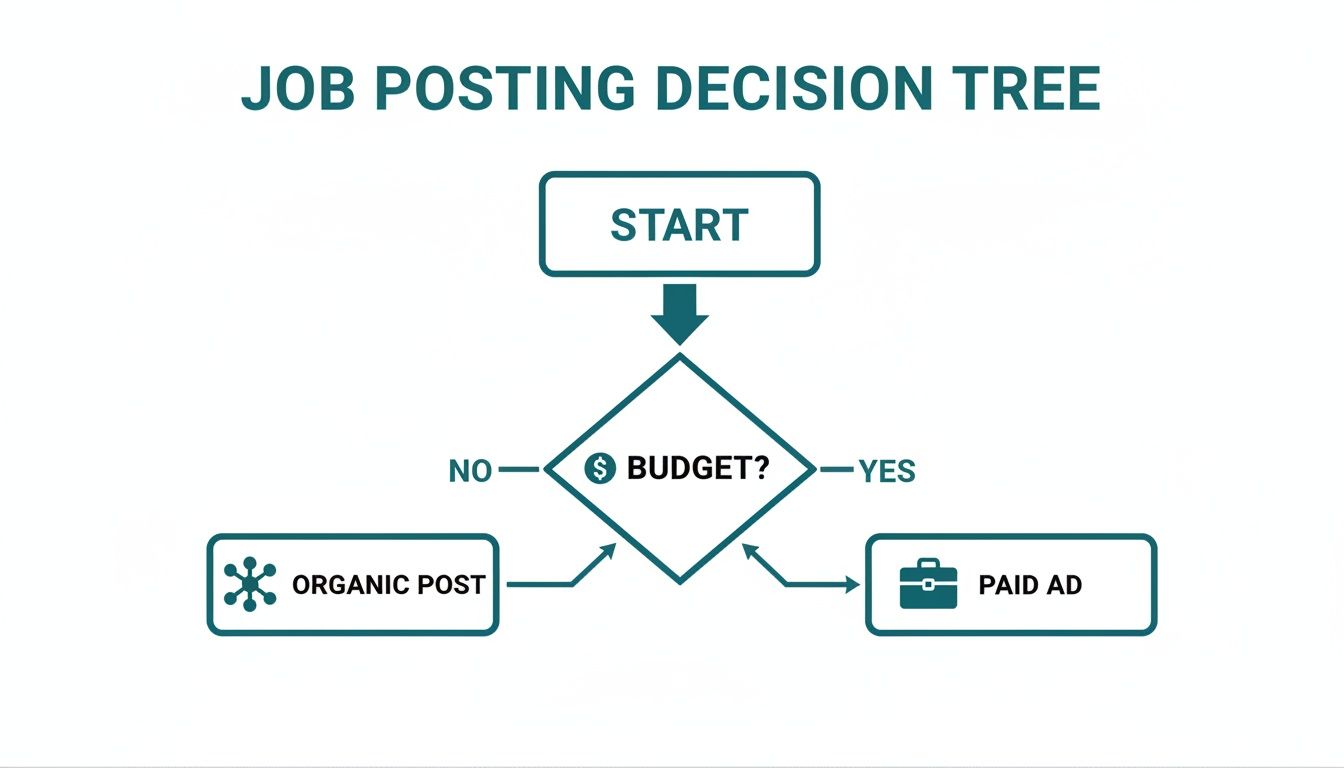
The takeaway here is pretty straightforward: your budget is the main thing that dictates whether you lean on your network’s organic reach or invest in the laser-focused targeting of a paid LinkedIn Job.
Crafting a Compelling Narrative
Think of your job ad as a story. Every section should build on the last, pulling the reader deeper into the world of this role, your team, and the company.
You need to start with a powerful hook. Address a common pain point or a career aspiration right out of the gate. For example, instead of a boring title, open with a question: “Ready to lead a design team that’s redefining the future of sustainable packaging?”
From there, paint a clear picture of what a day or week in this role actually looks like. Talk about the interesting problems they’ll get to solve, the brilliant people they’ll work with, and the real results they’ll see from their efforts. This helps candidates vividly imagine themselves on your team.
Your job ad is fighting for attention in a cluttered, fast-moving feed. Use short, punchy paragraphs and bullet points. A giant wall of text is the fastest way to get scrolled past, especially on a phone.
Key Elements of a High-Converting Ad
To make sure your ad actually works, you need to weave in a few crucial components. The trick is to write them in a way that truly connects with the person you want to hire.
- An Engaging Headline: Don’t just stick with the standard job title. Add a little flavour that hints at the impact or the team culture, like “Senior Software Engineer (Help Us Build the Next-Gen Fintech App).”
- A “What’s in It for You” Summary: The first couple of lines should be 100% candidate-focused. Talk about the growth path, the unique company culture, or the chance to work with groundbreaking tech.
- Clear Responsibilities (Not Just Tasks): Frame responsibilities as achievements. Instead of “Manage email campaigns,” try “Develop and execute email marketing strategies that drive customer acquisition and retention.”
- Essential Qualifications: Be realistic here. Clearly separate the absolute “must-haves“ from the “nice-to-haves.” A ridiculously long list of requirements can scare off fantastic candidates, particularly those from underrepresented groups.
- An Authentic Glimpse into Your Culture: Ditch the clichés like “work hard, play hard.” Give specific, concrete examples instead. Mention your flexible work policy, your monthly team-building events, or your commitment to professional development.
- A Strong, Clear Call-to-Action (CTA): End with a simple, direct instruction. Tell them exactly how to apply and what to expect. Adding a little urgency can help, too: “We’re reviewing applications on a rolling basis, so apply today!“
By getting these elements right, you can turn a basic listing into a powerful talent magnet. To see how this all comes together, it’s worth checking out some real-world examples of great job postings on LinkedIn.
Using Targeting, Budget, and Media to Find the Right People

You can write the most compelling job ad in the world, but it’s completely useless if the right people never see it. Once you’ve nailed the copy, your next job is to get strategic with promotion. This means digging into LinkedIn’s powerful targeting tools and setting a smart budget to zero in on your ideal candidates.
This isn’t about just randomly boosting a post. It’s about making a calculated investment to connect with professionals who have the exact skills and experience you’re looking for. A sharp targeting strategy turns your ad from a shout into the void into a direct message delivered straight to your future hire.
How Much Should You Actually Spend on Your Job Ad?
Figuring out a budget can feel a bit like guesswork, but it doesn’t have to be. For paid LinkedIn Jobs, you’re usually working with a pay-per-click (PPC) model. You set a daily or total budget, and LinkedIn bills you each time someone clicks your ad. Simple enough.
Your budget should really be tied to how urgent and difficult the role is to fill. A senior-level, highly specialised role is naturally going to demand a bigger budget than an entry-level position. My advice? Start with a modest daily budget to see what happens, gather some data, and then scale up if the performance is there.
Pro Tip: Don’t just set your budget and walk away. Check in on your spend and cost-per-application every day. If you’re burning through cash with lots of clicks but no applications, the problem probably isn’t your budget—it’s likely a red flag that your job description or the application process itself needs fixing.
Getting Granular with LinkedIn’s Targeting Filters
The real magic of LinkedIn advertising is in its incredibly detailed targeting options. Simply targeting by job title and location isn’t going to cut it if you want to find niche candidates and get the best bang for your buck. This is where you can get seriously specific.
Think of it this way: targeting a “Marketing Manager” is incredibly broad. But targeting a “Marketing Manager” in Munich with skills in “SaaS” and “B2B Lead Generation” who works at a company with 50-200 employees? Now you’re talking. That’s how you find your perfect match.
Here are a few of the most effective filters I always use:
- Skills: Target people based on the specific skills listed on their profiles, like “Python,” “Project Management,” or “Graphic Design.”
- Company Followers: This one’s a goldmine. Show your ad to people who already follow your company page. They’re already interested in your brand, making them much warmer leads.
- Seniority Level: Filter by experience, from “Unpaid” and “Entry” all the way up to “CXO” and “Owner.” This ensures your ad reaches professionals at the right stage of their career.
- Industry: Focus your budget on candidates from specific industries, whether that’s “Information Technology,” “Financial Services,” or “Hospitality.”
If you really want to go deep on how these filters work, checking out guides on LinkedIn audience insights can give you a serious leg up.
Why Media Is a Must-Have for Your Job Ad
A job ad today is so much more than just a block of text. Including the right visuals can make a massive difference in engagement and help your post stand out in a cluttered feed. It gives candidates a peek behind the curtain at your company culture and makes the role feel more real.
Consider this: LinkedIn posts with images get a 98% higher comment rate. A simple photo or graphic makes your job ad more engaging and shareable, which helps it spread organically.
Here are a few media ideas that I’ve seen work wonders:
- Team Photos: A genuine, high-quality photo of the team the new hire will be joining is incredibly powerful. It helps candidates actually picture themselves working with you.
- Short Videos: A quick, 30-second clip from the hiring manager or a future colleague can be a game-changer. They can talk about the role, what they love about the team, or a cool project they’re working on. It’s personal and effective.
- Branded Banners: Even a simple, well-designed graphic with your logo and the job title can grab attention as people scroll and make your post look more professional.
Don’t be afraid to A/B test your creative, either. Run the same ad with a few different images or videos and see what your audience responds to. You’d be surprised how a small tweak to your media can lead to a big jump in applications.
Analysing Performance to Improve Your Hiring Funnel
Hitting ‘publish’ on your LinkedIn job ad isn’t the finish line; it’s the starting gun. Now the real work begins. You have to shift from creating to analysing, because watching how your ad performs is the only way you’ll figure out what’s connecting with candidates and what’s falling flat.
Think of it as a funnel. Lots of people will see your ad at the top, a smaller group will bother to click, and an even smaller fraction will actually apply. Your entire goal is to make that funnel as efficient as possible, and you can’t do that without digging into the data.
Identifying the KPIs That Truly Matter
It’s incredibly easy to get distracted by vanity metrics. Sure, a high view count feels good, but it doesn’t pay the bills or fill the role. To get a real sense of your ad’s effectiveness, you need to zero in on the Key Performance Indicators (KPIs) that are directly tied to your hiring goals.
These are the numbers that give you genuine insight:
- View-to-Apply Rate: Honestly, this is probably the most critical KPI of them all. It shows the percentage of people who, after seeing your job ad, were convinced enough to hit ‘apply’. A high rate is a great sign that your copy is compelling and your application process isn’t a nightmare.
- Cost-Per-Application (CPA): If you’re running paid ads, this is non-negotiable. It tells you exactly how much money you’re spending to get one single application. This is the foundation for understanding your campaign’s financial efficiency.
- Cost-Per-Qualified-Applicant (CPQA): This metric takes CPA one crucial step further. It calculates the cost to get an application from someone who actually meets your minimum criteria. This is the true measure of how well your budget is working for you.
- Applicant Demographics: LinkedIn offers a peek into the seniority, industry, and location of the people applying. You can quickly see if the applicants match your ideal candidate profile or if your targeting is completely off base.
For a much deeper dive into the numbers, it’s worth checking out guides on how to use LinkedIn post analytics to make more informed decisions.
A Simple Framework for Diagnosing Problems
Once you’ve got the data, you need to know how to read it. A classic problem is getting tons of views but a pitifully low view-to-apply rate. This tells you that your ad is getting seen, but something is stopping people from taking that final step.
Your job ad’s data tells a story. High views with few applications often means the headline was great, but the job description or application process scared people away. Low views means your targeting or hook needs a complete rethink.
Let’s imagine a digital marketing agency is hiring a “Content Strategist”. Their ad gets thousands of views, but they only receive a handful of applications. That massive drop-off is a red flag, pointing directly at the content of the ad itself.
Is the job description a wall of text filled with corporate jargon? Is the list of required qualifications so long it looks like you’re trying to hire a unicorn? Or maybe the application process is just too clunky, asking candidates to jump through too many hoops.
Turning Engagement into an Asset
Performance isn’t just about passively looking at a dashboard; it’s also about actively engaging with your audience. The comment section on your job advertisement on LinkedIn is a goldmine that too many recruiters ignore.
When potential candidates ask questions, get back to them quickly and publicly. Your answer doesn’t just help that one person—it provides clarity for every other person who scrolls by.
Get your own team involved, too. Encourage them to share the post and add a personal comment. A simple share from a future colleague saying, “I’m so excited for someone to join our team and help with this project!” provides powerful social proof. This kind of activity keeps your post alive in the feed and showcases an engaged, vibrant company culture, turning every ad into a chance to learn and sharpen your entire hiring strategy.
Your Top LinkedIn Job Ad Questions, Answered
Posting a job on LinkedIn can feel like a moving target. What worked last month might not work today. I get it. Over the years, I’ve seen what works and what falls flat. Here are my straightforward answers to the most common questions recruiters and hiring managers ask.
How Long Should a LinkedIn Job Ad Be?
Forget word count for a moment. Think clarity and scannability. While the sweet spot is usually around 300 to 700 words, the real goal is to get your message across quickly and effectively.
Go too short, and you’ll leave serious candidates with more questions than answers. Go too long, and you’ll lose their attention completely, especially on mobile. And trust me, most people are scrolling on their phones.
Long blocks of text are a death sentence for a job ad. Keep it clean and digestible with a simple structure like this:
- Company & Role Intro: A couple of short, punchy paragraphs to set the scene.
- What You’ll Do: A bulleted list of 5-7 key responsibilities. Focus on the impact they’ll make, not just the daily grind.
- What You’ll Bring: Another bulleted list, this time for 4-6 essential skills or qualifications.
- How to Apply: A single, clear call-to-action. Don’t make them guess.
This approach lets candidates scan your ad in seconds and decide if it’s a fit, without getting bogged down in a wall of text.
What Are the Biggest Mistakes to Avoid in a Job Ad?
Two classic mistakes sabotage countless job ads before they even have a chance. The first is stuffing the description with internal corporate jargon and acronyms nobody outside your company understands. It’s confusing and, frankly, makes your organisation sound like an unwelcoming, exclusive club.
The second killer is the dreaded “laundry list” of qualifications. When you list a dozen “must-have” skills, you’re not filtering for the best—you’re scaring away great people. This is especially true for women and candidates from underrepresented backgrounds, who often won’t apply unless they feel they tick every single box.
Your job ad is a piece of marketing, not an internal HR document. Its number one job is to sell the opportunity. A dry list of duties completely misses the point by failing to answer the candidate’s most important question: ‘Why should I want this job?’
Instead, talk about the cool projects they’ll work on, the team they’ll join, and how they can grow with you. That’s the stuff that gets top talent excited.
Should I Include the Salary Range in My Job Post?
Yes. One hundred percent, yes. In today’s market, pay transparency isn’t just a perk; it’s a massive competitive advantage.
LinkedIn’s own data shows that job posts with salary ranges get way more applications. It’s a simple, powerful filter. You instantly screen out anyone whose expectations don’t match your budget, saving everyone a ton of time.
But it’s more than just efficiency. It builds trust from the very first click. It shows you’re a transparent employer who values a candidate’s time. With pay transparency laws popping up all over the place, this is quickly moving from a smart tactic to a non-negotiable standard.
How Can AI Tools Help Write Better Job Ads?
AI writing assistants are no longer a novelty; they’re a seriously practical tool for recruiters. They’re fantastic for getting you past that intimidating blank page and helping you create better ads, faster.
Here’s where they really shine:
- Brainstorming job titles that actually grab attention in a busy feed.
- Translating dry, internal job descriptions into compelling copy that speaks to real people.
- Suggesting keywords and hashtags to make sure your ad gets seen by the right audience.
- Formatting the entire post so it looks great and is easy to read on any device.
By letting an AI handle the first draft, you can spend your time on the high-value stuff—like fine-tuning your targeting strategy and actually engaging with great candidates. It’s a huge time-saver that can lead to a much stronger final post.
Ready to create compelling LinkedIn content without the guesswork? Postline.ai is your AI-powered assistant for writing, improving, and scheduling posts that capture attention and drive results. Transform your LinkedIn presence today.

Run every client pipeline in one place
Give each LinkedIn profile its own voice, calendar, approval flow, and analytics. Start in minutes.
Start free trial