
what does impression mean on linkedin: A Quick Guide
what does impression mean on linkedin? Learn its impact, how it differs from reach, and actionable steps to grow your LinkedIn visibility.
When you scroll through your LinkedIn feed, every single post that appears on your screen counts as an impression. Think of it as a digital fly-by. Your content flashed past someone’s eyes, and that’s one impression logged.
It’s the very first, most basic measure of visibility. It doesn’t mean they stopped to read it, but it does mean your content was successfully delivered to their feed.
What an Impression on LinkedIn Really Means
At its heart, an impression is simply a measure of exposure. It’s proof that your post, article, or video made it onto a LinkedIn member’s screen.
Impressions are the top of your content funnel. Before anyone can like, comment, or share your post, they have to see it first. So, a high impression count means you’re giving your content more chances to be seen and to connect with your audience.
The Scale of LinkedIn Impressions
The sheer volume of content on LinkedIn is staggering. The platform generates around 9 billion content impressions annually, with a massive 57% of that happening on mobile devices. That stat alone tells you how crucial it is to create content that looks good and is easy to read on a small screen.
Understanding impressions gives you a baseline for measuring how well the LinkedIn algorithm is pushing your content out. From there, you can dig deeper into your LinkedIn post analytics to see what’s truly working.
Key LinkedIn Metrics at a Glance
It’s easy to get impressions mixed up with other metrics like reach or engagement. This quick table should help clear things up.
| Metric | What It Measures |
|---|---|
| Impressions | The total number of times your content was displayed on a screen. |
| Reach | The number of unique people who saw your content. |
| Engagement | The number of interactions (likes, comments, shares) on your content. |
| Clicks | The number of times people clicked on your content, links, or profile. |
Think of impressions as the starting line. A high number shows the algorithm is giving you a shot, but it’s up to your content to turn that visibility into real connections and conversations.
Understanding Impressions vs Reach vs Engagement
On LinkedIn, you’ll often hear the terms impressions, reach, and engagement thrown around. While they sound similar, they measure completely different things about how your content is doing. Nailing the difference is the key to actually understanding your analytics and figuring out what’s working.
Think of an impression as a simple “sighting.” Every single time your post pops up on someone’s screen, that’s one impression. If a single person sees your post three times—once in their feed, once when a colleague shares it, and then again when they check out your profile—that one person just generated three impressions.
Distinguishing Reach from Impressions
Reach, on the other hand, only counts unique viewers. In that same example, even with three impressions, your reach is just one. Reach tells you how many individual people laid eyes on your content, not the total number of times it was seen.
Let’s try a billboard analogy. Imagine a big sign on a busy road.
- Impressions: The total number of cars that drive past the billboard all day. If the same car drives by five times, that’s five impressions.
- Reach: The number of unique cars that drive past. That car that drove by five times? It only counts as one for reach.
Impressions measure the total number of views your content gets, while reach measures the unique number of people who see it. A high impression-to-reach ratio means your audience is seeing your content multiple times.
Where Engagement Fits In
While impressions and reach are all about visibility, engagement is about interaction. It’s the next step. It shows that someone didn’t just see your post, they actually did something about it.
Engagement covers all the meaningful actions people take on your content:
- Likes: A quick nod to say your content landed well.
- Comments: A deeper interaction that kicks off a conversation.
- Shares: When someone finds your content so valuable they broadcast it to their own network.
- Clicks: This includes clicking a link, hitting the “see more” button, or even just clicking on your profile picture.
To get a clearer picture, let’s break them down side-by-side.
Comparing Impressions vs Reach vs Engagement
| Metric | Core Concept | Example Scenario |
|---|---|---|
| Impressions | The total number of times your content is displayed | A post is shown 1,000 times in the feed. |
| Reach | The number of unique people who see your content | That post with 1,000 impressions was seen by 750 individual people. |
| Engagement | The number of interactions with your content | Of those 750 people, 50 of them liked, commented, or shared the post. |
Each metric tells a different part of your content’s story. Impressions show your potential visibility, reach tells you the size of your unique audience, and engagement proves your content was compelling enough to make someone stop scrolling and take action.
For a deeper dive, you can learn more about the differences between views and impressions in our detailed guide.
Why Impressions Are a Key Part of Your Strategy
Let’s get past the textbook definitions. Understanding what an impression means on LinkedIn is vital because it’s the very first domino to fall in your content strategy. Impressions sit right at the top of your marketing funnel; without them, you’ve got zero chance of getting clicks, comments, or followers. Simple as that.
Think of impressions as the raw measure of your content’s initial visibility. A high number is a good sign—it means the LinkedIn algorithm is pushing your post out to a wide audience. This gives you your first clue about which topics and formats are hitting the mark, providing a solid starting point to figure out what’s working. To really get it, it helps to see how they fit into broader marketing fundamentals.
Gauging Brand Awareness and Content Reach
At their core, impressions are your number one tool for building and tracking brand awareness. A consultant, for instance, can watch for spikes in impressions to spot trending topics in their industry, which helps them create more relevant content on the fly. Likewise, a startup can use impression data to see how well they’re penetrating their target market and whether their message is actually landing.
This diagram shows how impressions feed into other key metrics like reach and engagement.
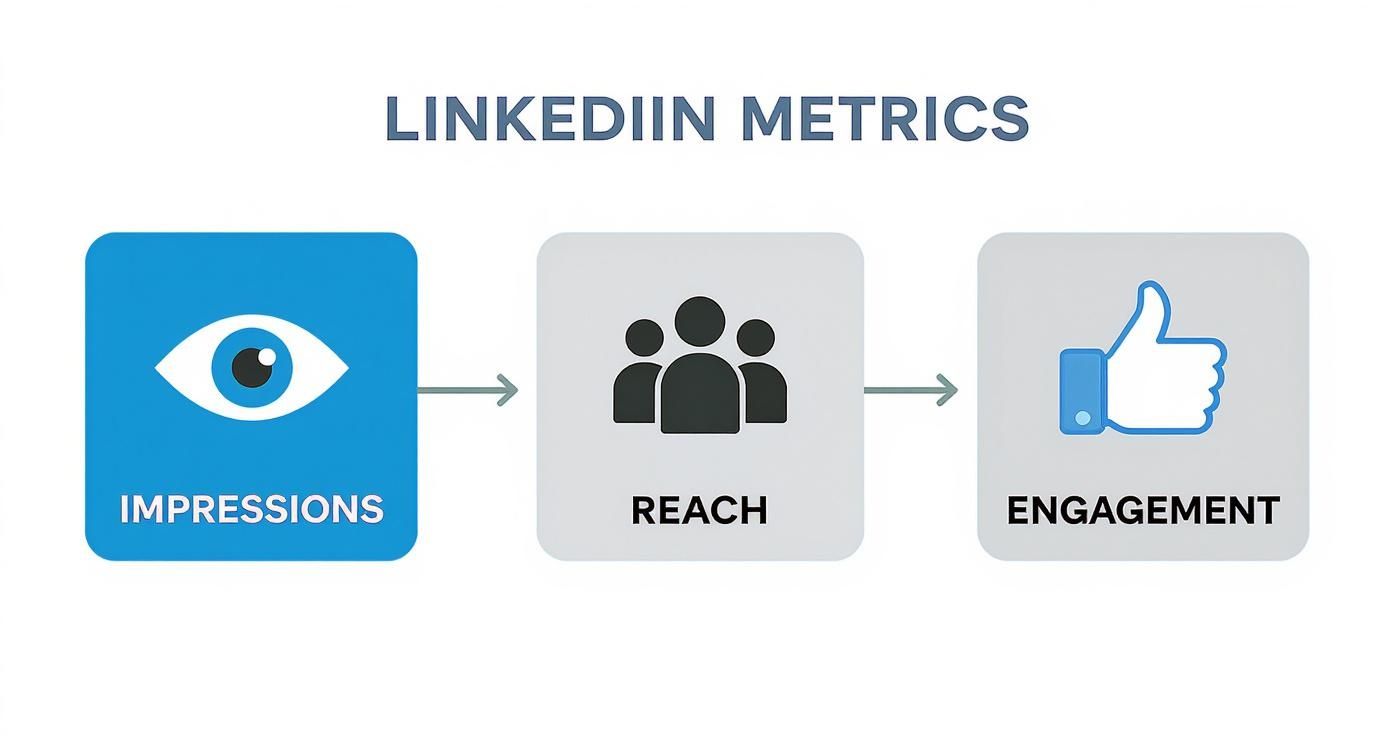
As you can see, impressions are the widest net you cast. They form the foundation for attracting unique viewers (reach) and, ultimately, sparking conversations (engagement).
Here in Germany, the line between impressions and real business outcomes is incredibly direct. The EMEA region boasts a 4.05% conversion rate on sponsored updates, showing just how powerfully visibility can drive action. What’s more, when employees share company posts, engagement can be amplified by 37%, which massively boosts impressions and overall reach. These numbers make it crystal clear: a smart visibility strategy delivers tangible results.
Impressions are way more than just a number; they’re a health check for your content. Keeping an eye on them helps you tweak your strategy, stay relevant, and make sure your voice gets heard in an incredibly crowded space.
How the LinkedIn Algorithm Impacts Your Impressions

To really get what an impression means on LinkedIn, you have to understand the gatekeeper deciding who sees your content in the first place: the algorithm. Think of it as the bouncer for your newsfeed, deciding which posts get a prime spot and which ones never make it past the velvet rope.
When you hit publish, the algorithm doesn’t just blast your post out to everyone. Instead, it shows it to a small, initial test audience and watches their reactions like a hawk. That first hour is make-or-break. Early likes and meaningful comments are a massive signal to the algorithm that your content is valuable, prompting it to open the floodgates and show it to more people.
Key Signals the Algorithm Looks For
The algorithm is smarter than just counting likes. It’s looking for the quality of engagement. A quick “Great post!” is nice, but a thoughtful comment that kicks off a real conversation is gold. Why? Because this kind of deeper engagement drives up dwell time—the amount of time people actually spend looking at your content.
Here are the main things that sway its decision:
- Initial Engagement: How fast do those first likes and comments roll in?
- Content Quality: Posts that get people talking are heavily favoured.
- Dwell Time: The algorithm rewards content that makes users stop scrolling.
- Your Authority: Posting consistently about a specific topic builds your credibility.
The algorithm’s main job is to keep users on LinkedIn for as long as possible. When you create content that people genuinely want to read, discuss, and spend time on, your goals and LinkedIn’s goals are perfectly aligned.
This is why formats like carousels and native videos often do so well; they’re practically designed to increase dwell time. By creating posts that the algorithm wants to promote, you directly boost your chances for a much higher impression count. If you want a deeper dive, you can explore how to master the LinkedIn algorithm for increased visibility in our guide.
Proven Strategies to Increase Your LinkedIn Impressions
Alright, so you know what an impression is. That’s half the battle. The real mission, though, is getting more of them. Racking up impressions means your content is landing in front of more eyeballs, which is always the first step to building your authority and growing your network on the platform.
The good news? You don’t need a massive marketing budget to make a dent. By consistently applying a few solid tactics, you can get the algorithm to start showing your content to a much wider audience.
Nail Your Content and Timing
The bedrock of high impressions is creating quality content that actually makes people stop scrolling. You need to start with a killer hook in the first line or two to grab their attention right away.
And timing? It’s huge. Posting when your audience is most active gives your content its best shot at getting that crucial early engagement. We’ve put together a detailed guide on the best times to post on LinkedIn to help you really fine-tune your schedule.
An impression is an opportunity. Every time your post appears on someone’s screen, you have a chance to make a connection, share knowledge, or build your brand. The goal is to maximise those opportunities.
Keeping a diverse mix of content also keeps your feed from getting stale and appeals to different people. You should definitely experiment with various formats to see what your audience really connects with:
- Text-only posts: Perfect for sharing quick thoughts or kicking off a conversation.
- Single images: A strong visual can stop the scroll way more effectively than text alone.
- Carousels (PDFs): These are fantastic for breaking down bigger topics into easy-to-digest slides and they really boost how long people spend on your post.
- Native video: Short, punchy videos can be a super effective way to tell a story or show off your expertise.
Expand Your Reach and Visibility
Creating great content is one thing, but you also have to help people find it. One of the simplest ways to push your content beyond your immediate network is by using hashtags strategically. Try a mix of broad, niche, and even branded hashtags—3-5 is a good rule of thumb—to tap into relevant communities.
Engaging with others is another powerful strategy that too many people sleep on. When you leave thoughtful comments on posts from others in your industry, you’re not just building relationships; you’re also putting your profile in front of their entire audience. It’s a simple action that can drive a surprising amount of traffic back to your own content. For a deeper dive, check out these effective B2B social media engagement strategies.
Common Questions About LinkedIn Impressions
Working with LinkedIn analytics can feel like you’re trying to read tea leaves sometimes. You know what an impression is, but what does it really mean for your content? Let’s clear up some of the common questions so you can read your data confidently and build a smarter strategy.
It’s a great feeling to see your impression count climb—it means people are seeing your stuff. But here’s the catch: quantity isn’t the same as quality. While a high impression count is brilliant for building brand awareness and just staying on people’s radar, it’s only telling you part of the story. A post with 10,000 impressions but only a handful of likes is like shouting into an empty room. Lots of noise, but no one’s listening.
The real magic happens when those impressions lead to actual engagement. Your goal should be to turn eyeballs into conversations. High impressions plus a healthy engagement rate? That’s the sweet spot. It tells you your content isn’t just being seen; it’s hitting the mark.
The Lifespan of a LinkedIn Post
Ever notice how some posts seem to take off right away? That’s all thanks to what many call the “golden hour.” When you hit ‘publish’, the LinkedIn algorithm shows your post to a small test group from your network to see if it’s any good. If you get strong engagement straight out of the gate—likes, comments, and shares in the first hour or two—the algorithm gets the message and starts showing it to a much wider audience.
That initial test is everything. If your post doesn’t resonate with that first group, its journey pretty much ends there, leaving you with a low impression count. This is exactly why it’s so important to post when you know your audience is online and ready to engage.
Think of impressions as invitations to a party. You want to send out as many as possible, but what really matters is how many people show up (reach) and join the conversation (engagement). Visibility is the start, but connection is the goal.
One last thing that trips people up: editing a post after it’s live. The short answer is, yes, it can hurt your reach. Fiddling with a post after it’s already gaining momentum can sometimes hit the brakes on its journey through the algorithm.
Now, fixing a quick typo probably won’t do much harm. But making big changes can mess with its distribution. The best policy? Proofread everything carefully before you publish. Give your post the best possible shot right from the start.

Run every client pipeline in one place
Give each LinkedIn profile its own voice, calendar, approval flow, and analytics. Start in minutes.
Start free trial