
A Guide to Using Links in LinkedIn Posts for Maximum Reach
Struggling with links in LinkedIn posts? Discover when to post links in the comments versus the post and how to avoid algorithm penalties to boost your reach.
Let’s settle this once and for all: Do links in LinkedIn posts kill your reach?
The short answer is yes, but it’s not as simple as a direct penalty. The LinkedIn algorithm just really, really wants to keep people on its own platform. That means posts pointing users elsewhere often get quietly nudged out of the spotlight.
Why Links in LinkedIn Posts Are So Complicated
Picture the LinkedIn algorithm as a nightclub owner. Their main job is to keep the club packed, the music pumping, and everyone buying drinks and having a great time inside.
When you share a post with an external link, you’re basically standing by the door handing out flyers for another club down the street. The owner isn’t going to throw you out, but they’re definitely not going to put you on the VIP list. They’ll probably tell the bouncer to stand in front of you.
This is what people mean when they talk about the “algorithmic tax.” It’s that subtle dip in reach your post takes because you’re tempting people to leave the party. This isn’t a conspiracy theory; it’s just good business for LinkedIn. Keeping users on the site longer means more ad revenue and a more buzzing platform.
The Real Cost of a Link
The problem isn’t that links are “bad.” It’s that they come with a price tag. You have to ask yourself if the value of getting that click—to your webinar sign-up, your latest article, or your product page—is worth the potential drop in eyeballs on LinkedIn itself.
Sometimes, it absolutely is. For a key webinar registration or a direct sales page, you’ll gladly pay that tax. For a general blog post? Maybe not.
This trade-off is especially critical in competitive markets. Take Germany, for instance, where LinkedIn is the undisputed king of professional networking. Every single impression matters.
In Germany, how you handle external links can make or break your content strategy. The competition for attention is fierce, and it directly impacts how often your profile and posts are seen—and clicked. As of December 2023, Germany had around 17.5 million LinkedIn users, making up 21.4% of the entire population. The biggest chunk of those users? The highly sought-after 25–34-year-old demographic.
This is the exact group making B2B buying decisions and scouting for new talent. A clumsy link strategy means you’re leaving a massive opportunity on the table. While LinkedIn keeps its numbers under wraps, German social media benchmarks show just how intense the fight for visibility is. You can dig deeper into the German LinkedIn user base on NapoleonCat.
Reframing the Problem
So, instead of asking, “Should I even bother with links in my posts?” a much smarter question is, “How can I use links strategically to hit my goals without completely tanking my reach?”
Getting this right means you’re working with the algorithm, not fighting a losing battle against it.
Your mission is to create content so valuable, so genuinely helpful, that it earns the right to include a link. When you deliver incredible insight right there in the post itself, you build trust and make people curious for more. That way, even if your reach is a bit lower, the people who do see your post are primed and ready to click. Your efforts become way more effective.
How the LinkedIn Algorithm Sees Your Links
Picture the LinkedIn algorithm as a party host. The host’s number one goal is to keep the party buzzing and make sure guests are having a great time inside the venue. When you post a link that sends people away from LinkedIn, you’re basically pointing them to the exit. The host won’t throw you out, but they’ll definitely be less inclined to put you in the spotlight.
This is the fundamental push-and-pull every creator on LinkedIn feels. We all need to drive traffic to our own websites, blogs, and landing pages, but LinkedIn’s priority is keeping users engaged and scrolling through its own feed. The secret to success is learning how to work with the algorithm, not against it, when sharing your links.
There are really only three ways to share links on LinkedIn, and each one comes with its own set of trade-offs between reach and user experience. Picking the right one isn’t about a single best practice; it’s about matching the method to what you want that specific post to achieve.
The Three Paths for Sharing Links
Let’s break down the common strategies people use to direct their audience off-platform. Each one sends a different signal to the algorithm and, just as importantly, creates a different experience for your reader.
-
Link Directly in the Post Body: This is the most obvious approach. You stick the link right in your text, and LinkedIn usually generates a nice preview card. It’s super easy for your audience to click. But it’s also a massive, flashing sign to the algorithm that you’re sending traffic away, which almost always means your post’s initial reach will be dialled down.
-
Link in the First Comment: This is the classic workaround you’ve probably seen a hundred times. You publish your post without any links, then immediately drop the link in the first comment. The idea is that the algorithm gives your post a fair shot at gaining momentum before it notices the outbound link. The trade-off? You’re making your reader do a bit of extra work to find it.
-
Link in Bio or Profile: With this method, you skip putting a link in the post entirely and just point people to your profile with a “link in bio” call-to-action. This is by far the most algorithm-friendly option because the post itself is clean. However, it asks the most of your audience—they have to leave the feed, go to your profile, find the link, and then click.
This diagram boils down the core decision and its immediate effect on your post’s visibility.
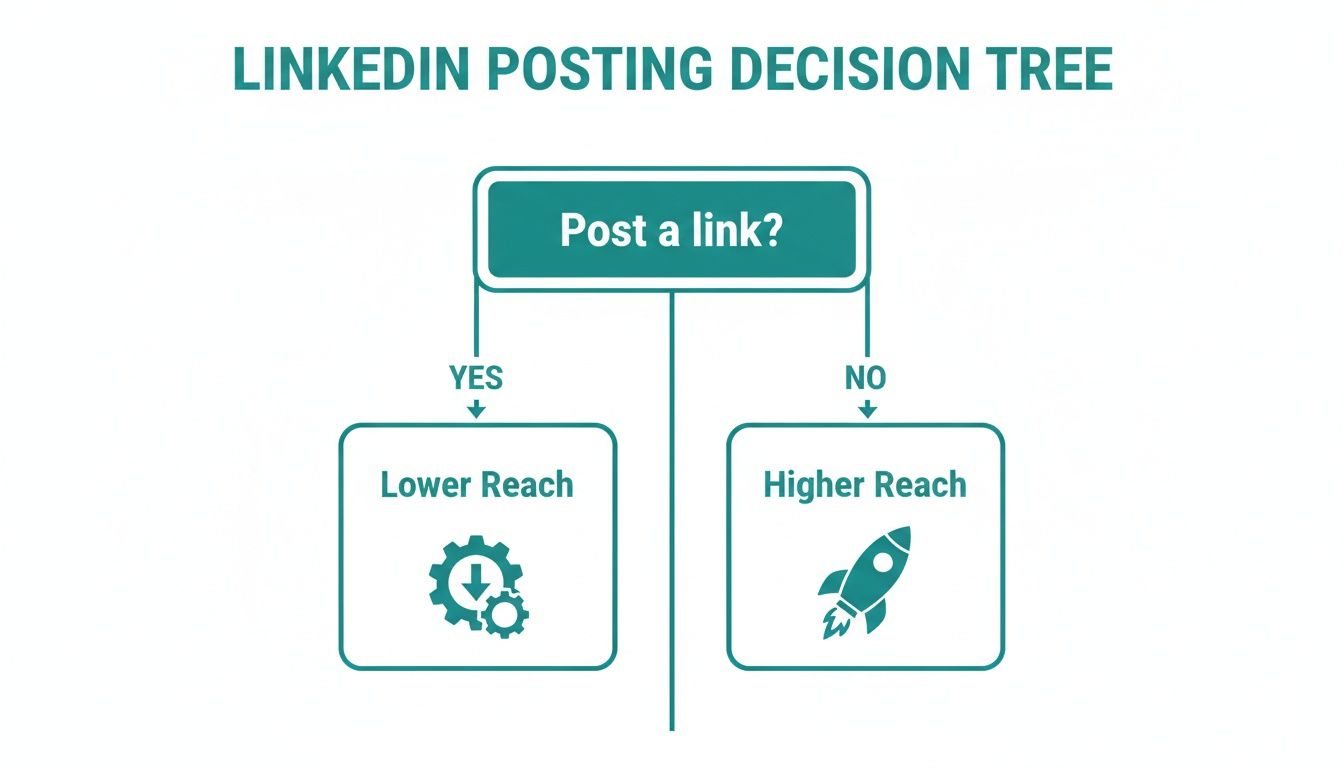
As you can see, from a pure reach perspective, the algorithm clearly favours posts that don’t send users packing.
Comparing Link Placement Strategies
Choosing where to put your link means weighing the pros and cons for each specific situation. There’s no silver bullet here; it’s all about context. And remember, when you do use a link that generates a preview, you want it to look its best. For a deep dive on that, check out our guide on how to optimise your LinkedIn link preview card so you get maximum impact from every click.
To make the decision a little easier, let’s put the three methods side-by-side.
Comparing Link Placement Strategies on LinkedIn
This table breaks down the three main strategies for sharing links on LinkedIn, helping you see the impact on reach, user experience, and where each method shines.
| Placement Method | Algorithmic Impact | User Experience (UX) | Best Use Case |
|---|---|---|---|
| Directly in Post Body | Lowest Reach. Signals an immediate intent to send users off-platform, which LinkedIn typically suppresses. | Highest. The link is easy to see, understand, and click. Minimal friction for the user. | Driving direct conversions or traffic is more important than maximising the post’s organic reach. |
| In the First Comment | Medium Reach. A common workaround that often avoids initial algorithmic suppression. Its effectiveness is debated. | Medium. Adds a small step for the user, who must navigate to the comments section to find the link. | Balancing the need for traffic with a desire for better organic reach. Good for blog posts or resources. |
| In Profile / “Link in Bio” | Highest Reach. The post itself contains no external links, so the algorithm treats it more favourably. | Lowest. Requires the most effort from the user, who must leave the feed and visit your profile. | Building brand awareness and engagement on-platform, where the primary goal is visibility, not immediate clicks. |
Essentially, the more friction you create for your audience, the less the algorithm seems to mind. The “link in comment” strategy tries to split the difference, but it’s a hot topic among creators. Some data suggests it can lift reach by 15-25% compared to putting the link directly in the post, but that often comes at the price of a lower click-through rate.
Ultimately, you have to ask yourself: what’s the number one job of this post? Is it to get as many eyeballs as possible, or is it to get clicks right now? Your answer will tell you exactly where to put that link.
Crafting Posts That Make People Want to Click
Knowing how the LinkedIn algorithm sees your links is only half the story. The other, far more critical part, is getting a real person to stop scrolling and actually want to click. A truly great post earns the right to share a link because it packs so much value and sparks so much curiosity that clicking feels like the obvious next step.
Your goal isn’t just to drop links in LinkedIn posts and hope for the best. It’s about building a compelling case for why your audience should follow them. This means you need to master the art of the scroll-stopping hook, structure your post to give value upfront, and write a call-to-action (CTA) that feels helpful, not demanding.
The Anatomy of an Irresistible Post
Every high-performing post that successfully drives traffic shares a common DNA. It’s built to grab attention in a split second, offer something tangible right there in the feed, and then smoothly guide the reader towards the next logical action—clicking your link.
Think of it as a simple, three-part formula:
- The Hook: The first line or two that makes someone hit the brakes on their scroll.
- The Body: The heart of your post where you deliver value and build trust.
- The CTA: The clear, compelling nudge that prompts the click.
Let’s break down how to nail each of these. If you want to go even deeper, check out our full guide on how to write engaging LinkedIn posts.
Step 1: Master the Scroll-Stopping Hook
You’ve got less than two seconds. That’s it. Your first sentence is make-or-break. If it doesn’t land, the rest of your brilliant content—and your precious link—will simply be scrolled past.
Here are a few proven hook formulas that just work:
- Ask a Provocative Question: “Is ‘hustle culture’ just burnout with a better marketing team?”
- Lead with a Bold Statement: “Most team-building exercises are a complete waste of time. Here’s what to do instead.”
- Drop a Surprising Statistic: “Did you know that 80% of B2B leads from social media come from LinkedIn? Let that sink in.”
- Start a Story: “The worst meeting of my career started with a single, innocent-looking email…”
The idea is to open a loop in the reader’s mind. You pose a question, a problem, or a surprising fact that they feel an itch to see resolved by reading on.
Step 2: Deliver Immediate Value in the Body
Okay, you’ve hooked them. Now you have to deliver. The body of your post is where you prove you know your stuff. Don’t just tease the content behind your link; give away some genuine insights right there in the post.
The secret to driving clicks is a bit counterintuitive: give away your best stuff for free in the post. This builds so much trust that people think, “If the free advice is this good, the full article must be incredible.”
Make sure the body is easy to read. Use short paragraphs, bullet points, and numbered lists to break up the text. This makes your content scannable and digestible, ensuring your audience gets the key takeaways without feeling like they’re reading a wall of text.
Step 3: Craft a Helpful Call-to-Action
Your CTA is the final piece of the puzzle. You’ve provided value, now you need to tell your reader what to do next. A limp, generic CTA like “Click here” can kill your momentum. Instead, frame it as the next helpful step on their journey.
Here’s how to write a CTA that actually works:
- Be Specific About the Benefit: Instead of “Read my blog post,” try “Get the complete 5-step framework for closing more deals in the article below.”
- Create Scarcity (When it’s real): For webinars or events, something like, “Only 25 spots left for the free workshop—grab yours here,” works wonders.
- Frame it as a Solution: “If you’re struggling with X, this case study shows exactly how we solved it. I’ve put the link in the comments.”
By focusing on what the reader gets out of it, your CTA becomes a helpful invitation, not just another ad. And with a tool like Postline.ai, you can generate and test different hooks, value-driven body copy, and compelling CTAs to see what resonates best, ensuring every part of your post is working hard to drive those clicks.
How to Measure Your Link Performance
Posting links on LinkedIn without tracking them is like shouting into a void. Sure, you put something out there, but you have no clue who heard you, what they did next, or if it made any difference at all. To prove your LinkedIn efforts are actually paying off, you need a way to connect what happens on the platform to the results you see on your website.
This is exactly where UTM parameters come in. Think of them as tiny, invisible tracking codes you attach to the end of your URLs. They don’t change where the link goes, but they give your website analytics a detailed report on precisely where that visitor came from and why. It’s the essential bridge between a click on LinkedIn and a conversion on your site.
Decoding UTM Parameters
So, what are these things? UTM stands for Urchin Tracking Module—a name left over from an old web analytics tool that Google bought ages ago. In simple terms, these parameters answer the who, what, and why of your website traffic. For LinkedIn, you really only need to worry about three of them.
Here’s what they mean in practice:
- Source (utm_source): This tells you where the traffic came from. For our purposes, the source is always going to be linkedin.
- Medium (utm_medium): This explains how the traffic found you. Think of it like the type of channel. For organic posts, a good, clean standard is to use social.
- Campaign (utm_campaign): This is the why. It’s a custom name you give a specific marketing push, like q4-webinar-promo or new-blog-launch.
When you combine these three, you create a clear story for every single click. You turn anonymous visitors into measurable data points that prove your LinkedIn strategy is working.
Building Your First Trackable Link
You don’t need to be a developer to get this right. Tools like Google’s free Campaign URL Builder make the whole process foolproof. Just paste in your destination URL, fill out the source, medium, and campaign fields, and it spits out the perfectly formatted trackable link for you.
A consistent naming convention is your best friend here. Seriously. Decide on a clear, simple system for your campaigns (e.g.,
product-feature-launch-apr24) and stick to it like glue. This will save you from a massive headache of messy, fragmented data in your analytics down the line.
In a market like Germany, for instance, this level of tracking is becoming the norm. With about 17.5 million users in Germany as of 2023, LinkedIn is a serious B2B player. European studies show 78% of B2B marketers see LinkedIn as their most effective social platform, and 38% directly attribute revenue to it. In Germany’s B2B-heavy economy, this means every link needs to pull its weight and show a measurable impact on leads and sales.
Finding Your Data in Google Analytics
Once people start clicking your shiny new UTM-tagged links, the data will pop up in Google Analytics (GA4). You can find it by heading over to Reports > Acquisition > Traffic acquisition. From there, you can filter your traffic by “Session campaign” to see exactly how your named LinkedIn campaigns are performing.
This is where the magic really happens. You’re no longer just looking at clicks. You can see how many people from your “q4-webinar-promo” campaign actually registered, or how many visitors from your “new-blog-launch” post ended up downloading a guide.
As you get deeper into measuring performance, it helps to be aware of common issues in traffic reporting, like how some tools can misattribute traffic. If you’re curious about the technical side, there are some great resources for understanding analytics reporting challenges that explain these discrepancies.
Following this process transforms your LinkedIn presence from a simple branding exercise into a predictable, data-driven engine for generating leads. To really get into the weeds, you can explore our complete guide to LinkedIn post analytics.
Creative Ways to Drive Traffic Without a Direct Link
 Sometimes, the cleverest way to share links in LinkedIn posts is to not share a direct link at all. It sounds counterintuitive, I know. But instead of trying to fight the algorithm, you can work with it, using LinkedIn’s own features to your advantage.
Think of it like this: you’re inviting someone over for a coffee (your valuable post) before you show them the holiday photos from your trip (your website). You warm them up, build a connection, and then they’re far more likely to be interested in what else you have to share.
This approach respects the user’s experience and what the platform is designed for, often leading to better engagement and, ultimately, more qualified traffic. These methods aren’t just workarounds; they’re genuinely powerful content strategies.
Leverage LinkedIn Articles for Long-Form Content
Instead of tempting people to leave LinkedIn for your latest blog post, why not bring the blog post to LinkedIn? The native Article feature is perfect for this. It lets you publish long-form content right on your profile, complete with proper formatting, images, and—most importantly—clickable links that don’t get penalised.
You can drop the full piece or even just a condensed version, then write a standard post that points people to it. Because the call-to-action keeps users on the platform, LinkedIn’s algorithm is much happier. Inside the article, you’re free to place as many contextual links to your website, products, or lead magnets as you need.
This strategy is brilliant for:
- Thought Leadership Pieces: Go deep on a topic and really establish your expertise.
- Case Study Summaries: Hook readers with a success story and link out to the full, detailed version.
- Repurposing Blog Content: Breathe new life into existing content by adapting it for the LinkedIn crowd.
Create Engaging Document Posts
Document posts (you might know them as carousels or sliders) are one of the most engaging formats on the platform right now. They’re interactive, visual, and they get people to spend more time on your post—a key metric the algorithm absolutely loves. You can easily turn a blog post summary, a report, or a how-to guide into a simple PDF or PowerPoint presentation.
The magic happens on the final slide. After you’ve delivered slide after slide of pure value, you can dedicate the last one to a clear call-to-action with a clickable link to your full resource. By that point, you’ve earned their attention and trust.
Document posts transform passive scrolling into active engagement. By breaking down complex information into digestible slides, you hold the user’s attention longer, making the final call-to-action feel like a natural and rewarding next step rather than a disruptive ad.
This method works especially well if you have visual content or a step-by-step process to share. You’re effectively teasing your best stuff, giving people a really compelling reason to click through for the whole story.
Use Your Profile as a Resource Hub
Your LinkedIn profile is so much more than a digital CV. It’s a permanent landing page for your personal brand. The “Featured” section, sitting right at the top of your profile, is prime real estate for your most important links. You can feature articles, key website pages, portfolio items, or specific landing pages.
So, instead of dropping a link in every single post, you can just point people back to your profile. A simple CTA like, “I’ve put a full guide to this in my Featured section—head to my profile to grab it,” is algorithm-friendly and incredibly effective.
This tactic turns your profile into a curated library of your best work. Anyone who stumbles across your profile can instantly find your most valuable resources without you having to constantly push them in the feed. It’s a simple, low-effort strategy with a huge long-term payoff.
Optimising Your LinkedIn Workflow with Postline.ai
Knowing the theory behind links in LinkedIn posts is one thing, but putting it all into practice consistently is where the real magic happens. This is where the right tools can help you move from guesswork to a smooth, scientific process.
Instead of trying to remember every little rule and manually piece together each post, imagine having a dedicated assistant. One that helps you pump out high-quality content that actually gets results. It’s not just about saving a few minutes here and there; it’s about applying these best practices at scale so you can see what truly clicks with your audience.
A tool built specifically for LinkedIn helps turn abstract ideas—like sparking curiosity before you drop a link—into a simple, everyday habit.
Crafting Perfect Posts in Minutes
The best posts don’t just throw a link at people; they earn the click by giving massive value first. That all starts with a killer hook and a clear, compelling call-to-action (CTA).
You can fire up the AI Post Generator inside Postline.ai to brainstorm and write hooks that genuinely stop the scroll. It’s designed to help you communicate the value of your link clearly in the body of the post, getting your audience warmed up and interested before they even think about clicking.
On top of that, the built-in LinkedIn Formatter makes sure your posts are perfectly laid out for easy reading. It uses short paragraphs and plenty of white space to create a much more inviting experience in a crowded feed. Getting the structure right is half the battle when it comes to holding someone’s attention.
Testing and Analysing Your Link Strategies
The whole “link in the post vs. link in the first comment” debate? The only way to settle it for your own audience is with cold, hard data. A scheduler is your best friend here, letting you systematically test these different approaches without losing your mind.
You can actually set up a proper A/B test for your link placement:
- Week 1: Schedule five posts with the link right there in the post copy.
- Week 2: Schedule five similar posts, but this time, drop the link in the first comment.
By scheduling different post types like this, you’re essentially running a controlled experiment. This is how you get beyond what some guru said on a webinar and gather real data on which linking method drives the most engagement and clicks from your specific audience.
This whole process turns your content strategy into a powerful feedback loop, where every post you publish teaches you something for the next one. This rhythm of consistent testing and analysis is simply the fastest way to sharpen your tactics for better reach and business results you can actually measure.
And if you want to get even sharper with your outreach, digging deeper into who your audience is can be a game-changer. You might even want to explore the world of AI-powered sales intelligence to find insights that inform not just your link strategy, but your entire content plan. Suddenly, technology isn’t just a tool; it’s a strategic partner helping you turn theory into practice and drive real results.
Of course, here is the rewritten section.
Got Questions About Links on LinkedIn? We’ve Got Answers.
Figuring out the best way to use links in your LinkedIn posts can feel like trying to solve a puzzle. Let’s clear up a few of the most common questions so you can post with confidence and get the right kind of attention.
Does Editing a Post to Add a Link Hurt My Reach?
In a word, yes. If you publish a post, let it get some early engagement, and then sneak back to edit a link into it, the algorithm is smart enough to notice. It will likely re-classify your post as one with an outbound link and throttle its future reach. It’s always better to decide on your link strategy before you hit publish.
Should I Use a URL Shortener Like Bitly?
There’s really no need. LinkedIn automatically shortens any link you share with its own lnkd.in shortener, making third-party tools like Bitly redundant. What really matters is the link preview LinkedIn generates. Make sure it’s clean, on-brand, and gives people a compelling reason to click.
The whole point of the “link in comments” strategy isn’t to trick the algorithm long-term. It’s simply to separate the link from the initial post text that the algorithm first analyses for reach.
And if you are going with the “link in comments” approach, don’t wait around. Drop that comment immediately after you publish the main post. That tiny bit of separation is all it takes to give your post the best shot at a wider audience.
Ready to put these insights into action? Postline.ai helps you generate, format, and schedule killer LinkedIn posts in minutes. You can even test different link strategies to see exactly what resonates with your audience. Start creating better posts today at Postline.ai.

Run every client pipeline in one place
Give each LinkedIn profile its own voice, calendar, approval flow, and analytics. Start in minutes.
Start free trial