
LinkedIn Content Automation A Practical Guide
A practical guide to LinkedIn content automation. Learn to build a strategy, create with AI, schedule posts, and measure what truly matters for growth.
When people hear “LinkedIn content automation,” they often think of software that plans, creates, and schedules posts to save time. And they’re not wrong. A good system can take a 45-minute daily task and shrink it down to just a few minutes.
But that’s only half the story.
Building Your Automation Foundation
Before you even think about tools or tech, you have to build a solid strategic foundation. This is the single most important step, and it’s the one most people skip.
Jumping straight into scheduling tools without a clear plan is like setting a ship to sea without a map or a destination. Sure, you’ll be active, but you won’t get anywhere meaningful. This initial planning phase makes sure every automated post has a purpose and actually helps you hit your business goals.
First things first: what does success actually look like for you? Are you trying to generate qualified leads? Establish yourself as the go-to expert in your niche? Attract top-tier talent? Your goals will steer the entire direction of your content.
Define Your Core Objectives
Vague goals like “increase engagement” just won’t cut it. You need to get specific about what you want to achieve. Your objectives should be measurable and tied directly to real business outcomes.
- Lead Generation: Aim to drive a specific number of demo requests or e-book downloads from LinkedIn each month.
- Thought Leadership: Set a goal to be mentioned by industry publications or get invited to speak at events.
- Brand Awareness: Track concrete metrics like profile views, follower growth, and the overall reach of your posts.
Having these clear KPIs from the start makes it a lot easier to measure whether your automation efforts are actually working later on.
Create Sharp Audience Personas
You can’t write compelling content if you don’t know who you’re talking to. And I mean really know them. Don’t just stop at job titles and demographics.
A truly effective persona gets into the psychographics of your audience—their day-to-day challenges, their professional ambitions, and the problems that keep them up at night.
For example, instead of just targeting “Marketing Managers,” you could create a persona for “Sarah, the Overwhelmed B2B Marketing Manager.”
Sarah is struggling to prove ROI on a tight budget. She feels constant pressure to adopt new technologies and is always looking for practical, low-cost strategies to get an edge on competitors. Her real pain point isn’t just “marketing”; it’s demonstrating tangible value to her higher-ups.
Content that speaks directly to Sarah’s struggles will always, always outperform generic marketing advice.
Establish Your Content Pillars and Voice
Your content pillars are the core topics you’ll talk about over and over again. Think of them as the intersection of your expertise, your audience’s interests, and your business goals.
For a cybersecurity firm, the pillars might look something like this:
- Threat Intelligence Analysis: Breaking down recent cyber threats for a non-technical crowd.
- Compliance and Regulation: Giving updates on data protection laws.
- Small Business Security Tips: Offering actionable advice for smaller companies that can’t afford a huge security team.
At the same time, you need to define your brand voice. Are you authoritative and analytical? Or are you more approachable and witty? Whatever you choose, that voice needs to stay consistent across all your automated posts to build a brand people recognise and trust.
To really nail this, a solid grasp of What is Content Automation is essential for building out this foundational strategy. This groundwork is absolutely crucial; it simplifies your entire content creation workflow and makes sure your automated output is high-quality and on-brand. Without this strategic direction, automation is just noise.
How to Use AI for Content Creation
Using artificial intelligence for your LinkedIn strategy isn’t about letting a robot take the wheel. Think of AI as a hyper-efficient assistant—one that makes you faster, more creative, and way more consistent. It’s here to handle the grunt work of content creation, freeing you up to focus on what truly matters: adding your unique expertise and personal voice.
This “human-in-the-loop” approach is the secret to making your LinkedIn content automation both effective and authentic.
Let’s walk through a real-world workflow I use all the time: turning a single piece of long-form content, like a webinar, into an entire month’s worth of solid LinkedIn posts.
Building Your AI-Powered Content Engine
Everything starts with your core content pillars. An AI tool is only as good as the instructions you feed it. By giving it your established pillars and a meaty piece of content, you create a focused system that spits out relevant ideas, not generic garbage.
Let’s say you just hosted a one-hour webinar on “Effective SEO Strategies for German SaaS Companies.” That recording is a goldmine. The goal is to systematically pull out all that value without spending days chained to your desk.
This three-step foundation shows the strategic thinking that has to happen before you even think about generating content.
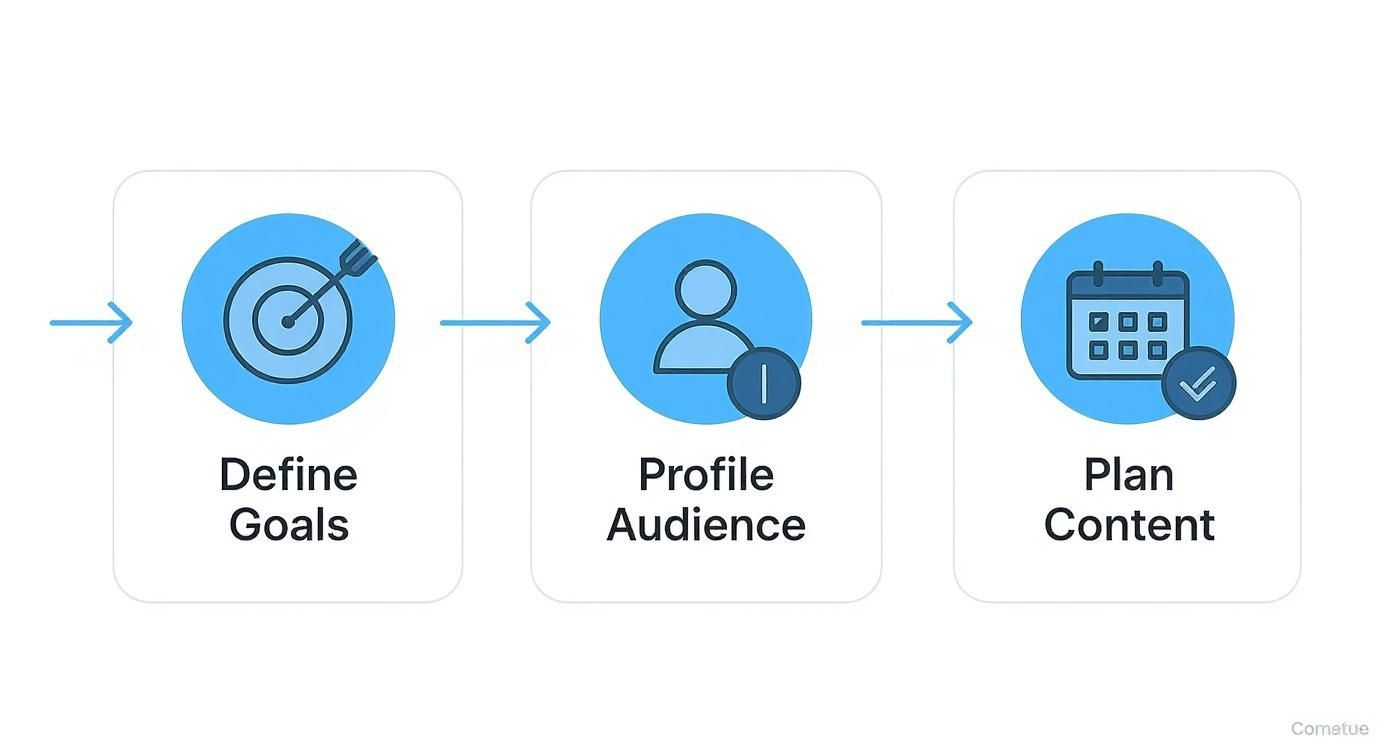
Following this process ensures every piece of content the AI helps you create actually aligns with what your business and audience care about.
From Webinar to a Full Content Calendar
Your webinar recording or transcript is the raw material. From there, it’s all about using a structured prompting method to slice and dice it into different post formats. This is where a top-notch best linkedin post generator can really shine, helping you turn raw concepts into polished drafts.
Here’s a quick breakdown of what you can get from that single webinar:
- Four Text-Only Posts: These are your deep dives into specific ideas from the webinar. For instance, one post could break down keyword research for the DACH market, while another could tackle technical SEO for B2B platforms.
- Four Carousel Outlines: Carousels are fantastic for visual storytelling. Your AI can quickly generate outlines for things like “5 Common SEO Mistakes German Startups Make” or “A Step-by-Step Guide to Local SEO,” all pulled directly from your webinar.
- Four Short Video Scripts: Isolate key quotes or powerful moments from the webinar. The AI can then whip up short, punchy scripts for one-minute videos, even suggesting on-screen text to make them pop.
Key Takeaway: The aim isn’t for the AI to write the final post perfectly in one shot. It’s about letting it handle 80% of the draft—the structure, the key points, the initial wording. This leaves you to spend your time on the final 20%, where the magic happens: adding your personal stories, unique insights, and authentic voice.
Crafting the Perfect Prompts
The quality of your output is directly tied to the quality of your prompts. Vague instructions get you vague, useless content. You have to be specific, give context, and tell the AI exactly what you want.
Here are a few prompt formulas you can steal and adapt:
For a Text-Only Post
- “Act as a LinkedIn B2B marketing expert. Using the attached webinar transcript, write a 300-word text post on the importance of [specific topic from webinar]. Kick it off with a strong hook that asks a question. Give me 3 actionable tips. End with a call-to-action asking for opinions in the comments. The tone should be conversational but professional.”
For a Carousel Outline
-
“Based on the webinar transcript, create a 7-slide carousel outline for LinkedIn. The topic is ‘[Carousel Topic]’.
- Slide 1: Title and Hook
- Slide 2: The Problem
- Slides 3-5: Three Solutions/Steps
- Slide 6: Summary of Key Takeaway
- Slide 7: Call to Engagement (e.g., ‘What would you add?’)”
This structured approach turns AI from a simple writing tool into a strategic partner. If you want to really streamline your workflow and get smarter with technology, you need to master content creation automation to get even better results. A system like this ensures every single post is rooted in your core expertise, which keeps quality and authenticity high while letting you pump out way more content.
Choosing the Right Automation Tools
Once you’ve got your content workflow dialled in, it’s time to pick the right tech to actually make your LinkedIn content automation happen. The market is absolutely flooded with options, from basic schedulers to powerhouse, all-in-one platforms. The right choice really boils down to your specific needs, the size of your team, and what you’re trying to achieve.
The trick is to match the tool to the job. A solo consultant simply doesn’t need the same beast of a platform as a large B2B marketing team. Getting this decision right from the start will save you a world of headaches and make sure your investment—whether it’s time or money—actually pays off.
Different Tools for Different Needs
Let’s break down the main types of tools you’ll come across. Each one serves a slightly different purpose, and you’ll find that many modern platforms are starting to blend features from multiple categories. For a much broader look at the landscape, our guide on various social media automation tools is a great place to start.
-
Scheduler-Focused Platforms: Think of these as the workhorses of content automation. Their main job is to get your pre-written content published at the right time. They’re perfect for individuals or small teams who just need to keep a consistent posting schedule ticking over.
-
All-in-One Suites: These platforms are the whole package. They go way beyond scheduling to include advanced analytics, team collaboration features, social listening, and complex content approval workflows. They’re built for marketing teams juggling multiple accounts and running bigger campaigns.
-
AI Content Generators: This is a newer breed of tool focused on helping you create the content itself. They can help brainstorm ideas, churn out first drafts, and repurpose old material. Many are now building in scheduling features, blurring the lines between the categories.
This distinction is especially relevant when you think about different business cultures. In Germany, for instance, a market known for its focus on efficiency, 73% of LinkedIn users prefer to automate scheduling over content generation. This really reflects a cultural preference for authentic, human-crafted communication. You can find more on German LinkedIn automation trends on example.com.
LinkedIn Automation Tool Feature Comparison
So, how do you decide which is for you? Let’s put these tool types side-by-side to see how their features stack up for different scenarios. Imagine a solo consultant compared to a marketing team at a German mittelstand company—their needs are worlds apart.
| Feature | Tool Type A (All-in-One Suite) | Tool Type B (Scheduler-Focused) | Tool Type C (AI Content Generator) |
|---|---|---|---|
| Primary Use Case | Full-scale social media management | Consistent post scheduling | Content drafting and idea generation |
| Ideal User | B2B Marketing Teams | Solo Consultants, Solopreneurs | Creators with writer’s block |
| AI Integration | Often includes basic AI for captions | Limited to optimal time scheduling | Core feature for drafting and editing |
| Analytics | Deep, customisable reporting | Basic engagement metrics | Usually minimal or none |
| Team Workflows | Advanced (approval, roles) | Basic or single-user | Varies, often single-user |
| Pricing | Higher Tier (€€€) | Lower Tier (€) | Mid Tier (€€) |
For the solo consultant, a simple scheduler is likely a perfect fit. It’s cost-effective and solves their biggest pain point: posting consistently without having to live on the platform. The German mittelstand team, however, absolutely needs the robust collaboration and in-depth analytics of an all-in-one suite to manage their brand presence and report back on ROI effectively.
My Personal Tip: Don’t fall into the trap of paying for features you’ll never touch. Start with a simpler, more affordable tool that solves your immediate problem. You can always level up to a more powerful platform as your strategy—and maybe your team—grows.
Building an Effective Content Calendar
No matter which tool you land on, a solid content calendar is the heart of your automation strategy. It’s more than a schedule; it’s your strategic map, making sure you have a balanced mix of content that hits all your key pillars.
Here’s a practical way I like to build one out:
-
Map Out Your Pillars: Assign specific days of the week to each content pillar. For instance, Mondays could be for industry news, Wednesdays for a deep-dive educational post, and Fridays for a more relaxed behind-the-scenes look at company culture.
-
Plan for Different Time Zones: If you’re targeting a global audience, this is a must. Schedule your most important posts to go live during peak hours in those key regions. Most decent schedulers have timezone support that makes this a breeze.
-
Mix Up Your Formats: Don’t be a one-trick pony. Intentionally plan for a variety of formats—sprinkle in carousels, videos, polls, and articles to keep your feed from getting stale and predictable.
-
Leave Room for Spontaneity: Your calendar should be a guide, not a straitjacket. I always recommend leaving a few empty slots each week. This gives you the freedom to jump on trending topics or share timely, in-the-moment thoughts. It’s this blend of planned and spontaneous content that feels the most human and authentic.
Measuring What Actually Matters
Automating your LinkedIn content without measuring its performance is like driving with your eyes closed. Sure, you’re active, but you have no idea if you’re actually moving in the right direction. To turn your LinkedIn content automation into a predictable growth engine, you have to track the metrics that drive real business outcomes—not just the vanity stats that feel good to look at.
Pushing content out is only half the job. The other, more critical half, is creating a feedback loop where data from your last post informs your next move. This is how you stop guessing and start building a strategy that truly works.

Moving Beyond Vanity Metrics
Likes and impressions are easy to count, but they rarely tell the whole story. I’ve seen posts with a thousand likes generate zero leads, while a niche post with only fifty likes landed a major client. The key is to focus on metrics that signal genuine interest and actually line up with your business goals.
So, instead of obsessing over surface-level numbers, let’s shift focus to the metrics that indicate deeper engagement and intent. These are the numbers that tell you if your content is truly resonating with the right people.
Here’s what you should be tracking:
- Meaningful Engagement: Look beyond simple likes. Are people leaving thoughtful comments that spark a real conversation? Are they sharing your post with their own network? These actions show your content has made a genuine impact.
- Click-Through Rate (CTR): If your goal is to drive traffic to your website, blog, or a landing page, this is your north star. A high CTR means your call-to-action is compelling and your content is successfully pulling people off the platform.
- Follower Growth and Demographics: Is your follower count growing? More importantly, who are these new followers? LinkedIn Analytics gives you some great demographic data, letting you see if you’re attracting people from the right industries, companies, and job functions.
- Profile Views: A spike in profile views right after a post goes live is a fantastic indicator of interest. It means your content was compelling enough to make someone want to learn more about you or your business.
By tracking these deeper metrics, you get a much clearer picture of your content’s real-world impact. You start measuring not just attention, but actual influence and intent—which are far more valuable for long-term growth.
Your Toolkit for Tracking Performance
You don’t need a complicated suite of expensive tools to get started. Honestly, a combination of LinkedIn’s own built-in analytics and the dashboard from your scheduling platform can provide all the data you need.
LinkedIn Native Analytics is surprisingly robust. It offers a post-by-post breakdown of impressions, clicks, and engagement rates. Crucially, it provides those demographic insights into who is viewing and engaging with your content, which is gold for refining your audience targeting.
Third-Party Dashboards, like those in platforms such as Postline.ai, often centralise this data, making it much easier to spot trends over time. They let you see your best-performing content at a glance and compare different post formats or topics side-by-side.
For those wanting to take a deeper dive, our comprehensive guide on how to measure content performance offers more advanced techniques and frameworks.
Creating a Monthly Performance Review
Data is useless if you don’t do anything with it. I recommend setting aside a bit of time each month for a simple performance review. This process doesn’t need to be some monumental task; it’s just about consistently checking in on what’s working and what isn’t.
Here’s a simple checklist to guide your monthly review:
- Identify Top-Performing Posts: Which pieces of content got the most meaningful engagement (comments, shares) and the highest CTR? Look for patterns. Was it the topic? The format? The hook you used?
- Analyse Underperforming Posts: What fell flat? Was it the topic, the format, or maybe the time you posted? Don’t be afraid to dissect your “failures”—they often hold the most valuable lessons.
- Review Audience Growth: Check your follower count and demographic data. Are you attracting the right kind of audience? If not, you may need to tweak your content pillars or hashtags.
- Refine Your Schedule: Dig into your analytics to see which days and times consistently generate the most engagement. Adjust your automated posting schedule to align with these peak periods.
- Set Goals for Next Month: Based on what you found, set one or two clear goals for the next month. It could be something like “experiment with more carousel posts” or “focus on topics related to X” to keep improving your strategy.
Avoiding Common Automation Mistakes
Getting your LinkedIn content automation up and running is exciting, but this is exactly where most people stumble. It’s easy to fall into traps that make your brand look robotic, generic, or even get you flagged by LinkedIn. This isn’t about setting and forgetting; it’s about automating the mundane tasks so you can double down on the human stuff.
Think of automation as a powerful amplifier. It can take a great strategy and make you look consistently brilliant and ever-present. But it can also amplify a bad one, blasting out soulless, bland content at a speed that just creates noise. The goal is to avoid the common pitfalls that separate smart automation from spam.
The Pitfall of Robotic Engagement
One of the most tempting mistakes is trying to automate engagement. Tools that promise to automatically like, comment, or connect seem like an easy win, but they almost always do more harm than good. Both LinkedIn’s algorithms and actual human beings can spot these a mile away.
A generic comment like “Great post!” or “Thanks for sharing!” copy-pasted across dozens of posts is a dead giveaway. It doesn’t build relationships; it kills trust. Real engagement needs context, a bit of thought, and an actual human perspective. You simply can’t fake authenticity with a script.
Creating a Simple Governance Policy
If you’re working with a team, the risk of going off-brand multiplies with every person you add. This is where a simple governance policy becomes your best friend. I’m not talking about a huge, stuffy document nobody reads. It’s about setting a few clear, simple ground rules to keep everyone aligned.
Your policy just needs to cover a few key things:
- Brand Voice: A quick one-pager on your tone. Are you witty, formal, encouraging? Give a few “say this, not that” examples.
- Approval Workflow: Who needs to give a post the thumbs-up before it goes live? For a small team, this might just be a quick peer check in a Slack channel.
- Topic Boundaries: What’s fair game for us to talk about, and what topics should we steer clear of? This stops you from wandering into irrelevant or controversial territory.
- Tool Usage: A clear list of which automation tools are approved and exactly how to use them (e.g., “Use for scheduling only, not for auto-commenting”).
This simple framework makes sure everyone is on the same page and protects your brand’s reputation while you scale up.
My personal rule is the 80/20 blend. Let automation handle 80% of the grunt work—scheduling, pulling data, and repurposing content. But always, always save 20% of your time for the stuff only a human can do: genuinely engaging with comments, writing from personal experience, and jumping into timely conversations.
Forgetting the Human Touch in AI Content
The explosion of AI has made generating content incredibly easy, but it’s also created a sea of generic, forgettable posts. The single biggest mistake is taking a raw AI draft and hitting “publish” without adding a deep, personal touch. AI is a fantastic co-pilot, but it can’t replicate your unique experiences, your funny stories, or your unpopular opinions.
An AI draft doesn’t have a soul. It hasn’t lived through your career, faced your challenges, or celebrated your wins. The real magic happens when you inject those personal elements into the structure AI provides.
Real-World Scenario: Adding the Human Layer
Let’s say an AI tool generates a post about “The Importance of Team Collaboration.” It’s well-structured, but it’s vanilla.
- AI Draft: “Effective collaboration is key to project success. Teams that communicate well are more innovative.”
- Human-Edited Version: “We almost lost the Acme project because our sales and tech teams weren’t talking. It taught me that ‘collaboration’ isn’t a buzzword; it’s a survival skill. Here’s the one change we made that fixed everything…”
See the difference? The second version is a story. It has stakes, vulnerability, and a lesson learned the hard way. That’s the human element automation can never fake. Your goal with LinkedIn content automation shouldn’t be to remove yourself from the equation. It’s to offload the tedious bits so you have more time for the high-impact, human work that actually builds your brand.
Frequently Asked Questions
Thinking about automating your LinkedIn content always brings up a few big questions. It’s smart to have concerns about safety, effectiveness, and the right way to do things. Let’s tackle some of the most common queries head-on so you can move forward with confidence.
These questions are completely normal. The trick is to see automation as a way to enhance your strategy, not replace it. Done right, it keeps your presence authentic and safely within LinkedIn’s professional guidelines.
Can LinkedIn Content Automation Get My Account Banned?
This is the big one, and the answer comes down to the kind of automation you’re using. LinkedIn’s terms of service are mainly looking to stop bots that spam people with connection requests, cold messages, or aggressive profile viewing. Those activities are designed to game the platform, and LinkedIn is right to crack down on them.
However, tools that focus on content scheduling and AI-assisted writing are a different story. These platforms, which often use official APIs or mimic human behaviour without being disruptive, are generally considered safe. The real risk lies almost entirely with tools that automate aggressive outreach.
To play it safe, just stick to these principles:
- Prioritise Content Scheduling: Focus your automation on planning and publishing your posts, not on sending unsolicited DMs or connection requests.
- Choose Reputable Platforms: Go with well-known tools that have a track record of playing by LinkedIn’s rules.
- Avoid Engagement Bots: Never, ever use a service that promises to auto-like or auto-comment for you. That’s a one-way ticket to getting your account flagged.
Smart LinkedIn content automation is about being more efficient with your publishing, not faking your engagement.
How Much Human Involvement Is Needed with Automation?
You should think of automation as a powerful assistant, not a full-on replacement for your brain and experience. The best strategies I’ve seen follow what I call the ‘80/20’ rule: let automation handle 80% of the grunt work, while you dedicate 20% of your time to the high-value human stuff.
This means letting the tools do the heavy lifting, like scheduling posts at the right time or generating first drafts. But that final 20% is where you really make a difference.
Your time is best spent personalising AI-generated drafts to add your unique stories and insights, engaging with comments to build a real community, digging into the performance data, and tweaking your overall strategy. That human touch is what builds genuine authority and connection.
Automation simply frees you up to focus on the parts of content creation that actually build relationships and get results, rather than just filling a calendar.
What Is the Best Type of Content to Automate?
The perfect content to automate is your “foundational” or “evergreen” material—the stuff that stays relevant no matter when someone sees it. These posts create a consistent backbone for your content calendar, keeping you visible and providing steady value to your audience.
Good candidates for automation include:
- Industry Insights: Posts explaining core concepts or long-term trends in your field.
- Educational Content: How-to guides, handy checklists, or breakdowns of complex topics.
- Repurposed Material: Key takeaways from your blog posts, webinars, or podcasts, reformatted for LinkedIn.
- Company Updates: Sharing big milestones, case studies, or a peek behind the scenes.
On the flip side, some content just works better when posted manually. Breaking news, personal stories that need a very specific tone, and interactive posts like polls often feel more authentic when published in the moment. A healthy strategy always balances the consistency of scheduled, automated posts with the spontaneity of real-time updates.
Ready to transform your LinkedIn strategy and reclaim your time? Postline.ai combines powerful AI writing with intuitive scheduling, helping you create standout content that sounds just like you. Turn your ideas into polished, engaging posts in minutes, not hours.

Run every client pipeline in one place
Give each LinkedIn profile its own voice, calendar, approval flow, and analytics. Start in minutes.
Start free trial