
The Ultimate Guide to the Perfect LinkedIn Format Post
Master the perfect LinkedIn format post with our guide. Learn to craft hooks, use spacing, and add visuals to boost engagement and grow your audience.
A great linkedin format post isn’t just about what you say, but how you say it. It’s built on a strategic structure—a strong hook, easily scannable paragraphs, and a clear call-to-action—designed to grab attention and get people talking. Nailing this format is non-negotiable because both the LinkedIn algorithm and real, live humans favour content that’s easy to digest in a hurry.
Before we dive into the nitty-gritty of each component, let’s get a high-level view of what a perfectly structured post looks like. Think of these as the essential ingredients you’ll need every single time.
Key Elements of a High-Engagement LinkedIn Post
| Component | Purpose | Best Practice |
|---|---|---|
| Compelling Hook | To stop the scroll and intrigue readers to click “see more.” | Pose a question, state a bold opinion, or share a surprising statistic. |
| Scannable Body | To keep readers engaged and make your message easy to follow. | Use short paragraphs, bullet points, emojis, and lots of white space. |
| Supportive Visuals | To enhance your message and increase visual appeal. | Add relevant images, carousels, videos, or even document uploads. |
| Clear CTA | To guide your audience on what to do next. | Ask a question, tell them to follow, or prompt a specific action. |
| Relevant Hashtags | To increase discoverability and reach the right audience. | Use 3-5 specific, niche hashtags related to your content. |
With this framework in mind, let’s explore exactly why getting the format right has become so critical for anyone serious about growing on the platform.
Why Your LinkedIn Post Format Is More Important Than Ever

Ever pour your heart into what you thought was a brilliant LinkedIn post, only for it to land with a thud—a few likes, maybe a single comment? I’ve been there. More often than not, the problem isn’t your message; it’s the packaging. A dense wall of text is the fastest way to get scrolled past in a busy feed.
Let’s be clear: strategic formatting isn’t just a “nice-to-have” anymore. It’s a must.
The LinkedIn algorithm is designed to reward posts that keep users on the platform longer. Short paragraphs, bullet points, and clean visual breaks are all signals to the algorithm that your content is user-friendly. In return, it shows your post to more people.
This is especially true as professional networks continue to explode in growth. In Germany, for example, LinkedIn’s user base recently swelled to 21.0 million people, a jump of 16.7% in recent years. That’s a massive audience just waiting to see your content, but you’ll only reach them if your posts are formatted to stand out.
The Core Components of a Winning Post
Understanding how to format a post is really just one piece of the puzzle. It all ties back to the broader principles of creating engaging social media content that resonates. Every single high-performing post you see is built on a few key pillars that work in harmony to guide the reader from the first word to the final click.
These are the absolute essentials:
- A Compelling Hook: You have to grab attention within the first two lines, right before the dreaded “see more” link cuts you off. Make it count.
- A Scannable Body: Nobody wants to read an essay. Use short paragraphs, plenty of white space, and lists to make your content feel light and digestible.
- A Clear Call-to-Action (CTA): Don’t leave your audience hanging. Tell them exactly what you want them to do next—whether it’s to comment, follow, or click a link.
- Supportive Visuals: A picture (or video, or carousel) is still worth a thousand words. Use media to break up text and make your message more memorable.
Of course, even the most perfectly formatted content won’t get seen if you post it at the wrong time. Pairing these structural tips with an understanding of the https://postline.ai/blog/best-time-to-post-linkedin is how you truly maximise your visibility and ensure all your hard work pays off.
Crafting an Irresistible Hook and Opening
Let’s be honest: those first couple of lines are everything. It’s the most valuable real estate in your entire LinkedIn post. Before anyone clicks “…see more,” you’ve got a split second to convince them your content is worth their time.
If your opening is weak, your post is dead on arrival. It doesn’t matter how brilliant the rest of it is.
The trick is to spark instant curiosity or hit a nerve. Think about what makes you stop scrolling. It’s usually a bold statement, a problem you’ve faced yourself, or a question that makes you pause. That’s what a great hook does.
Hook Formulas That Stop the Scroll
Instead of easing into your post with a generic intro, you need to grab their attention from the very first word. I’ve found these approaches work wonders because they tap into different psychological triggers.
- The Question Hook: Go straight for a question your audience has definitely asked themselves. Something like, “Are cover letters officially a waste of time?” It forces them to mentally engage right away.
- The Storytelling Opener: Drop them right into the middle of a story. Don’t say, “I learned a lesson.” Instead, try, “I made a huge mistake on a client project last Tuesday.” Who wouldn’t want to know what happened next?
- The Data-Driven Insight: Hit them with a surprising statistic that flips a common belief on its head. For example, “Only 5% of sales pitches actually lead to a conversation. Here’s what the other 95% get wrong.”
Key Takeaway: Your hook has one job: earn that click. It needs to promise value, create a knowledge gap, or present a relatable conflict that the rest of your post is going to solve.
This is particularly true for the German market. LinkedIn’s largest user group in Germany is the 25–34 age demographic, making up about 35% of the platform’s user base. This audience craves actionable career advice, so hooks that address professional growth and skills development hit the mark every time. You can dig deeper into these numbers in this report about LinkedIn users in Germany.
If you’re struggling to nail your openings, you might want to try a tool like the best LinkedIn post generator. It can be a great way to brainstorm a few different hook ideas and see which one feels the most powerful for your audience.
Structuring the Body for Maximum Readability
You’ve landed a great hook and grabbed their attention. Fantastic. But the next few lines are just as crucial. The biggest mistake people make here is hitting their reader with a massive “wall of text”.
Honestly, nothing makes someone scroll past faster than a dense block of paragraphs. It just looks like hard work.
The secret to a readable LinkedIn format post is to create visual breathing room. Think short, punchy sentences. I’m a huge fan of using one-sentence paragraphs because they literally pull the reader’s eye down the page, making your post incredibly easy to skim.
Breaking Down Complex Ideas
So, what happens when you need to explain something a bit more complicated, like project steps or key takeaways? Don’t just stuff it all into a long paragraph. This is where lists shine.
Bullet points or numbered lists are your best friends. They instantly break up the text and signal to your reader that this information is important and easy to scan.
For instance, instead of writing this: “Our project’s success was due to clear communication, efficient task delegation, and consistent feedback loops.”
Flip it into something like this: “Our project’s success came down to three key factors:
- 🚀 Clear and consistent communication
- 🎯 Efficient task delegation
- 💬 Regular feedback loops”
See the difference? The second version is so much more inviting and scannable. The emojis also add a bit of personality and a visual pop without looking unprofessional. It’s a small change that makes a huge impact.
A well-structured post guides the reader’s eye. Use white space, short lines, and lists to make your content feel light and inviting, not like a chore to read.
This isn’t just about making things look pretty; it’s about making your message stick. When you prioritise readability, you make sure your hard-earned insights actually get read. If you want to get this right every time without overthinking it, checking out some ready-to-use LinkedIn post templates can give you a solid starting point for structuring effective content.
Going Beyond Text: How to Use Media and Smart Formatting
A well-written, cleanly formatted text post is the bedrock of good LinkedIn content, but let’s be honest—text alone can only get you so far. If you really want to stop the scroll and make your message stick, you need to bring in visuals.
Posts that include an image, for example, consistently get more engagement than those without. They’re perfect for showing off results, sharing a team photo, or using a simple graphic to hammer home your main point. Carousels, which you upload as a PDF, are fantastic for telling a story or breaking down a complex idea into easy-to-digest slides.
And if you’re using video, remember that most people on LinkedIn watch with the sound off. Learning how to caption videos effectively is non-negotiable for accessibility and can seriously bump up your engagement.
A Smarter Way to Use Hashtags
Think of hashtags as the discovery engine for your post, connecting you with people who don’t follow you yet. But this is one case where more is definitely not better. I’ve found the sweet spot is 3 to 5 highly relevant hashtags. Pop them at the very end of your post to keep things looking clean and professional.
Here’s a simple formula that works every time:
- One broad tag: Something like #ContentMarketing or #PersonalBranding.
- Two niche tags: Get more specific here. Think #LinkedInTips or #StartupGrowth.
- One branded tag: This could be your company’s tag or your personal brand, like #YourBrandHere.
This balanced approach helps you reach a wider audience while still pulling in the right kind of readers—those who are genuinely interested in what you have to say. It’s a small tweak that pays off big in the long run.
The flowchart below gives you a bird’s-eye view of how to structure your post’s body for the best results.
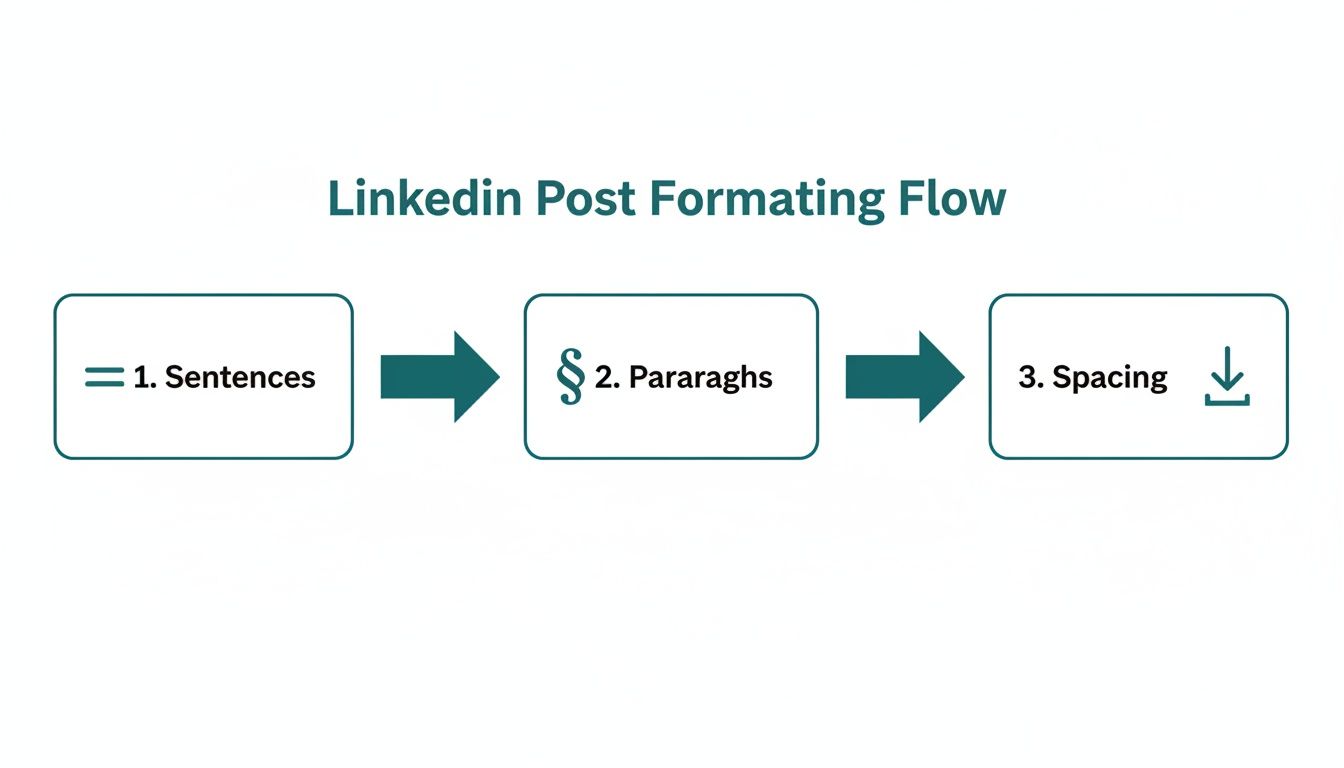
As you can see, great formatting isn’t accidental. It’s a deliberate process that starts with the sentence and builds up to perfectly spaced paragraphs that are effortless to read. To make this whole thing easier, you might want to check out a dedicated https://postline.ai/blog/2/linkedin-text-formatter that handles all the heavy lifting for you.
Closing with a Powerful Call to Action
You’ve crafted a brilliant post, but a weak ending can make the whole thing fall flat. It’s a massive missed opportunity. Your Call to Action (CTA) is the final, crucial piece of your LinkedIn format post; it’s what turns someone who just read your content into someone who actually does something about it.
If you don’t give people a clear next step, you’re basically just leaving engagement on the table.
Lots of people fall back on a simple “What do you think?” but you can get so much more strategic. The best CTAs I’ve seen are direct, add value, and feel like a logical extension of the content you just shared. They guide your audience toward an action that benefits both of you.
Types of High-Impact CTAs
Instead of slapping the same CTA on every post, think about the goal of that specific piece of content. What do you actually want to achieve with it?
- To Spark Conversation: Ask a specific, open-ended question that’s directly related to your topic. Something like, “What’s one productivity tool you can’t live without? Share it below.” works so much better than a generic question.
- To Drive Traffic: Direct readers to a resource that builds on what you just talked about. Try, “I broke down the full process in my latest blog post. You can read it here.”
- To Generate Leads: Offer up something really valuable in exchange for a direct message. A great example is, “DM me ‘GUIDE,’ and I’ll send you my free checklist for…”
The goal is to make your CTA feel like a natural and helpful next step, not a sales pitch. It should provide a clear path for readers who want to engage further with your insights.
In a market like Germany, where LinkedIn’s advertising reach shot up by 1.0 million (+5.0%) in just one quarter, there’s a growing gap between registered users and genuinely active engagement. A sharp, powerful CTA is one of the best ways to turn that massive audience into an active community around your profile. If you want to dive deeper, you can discover more insights about regional LinkedIn engagement to really fine-tune your approach.
Got Questions About LinkedIn Formatting? Let’s Clear Them Up.
Even when you’ve got a solid strategy, the little details of formatting a LinkedIn post can still trip you up. I get these questions all the time, so let’s walk through the most common ones to get you posting with total confidence.
What’s the Magic Number for Post Length?
LinkedIn gives you a massive 3,000-character runway, but honestly, you rarely need all of it. From what I’ve seen, the sweet spot is usually somewhere between 1,200 and 2,000 characters (that’s about 200-300 words). Go much shorter, and you might come across as superficial. Go longer, and you risk your reader scrolling right past unless your story is absolutely captivating from the first line.
The real secret isn’t the character count itself, but whether you can land a complete, valuable idea without rambling. Your hook is everything. If the first two lines don’t grab them, the rest of your post doesn’t stand a chance, no matter how long it is.
My advice? Aim to be thorough, not just long. Use short paragraphs and bullet points to break up bigger ideas. This makes even a longer, value-packed post feel light and easy to digest.
How Many Hashtags Should I Actually Use?
Stick to 3 to 5 highly relevant hashtags. This seems to be the consensus for hitting that perfect balance of discoverability without looking spammy. Too many hashtags can make your post look cluttered and unprofessional, which can turn readers off and might even hurt your reach.
Think of your hashtags as filing cabinets for your content. You want to make it easy for the right people to find it.
- Try a mix: one broad, one niche, and maybe one branded or community hashtag.
- Tuck them away at the very end of your post. It just looks cleaner.
For instance, if I were posting about this topic, I might use #LinkedInTips (broad), #PersonalBranding (niche), and #ContentStrategy (specific). This helps your post show up in relevant searches and topic feeds, putting it right in front of the audience you want to attract.
Can I Edit a Post After I’ve Published It?
Yes, but with one major catch. You can absolutely edit the text of your post after it’s live. Just click the three little dots in the top-right corner of your post and hit ‘Edit post’. It’s a lifesaver for fixing that typo you only spot after publishing.
Here’s the critical part: you cannot edit or swap out any media—an image, video, PDF, or document—once the post is up. If you uploaded the wrong picture or want to change the document, your only option is to delete the entire post and start from scratch. It pays to double-check everything before you hit that publish button.
Tired of the guesswork? Postline.ai uses smart AI and real-time research to help you create perfectly formatted, high-engagement LinkedIn posts in a fraction of the time. See how Postline.ai can level up your LinkedIn game today.

Run every client pipeline in one place
Give each LinkedIn profile its own voice, calendar, approval flow, and analytics. Start in minutes.
Start free trial