
Mastering the LinkedIn Ads Library
Unlock competitor strategies with our complete guide to the LinkedIn Ads Library. Learn how to find, analyze, and use ad insights to boost your campaigns.
On the hunt for a LinkedIn Ads Library? You’re not alone. While LinkedIn doesn’t actually call it that, they have something that works just the same: a powerful ad transparency tool. It’s essentially a free, public window into every single ad running on the network.
Unlocking the Secrets of LinkedIn Ad Transparency
Think of LinkedIn’s ad transparency feature less as a library and more as a searchable museum of modern B2B advertising. It’s not just some box-ticking compliance tool; for marketers, sales teams, and business owners, it’s a strategic goldmine. This whole thing is part of a bigger global push for more openness in online ads, giving everyone a peek behind the curtain to see who’s paying for the ads in their feed.
For marketers, this is a huge leveller. You no longer need to shell out for expensive third-party tools just to get a basic idea of your competitors’ playbooks. With direct access to crucial campaign details, you can get the insights you need to build your own powerful LinkedIn marketing strategies.
Why This Tool Is a Game-Changer
So, what makes this feature so incredibly valuable? It completely demystifies what used to be a total black box. Instead of just guessing which messages are hitting the mark in your industry, you can see them for yourself.
This opens up a ton of possibilities:
- Analyse Competitor Campaigns: See the exact creatives, copy, and offers your rivals are pushing to win over customers.
- Find Creative Inspiration: Stuck in a rut? A quick browse can show you what formats and hooks are trending in your niche, sparking fresh ideas.
- Identify Market Trends: Spot the recurring themes and value propositions popping up across multiple competitors. This tells you exactly what the market is buzzing about.
- Validate Your Ideas: Before you sink a big chunk of your budget into a new campaign, you can see if anyone else is already testing similar concepts.
This transparency is more than just a feature—it’s a fundamental shift. It empowers smaller businesses and solo marketers to conduct sophisticated competitive intelligence that was once only accessible to large agencies with big budgets.
What You’ll Find Inside
When you dive into LinkedIn’s ad transparency tool, you’re not just seeing a picture of an ad. You get a whole lot more. It’s designed to give you a clear, comprehensive look at what your competitors are up to.
To give you a clearer picture, here’s a quick rundown of what you can expect to find and why it’s so useful for your marketing efforts.
LinkedIn Ad Library Features at a Glance
| Feature | What You Can See | Why It’s Useful for Marketers |
|---|---|---|
| Advertiser Search | All ads run by a specific company page in the last 6 months. | Lets you conduct a deep-dive analysis of a single competitor’s entire ad strategy. |
| Ad Creatives | The full ad, including images, videos, carousels, and copy. | Perfect for sparking creative inspiration and understanding what visual styles and messaging resonate. |
| Ad Format | Identifies whether the ad is a single image, video, carousel, etc. | Helps you spot trends in ad formats and decide which types might work best for your own campaigns. |
| Impressions & Targeting (EU) | For ads shown in the EU, you can see impression numbers and detailed targeting criteria. | Provides invaluable data on audience size and targeting strategies, giving you a massive competitive edge. |
| Run Dates | See when an ad started running. | Helps you gauge campaign longevity and understand which messages have staying power. |
This isn’t just a list of features; it’s your toolkit for smarter, more informed advertising. By using this data, you move from guesswork to a strategy backed by real-world insights.
The Official Launch and Its Impact
LinkedIn officially rolled out its Ad Library in June 2023, creating a publicly accessible database for marketers to view ads running on the platform, including those targeted at the German market. This tool pulls back the curtain on ad previews, formats, and who’s paying for them.
For any ads running in the EU, it goes even deeper, revealing rich data like impression numbers and the specific targeting criteria used. The tool’s value was immediately obvious—in its first year alone, searches grew by a staggering 60 percent. This rapid adoption shows just how hungry marketers are for real-time competitive analysis. You can discover more about the library’s features and impact in this detailed overview from Simplified.
Finding and Navigating the Ad Library
Alright, now that you know this powerful tool exists, it’s time to get your hands dirty. Getting into LinkedIn’s ad transparency feature is surprisingly simple, and you don’t even need a LinkedIn account to start snooping. Here’s your practical guide to finding it and using it with confidence.
The easiest way in is directly through a company’s LinkedIn Page. Think of it as walking right up to a competitor’s virtual storefront and peeking into their advertising department. This method is perfect when you have a specific company in your sights and want to do a targeted deep-dive.
Your Step-by-Step Guide to Accessing Ads
Getting to a company’s ad collection is a quick, three-step process. Let’s walk through it.
- Search for the Company: Use the main LinkedIn search bar to find the official Page of the competitor you want to check out.
- Navigate to Their Page: Click on their profile to land on their main company Page.
- Find the ‘Ads’ Tab: On the left-hand navigation menu, scroll down and click on the ‘Ads’ tab. Just like that, you’re in their dedicated ad library, looking at all their active and recent campaigns.
Remember, the ads you see here have been active within the last year. This isn’t a complete historical archive, but it’s a super relevant snapshot of their recent and current strategies, making it perfect for timely analysis.
Once you’re in, you’ll see a gallery of their advertisements. This first look is brilliant for a quick visual audit of their creative style and how often they’re pushing out new messages.
Here’s an example of what LinkedIn’s own ad library looks like, showing a variety of their promotional content.
From this view, you can immediately spot the different formats they’re testing—from single-image ads to carousels—giving you instant clues about their content strategy.
Using Filters to Pinpoint Specific Campaigns
Just scrolling through a raw feed of ads is useful, but the real magic happens when you start refining your search. The filter functions inside the LinkedIn Ads Library let you slice and dice the data to find exactly what you’re looking for. It’s a massive time-saver.
You can narrow your search results using several key filters:
- By Keyword: Search for specific terms in the ad copy. This is great for seeing how competitors are talking about certain product features or customer pain points.
- By Date Range: Focus on ads from the last week, month, or a custom period to see what they’re doing for seasonal campaigns or new product launches.
- By Country: If you’re targeting a specific region, like Germany, you can filter to see only the ads being shown to that audience.
This level of control turns a broad overview into a surgical analysis. For example, filtering by the keyword “AI” within the last 30 days for a competitor in Germany can reveal their entire go-to-market strategy for a new feature.
The insights you can pull are incredibly detailed. For those dealing with large datasets, it’s also helpful to know how to export your LinkedIn analytics data for an even deeper review. By mastering these simple navigation and filtering tools, you transform the ad library from a cool novelty into a core part of your strategic workflow.
Analysing Competitor Ads for Actionable Insights
Spotting a competitor’s ad is one thing, but knowing how to break it down is where the real magic happens. This is your chance to move from just watching to actively strategising, turning their ad spend into a free masterclass for your own campaigns. Think of it like a mechanic getting a rare look under the bonnet of a rival’s race car—you’re trying to figure out what makes it go.
The goal isn’t just to see what they’re doing, but to truly understand why they’re doing it. By taking their ads apart piece by piece, you can reverse-engineer their entire approach, get a read on their target audience, and pinpoint the exact problems they’re promising to solve.
This simple flowchart lays out the three-step process for finding any company’s ads on LinkedIn.
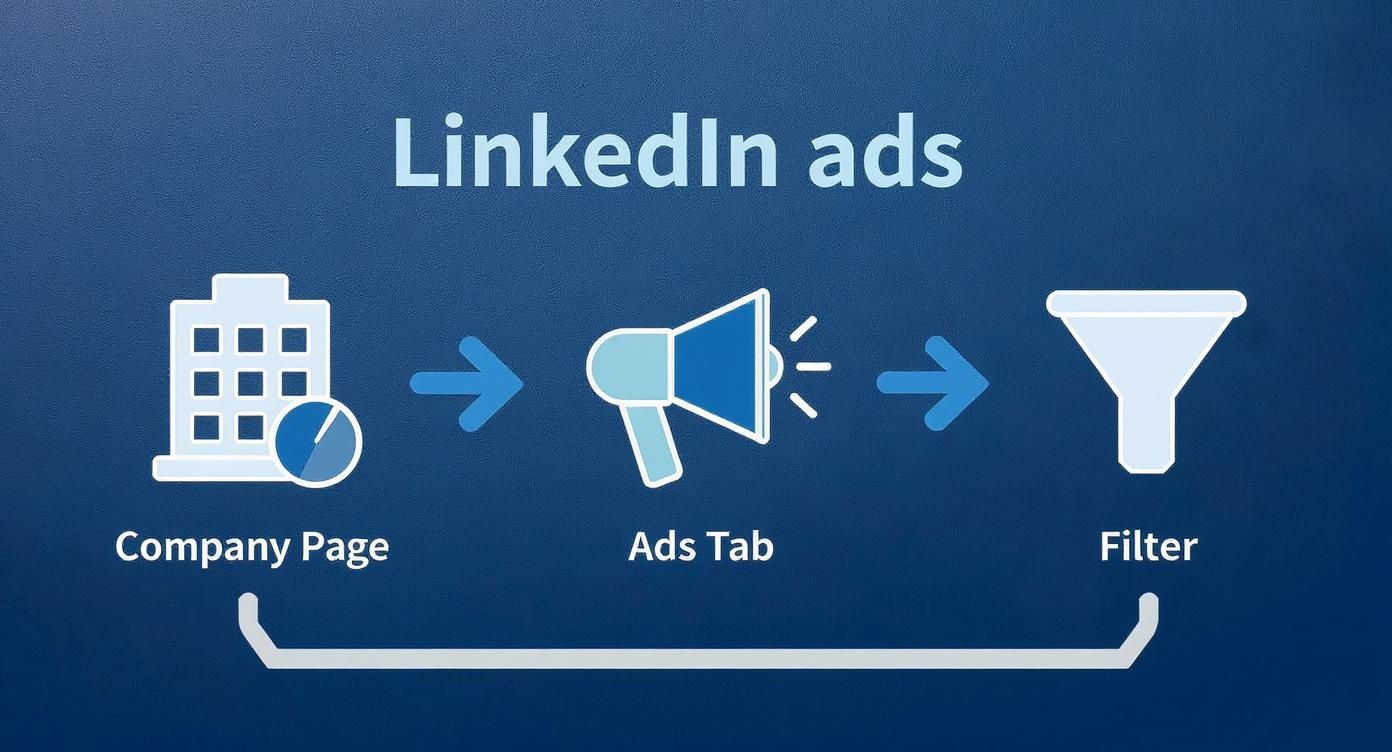
This process—hopping from their company page to the Ads tab and then tweaking the filters—is your direct line to the raw material you need for a solid competitor analysis.
Decoding the Ad Creative and Copy
First things first, look at what’s right in front of you: the visuals and the text. These two elements have to work together to grab someone’s attention and land a key message in just a couple of seconds.
When you’re looking at an ad, ask yourself a few key questions:
- What’s the Headline’s Hook? Is it a question? A bold statement? A straight-up benefit? This tells you how they’re trying to stop the scroll.
- What’s the Value Proposition? Dig into the main text. What problem are they actually solving? Are they promising to save money, boost efficiency, or help someone get a promotion?
- What’s the Call-to-Action (CTA)? Are they pushing for a “Free Demo,” a “Download Ebook,” or a “Register Now” for a webinar? This is a massive clue about which part of the sales funnel they’re targeting.
Let’s say you notice a competitor is constantly running ads with a “Download Our 2025 Industry Report” CTA. That’s a pretty clear sign they’re focused on top-of-funnel lead generation, happy to trade a valuable piece of content for an email address. That’s a huge piece of intel for your own content strategy.
Identifying the Target Audience and Offers
Even though LinkedIn’s ad transparency doesn’t give you the exact targeting details, you can still figure out a lot about who your competitors are trying to reach. Their language, choice of imagery, and the offer itself are all dead giveaways. An ad full of manufacturing jargon with pictures of factory floors isn’t aimed at marketing managers.
This is especially true in a big, professional market like Germany. LinkedIn’s ad audience in Germany hit about 21.0 million members in early 2025, and that potential reach grew by a whopping 16.7 percent between January 2024 and January 2025. This shows just how vital the platform is becoming for B2B marketers there.
By carefully analysing the messaging and creative, you can build a surprisingly accurate picture of a competitor’s ideal customer profile. To take this further, you can explore detailed strategies for understanding your target market in our guide on https://postline.ai/blog/2/linkedin-audience-insights.
Building Your Intelligence Report
Finally, don’t let all this good research go to waste. You need to organise your findings somewhere. A simple spreadsheet or document will do the trick. Keep track of your main competitors, take screenshots of their best (and worst) ads, and make notes on recurring themes, offers, and messaging angles you see.
This is where you can put it all together. A checklist helps make sure you’re systematically pulling out the most valuable information from every ad you analyse.
Competitor Ad Analysis Checklist
Use this checklist to break down any competitor ad you find. It helps you move beyond a quick glance and into a more structured analysis, ensuring you don’t miss any critical insights.
| Analysis Area | Key Questions to Ask | Example Insight |
|---|---|---|
| Headline & Hook | Does it use a question, statistic, or benefit? How does it grab attention? | Competitor A always uses questions in their headlines, likely to engage users and make them feel understood. |
| Core Message | What is the main value proposition? What pain point are they addressing? | Their ads focus heavily on “reducing manual data entry,” suggesting their target audience is struggling with inefficiency. |
| Visuals | Is it a single image, video, or carousel? Does it feature people, product shots, or graphics? | They consistently use short, 15-second video testimonials, which probably perform better for them than static images. |
| Call-to-Action (CTA) | What are they asking the user to do? (e.g., Download, Register, Learn More) | Most CTAs lead to a webinar registration, indicating a mid-funnel strategy focused on education. |
| Audience Signals | What clues does the language, imagery, or offer give about the target audience? | The use of acronyms like “ERP” and “CRM” suggests they are targeting tech-savvy operations managers. |
| Offer | Is it a free trial, an ebook, a demo, a discount? What are they giving in return for a click? | They are pushing a “free implementation guide,” which is a high-value, bottom-of-funnel offer. |
By consistently applying this framework, you’ll start to see patterns in their strategy that you can either counter or learn from in your own campaigns.
While LinkedIn gives you a direct window into your competitors’ ads, you can get a broader view of competitive research by checking out this guide on how to conduct effective competitor analysis. This simple habit of documenting what you find turns casual browsing into a powerful strategic asset that can directly shape your content and campaign plans.
Using Advanced Search and Discovery Techniques
The official ‘Ads’ tab on a company page is a great starting point, but it’s not the whole story. Real competitive intelligence means looking beyond the obvious. Think of the official library as the main road; savvy marketers also know the scenic routes and shortcuts that reveal even more.
These advanced methods help you find ads that might not pop up in a standard search, giving you a much fuller picture of a competitor’s strategy. By mixing up your discovery techniques, you can piece together a much richer understanding of their digital footprint.
Unearthing Ads with Google Search
One of the most powerful—and most overlooked—methods is using Google itself. With a few specific search operators, you can tell Google to find sponsored LinkedIn posts that it has indexed. This can sometimes surface ads from highly targeted or older campaigns that aren’t easy to spot on a company’s page.
Try dropping this search string into Google, just swap out “competitorname” with the brand you’re digging into:
site:linkedin.com/posts/ "sponsored" "competitorname"
This command tells Google to search only within LinkedIn post URLs for the word “sponsored” right alongside your competitor’s name. It’s like having a digital detective sift through public posts to find the paid promotions. This little trick often shows how competitors are blending their sponsored content with their organic posts.
Leveraging Third-Party Intelligence Tools
For a more panoramic view, specialised third-party tools are gold. Platforms like Superads.ai or SEMrush are built to pull advertising data from multiple sources, not just LinkedIn. They basically act as a central dashboard for a competitor’s entire paid strategy across different networks.
These tools often provide features that the native LinkedIn Ads Library simply doesn’t have:
- Historical Data: Get access to campaigns that are older than the one-year limit on LinkedIn.
- Performance Estimates: Some platforms offer educated guesses on engagement or reach, giving you clues about an ad’s effectiveness.
- Cross-Platform Views: See how a competitor’s LinkedIn messaging stacks up against their ads on Meta or Google.
Sure, these tools often come with a subscription fee. But the depth of insight can easily justify the cost by saving you hours of manual digging and revealing trends you’d otherwise miss completely.
The Power of Organic Discovery
Finally, never underestimate the value of just keeping your eyes open. Actively follow your key competitors and industry influencers on LinkedIn. Your own feed can become a source of valuable intelligence as their sponsored content naturally shows up.
This method gives you context that a structured search just can’t. You see the ad exactly as a target user would, complete with social proof like likes and comments. Seeing an ad “in the wild” helps you gauge its initial reception and understand how it fits into the daily flow of a professional’s feed. This passive approach perfectly complements active research, ensuring you don’t miss the subtle nuances of how a campaign actually lands.
Turning Insights Into High-Performing Content

Research is pointless if you don’t act on it. The gold you dig up from LinkedIn’s ad transparency features is the raw material for building a smarter, more effective content engine. This is where you turn competitor intel into organic posts and paid campaigns that actually hit the mark with your audience.
By looking at what your competitors are saying, you can spot gaps in the market almost instantly. Are they all hammering on about technical features but completely ignoring the human side of their solutions? That’s your cue to create content that speaks to the real, emotional reasons people buy.
This whole process lets you get much better at addressing your audience’s pain points in your blog posts, carousels, and videos. When you see what’s working for others, you can sharpen your own value proposition until it’s impossible to ignore.
From Analysis to A/B Testing
One of the most immediate ways to use your research is in your ad creative. Stop guessing what might work. Use what you’ve learned to form data-backed ideas for your A/B tests. It’s a systematic approach that saves you a ton of time and money.
Here’s a simple way to structure your tests based on what the competition is doing:
- Test Their Hooks: If a rival consistently leads with a question in their headlines, try pitting a question-based hook against a statement-based one in your own ads.
- Borrow Proven Formats: Seeing a lot of short, animated videos in your space? That’s a massive clue that the format is working. Test a similar style against your usual static images and see what happens.
- Experiment with CTAs: Is everyone else using a generic “Learn More”? Try something more specific like “Get Your Free Checklist” and see if you can pull in more qualified clicks.
The goal isn’t to straight-up copy your competitors. It’s about figuring out the why behind their successful ads. Use their campaigns as a launchpad for your own creative experiments. You’ll innovate faster and more effectively.
Doing this turns your ad budget from a shot in the dark into a calculated investment in learning exactly what your audience wants.
Accelerating Content Creation with AI
Manually translating all these insights into a full content calendar can be a real slog. This is where AI tools can seriously speed things up, bridging the gap between research and actually getting stuff published. They let you scale up your content creation while staying on-point with what’s proven to work.
For example, you could take the central idea from a top-performing competitor ad and feed it into an AI post generator to spit out several different organic post variations in minutes. It’s a brilliant way to broaden your reach. A tool like Postline.ai is built for exactly this, helping you spin a single idea into a week’s worth of quality LinkedIn content. A streamlined content creation workflow like this ensures your organic posts are constantly backed by the logic of proven paid strategies.
By mixing solid, manual competitor analysis with the speed of AI, you create a powerful feedback loop. You spot winning tactics in LinkedIn’s ad library, then use tools to roll out those tactics at scale across your entire content strategy.
Budgeting and Optimising Your Ad Spend
Figuring out what your competitors are up to is only half the battle. The other half? Paying for your own campaigns. Let’s talk about the money side of LinkedIn advertising, which means having a solid grasp of the costs and a smart plan to make every euro count. This is exactly where all that research you did into their ads becomes your secret weapon for budgeting.
Before you even think about a budget, you need to get your head around the main pricing models. You’ll run into two big ones: Cost Per Click (CPC), where you pay when someone actually clicks on your ad, and Cost Per Mille (CPM), where you pay for every thousand times your ad gets shown (impressions). Understanding the difference is key. Are you chasing direct actions like sign-ups? Go for clicks. Want to get your brand name out there? Impressions are your friend.
Establishing a Realistic Campaign Budget
Armed with insights into what the competition is doing, you can now piece together a budget that actually makes sense. If you saw a rival running huge, glossy video campaigns, you know you’ll likely need a bigger war chest to make a dent. On the flip side, if their ads are mostly simple, targeted text promotions, you might get away with a more modest starting budget and still make an impact.
Advertising on LinkedIn in Germany isn’t cheap—it’s a premium market for a reason. You’re paying for access to business professionals and decision-makers. For instance, Sponsored Content can run you anywhere from €3.50 to €6.00 per click (CPC). If you’re paying for impressions (CPM), expect to be in the €25 to €40 range. These rates highlight just how valuable this audience is.
Smart Optimisation Tactics
Throwing more money at a campaign doesn’t automatically mean better results. The real magic happens with smart optimisation. That’s how you get a strong return on your investment.
- Start with Test Budgets: Don’t go all-in from day one. Set aside a small chunk of your budget to experiment. Test different ad creatives, headlines, and audience segments based on what you learned from your competitor research.
- Focus on Hyper-Specific Audiences: This is where LinkedIn truly shines. Instead of trying to reach everyone, get granular. Target specific job titles, industries, and company sizes that are a perfect fit for your offer. A smaller, more engaged audience almost always delivers a higher ROI.
- Reallocate Based on Performance: Once the data starts rolling in, be ready to pivot. It’s all about being agile. Shift your budget away from the ads that are falling flat and double down on the ones that are bringing in the leads.
By combining sharp competitor analysis with savvy ad spend optimisation, you can seriously lower your SaaS Customer Acquisition Cost (CAC). This isn’t just about spending money; it’s about turning your ad budget into a strategic investment that fuels real growth.
Frequently Asked Questions
Still have a few questions floating around about LinkedIn’s ad library? Let’s clear those up right now. Here are some quick answers to the most common things people ask.
Can I See Competitor Ad Spend?
Nope. LinkedIn’s ad library doesn’t spill the beans on how much a competitor is spending. You won’t find their budget, cost-per-click, or any other financial data.
The whole point of the library is transparency around the ad creative itself—what it looks like, what it says, and what format it’s in. For ads running in the EU, you might get a few extra details like targeting info and total impressions, but the price tag remains a secret. It’s all about the what, not the how much.
How Far Back Can I View Ads?
You can generally see ads that have been active and received at least one impression within the last year. Think of it as a rolling archive of recent campaigns, not a dusty, all-encompassing historical record.
This one-year window is more than enough to get a solid feel for a company’s current and recent strategies. Anything older than that is automatically cleared out of the public view.
Why Can’t I Find a Specific Ad?
Just because you saw an ad pop up in your feed doesn’t mean it’s guaranteed to be sitting in the company’s ad library. There are a few good reasons why it might be playing hide-and-seek:
- The Campaign is Over: It could have been a flash-in-the-pan campaign that has already wrapped up.
- There’s a Bit of a Lag: It can sometimes take up to 48 hours for a brand-new ad to show up in the library. Give it a day or two.
- It Wasn’t From Them (Directly): The ad might have been run through a partner’s account or even an individual employee’s profile, not the main company page you’re checking.
Don’t get too hung up on finding one specific ad. The real gold is in spotting the bigger picture—the patterns, the messaging, and the creative angles a competitor is taking over time. That’s where the best insights live.
Ready to turn those competitor insights into killer content? Postline.ai helps you craft high-performing LinkedIn posts in minutes, blending powerful AI with real-time research and your own unique voice. Start creating better content today.

Run every client pipeline in one place
Give each LinkedIn profile its own voice, calendar, approval flow, and analytics. Start in minutes.
Start free trial