
Creating a LinkedIn Account for a Company That Gets Noticed
Learn how to create a LinkedIn account for a company that drives growth. This guide covers setup, optimization, and content strategies for real results.
Think of your LinkedIn Company Page as more than just an online profile. It’s your business’s digital headquarters—a dedicated space on the world’s biggest professional network where you can shape your brand, connect with clients, attract talent, and talk directly with others in your industry.
Why Your Business Needs a Strategic LinkedIn Presence

It’s easy to treat a LinkedIn page as a box-ticking exercise. You set it up, add a logo, and then… nothing. It just sits there, like a digital business card collecting dust. But this is a massive missed opportunity. When managed well, your Company Page becomes a powerful tool that can drive real growth, build your credibility, and connect you with the very people who can help your business thrive.
Seeing it as a core part of your wider strategic planning process steps is the first step. Your page isn’t just a profile; it’s the central hub for telling your company’s story.
Building Authority and Generating Leads
Having a strategic presence on LinkedIn means you’re doing more than just showing up. You’re actively establishing your business as an authority by sharing useful insights, company news, and expert opinions. This consistent activity turns your brand into a trusted resource, which is the bedrock of modern B2B marketing and lead generation. This whole approach is central to the idea of social selling.
Every single post, article, or comment you share helps build a foundation of trust with potential clients and partners.
A thoughtfully managed LinkedIn Company Page transforms from a passive profile into an active, lead-generating machine. It’s where you can demonstrate expertise, showcase your company culture, and attract not just customers, but also the top-tier talent needed to fuel your growth.
Tapping into a Growing Professional Network
The influence of LinkedIn just keeps growing, especially in major professional markets. Take Germany, for instance. In early 2023, the platform had 15 million members there, which was a massive 15.4% increase from the year before. This isn’t just a random statistic; it shows how dominant the platform has become for reaching the professionals and decision-makers you need to talk to.
And it’s not just about the numbers. It’s about the access an active company page gives you. Suddenly, you have a direct line to:
- Top-tier talent: You can find and attract candidates who are serious about their careers.
- Qualified leads: You’re reaching decision-makers in a professional setting where they’re open to hearing about new solutions.
- Industry peers: It’s the perfect place to build partnerships and keep a finger on the pulse of what’s happening in your market.
When you look at it that way, ignoring your Company Page is like leaving money on the table for your competitors to pick up.
Building Your Company Page Foundation
Setting up a LinkedIn Company Page is far more than just filling out a few boxes. Think of it as laying the digital foundation for your brand. Getting these first steps right from the start will save you a world of headaches down the line and ensure you look professional and discoverable from day one.
It all starts from your personal LinkedIn profile. Just head over to the ‘Work’ icon in the top right corner and click ‘Create a Company Page’. LinkedIn will give you a few options, but for most businesses—from a small startup to a massive corporation—the choice is simple: ‘Company’. The other options are for niche cases, like universities or for creating showcase pages that branch off your main page.
Choosing Your Core Details
After you’ve selected ‘Company’, you’ll land on a page asking for your core information: the official company name, your industry, company size, and type. It’s tempting to rush through this, but be precise. This data is exactly what LinkedIn uses to categorise your page and, more importantly, to help the right audience find you.
Now for what I consider the most critical part of the initial setup: your public URL. This becomes your page’s unique web address, like linkedin.com/company/your-company-name. You want this to be clean, short, and instantly recognisable.
-
Good Example:
linkedin.com/company/postlineai -
Avoid:
linkedin.com/company/postline-ai-solutions-2024
A tidy URL isn’t just about looking professional; it’s practical. It’s easier to pop onto a business card, add to an email signature, or share anywhere else. If your first choice is already taken, try a simple, logical variation. Just steer clear of tacking on random numbers or extra words that clutter it up.
I always tell clients to think of their public URL as their page’s permanent digital address. A professional, SEO-friendly URL signals credibility before a visitor even sees your content. It’s a small detail that makes a surprisingly big impact.
Assigning Roles and Permissions
Before you push the page live, take a moment to think about who will be running it. I’ve seen so many companies make the mistake of handing all the keys to one person. This creates a huge bottleneck and a real risk if that person ever moves on.
Thankfully, LinkedIn has a flexible system for assigning admin roles. You can give different team members different levels of access.
A Super Admin has full control, but you can also assign more focused roles. A Content Admin, for instance, can post updates and manage comments but can’t change core page settings. An Analyst can dive into all the performance data without being able to post or edit anything.
A common setup I recommend is making the Head of Marketing a Super Admin, the social media manager a Content Admin, and maybe a data-savvy team member an Analyst. Spreading the responsibility like this creates a much smoother and more secure workflow from the very beginning.
This groundwork is vital before you move on to the fun stuff, like optimising the page itself. For a more granular walkthrough of these initial steps, you can learn more about how to create a business profile on LinkedIn in our detailed guide.
Optimising Your Page for Visibility and Engagement
So, you’ve created your LinkedIn Company Page. That’s the first step, but the real work starts now. An empty or half-finished page is like a closed shop—it’s not going to attract followers, clients, or the talent you’re looking for. It’s time to turn that basic shell into a dynamic hub for your brand.
This is where we move from just having a page to having a strategy. A properly optimised page does more than just look good; it’s built to be found. Every single element, from your tagline right down to your ‘About’ section, needs to work in concert to boost your visibility on LinkedIn and even on search engines like Google.
Crafting a Compelling First Impression
The first thing anyone sees is your page’s visuals, so they have to be sharp. A high-quality logo and a well-thought-out banner image are non-negotiable. Your logo should be the official one everyone recognises, crisp and clear.
The banner, on the other hand, is your creative playground. Think of it as your digital billboard. You can use this space to:
- Showcase your value proposition: What’s the one thing you do better than anyone else?
- Announce upcoming events: Got a webinar or a big conference coming up?
- Highlight a recent achievement: Feature a new product launch or a big award win.
- Feature your team: A great photo of your employees adds a much-needed human touch.
Whatever you do, please avoid generic stock photos. Your banner needs to feel authentic and give visitors an instant feel for who you are.
Your company page is often the very first interaction someone has with your brand. A professional and on-brand banner isn’t just a design choice; it’s a statement. It tells people you’re serious about your business.
Next up is your tagline. This is that short, snappy sentence right under your company name. Don’t just state what industry you’re in. Instead, talk about the problem you solve. For instance, instead of “Software Development Company,” try something like, “Building Custom Software That Drives Business Growth.” It’s far more descriptive and immediately tells people what you deliver.
Mastering the ‘About’ Section for SEO
Your ‘About’ section is arguably the most valuable real estate on the entire page. This is your opportunity to tell your story, share your mission, and—most critically—pack it with the keywords your audience is actually searching for. So many businesses make the mistake of filling this with dry, corporate jargon.
Don’t be one of them. Structure it for readability. Kick things off with a strong opening paragraph that hooks the reader. Then, use the 2,000 characters you’re given to explain who you are, what you do, and who you do it for.
Break up the text with headings or bullet points to make it scannable. Most importantly, put yourself in your ideal customer’s shoes. What words would they type into a search bar to find a company like yours? Weave those keywords naturally throughout your text. A well-written ‘About’ section will help your page rank higher not just within LinkedIn, but in external search results, too.
This flowchart gives a great visual summary of those foundational steps—creating the page, setting a custom URL, and getting your admins in place.
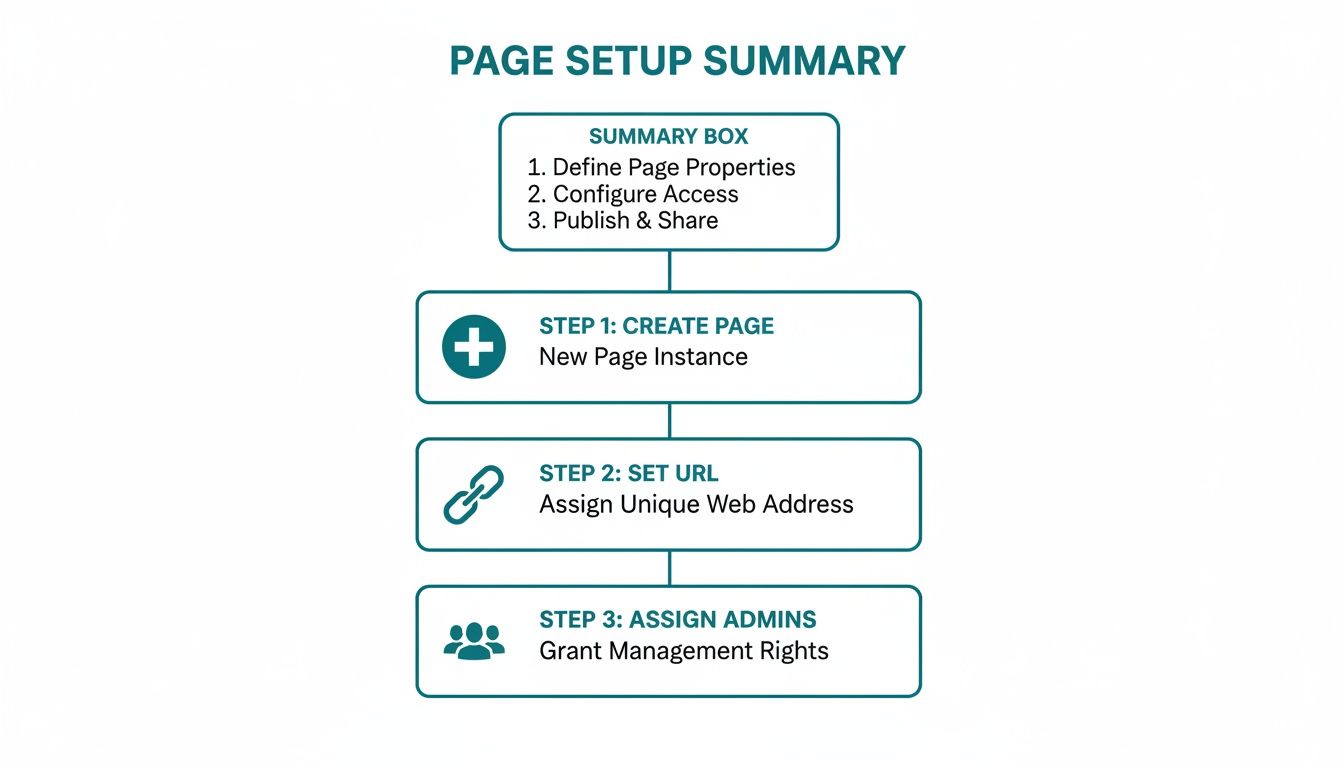
Nailing these core elements gives you a solid foundation to build all your future optimisation efforts on.
To help you visualise the difference, I’ve put together a quick checklist comparing a basic page with a fully optimised one.
Company Page Optimisation Checklist
| Feature | Basic Setup (What to Avoid) | Optimised Setup (Best Practice) |
|---|---|---|
| Banner Image | Generic stock photo or left blank. | Custom-designed graphic with a clear value proposition or team photo. |
| Tagline | Vague industry label, e.g., “Marketing Agency”. | Benefit-driven statement, e.g., “Data-Driven Marketing for SaaS Growth”. |
| About Section | A short, jargon-filled paragraph. | A detailed, keyword-rich story broken up with bullet points. |
| CTA Button | Left as the default “Follow” button. | Customised to “Visit website,” “Sign up,” or another relevant business goal. |
| Specialties | Only a few generic terms listed. | All 20 slots filled with specific, relevant keywords for your services. |
This table makes it clear how a few strategic tweaks can dramatically elevate your page’s effectiveness.
Activating Key Features for Engagement
Beyond the main profile sections, LinkedIn offers some smaller but surprisingly powerful features you need to switch on. Your call-to-action (CTA) button is a perfect example. It sits right at the top of your page and can be customised to drive specific actions. Some of the most common choices are:
- Visit website: This is the go-to for most, sending traffic straight to your homepage or a dedicated landing page.
- Contact us: Ideal for service-based businesses looking to generate direct enquiries.
- Learn more: A softer CTA that can point to a blog post, case study, or resource hub.
- Sign up: Perfect if you’re promoting a newsletter, a webinar, or a free trial.
Think about your main business goal right now and choose the CTA that best supports it.
Finally, don’t sleep on the ‘Specialties’ section. This is where you can list up to 20 keywords describing your company’s core services and areas of expertise. These act like tags, helping LinkedIn’s algorithm understand exactly what your business offers and show your page to the right people. Be specific and use every single slot to get the most out of it.
Developing a Content Strategy That Connects

So, your page is fully optimised and looking sharp. You’ve built the stage. Now, it’s time to put on a show that your professional audience actually wants to see. A great LinkedIn page isn’t just about existing; it’s about having a purpose. That purpose comes from a content strategy designed to consistently provide value and build a genuine community.
Without a plan, you’re just posting into the void. The goal here is to shift from random updates to a deliberate mix of content that educates, inspires, and gets people talking. This is how you turn a static online brochure into a dynamic conversation hub.
Finding Your Content Pillars
The best company pages I’ve seen don’t just talk about themselves. They anchor their strategy around a few core themes—or “content pillars”—that hit the sweet spot between their audience’s interests and their own expertise. Think of these as the main topics you want to own.
For instance, a B2B software company might build its content around these pillars:
- Industry Insights: Sharing sharp analysis of market trends, new research, or even bold predictions for the future.
- Customer Success Stories: Real-world examples of how clients are using your product to solve frustrating problems.
- Company Culture & People: Putting a face to the name. Highlighting the team, celebrating milestones, and sharing authentic behind-the-scenes moments.
- Product Education: Practical tips, tutorials, and clever use-cases that help customers get more out of the tool they’re already paying for.
When you have these pillars defined, coming up with new content becomes so much easier. Stuck for an idea? Just go back to one of your core themes. It keeps your content on-brand and reliably valuable.
Crafting the Perfect Content Mix
A classic mistake is hammering the sales pitch over and over. A healthy content mix is absolutely essential for keeping people engaged. A solid rule of thumb to start with is the 4-1-1 rule: for every one self-promotional post, share one relevant article from another source and four pieces of original, value-packed content.
This balance prevents your feed from feeling like one long advertisement. The real power of a platform like LinkedIn is its insight into professional trends. It’s so powerful, in fact, that Germany’s Federal Statistical Office (Destatis) uses anonymised LinkedIn data from over 19 million regional members to create near real-time labour market indicators. You can even check out their findings on these experimental labour market statistics from Destatis.
Think of your content like a conversation at a networking event. You wouldn’t just talk about yourself the whole time. You listen, share interesting things others have said, and then add your own unique perspective. Your LinkedIn page should behave the same way.
Part of a strong strategy is also nailing your posting frequency. While there’s no single magic number, most businesses find a sweet spot posting 3-5 times per week. The key is consistency, not just volume. Regular posting tells both the algorithm and your audience that you’re active and worth following.
Streamlining Your Workflow with Modern Tools
Let’s be honest—maintaining this consistency is tough, especially for busy teams. This is exactly where modern content creation tools can be a game-changer. Instead of the chaotic scramble to brainstorm, write, and manually schedule every single post, you can bring some much-needed order to the process.
Platforms like Postline.ai are designed to be a strategic partner in this. You can use it to generate relevant ideas that align with your content pillars, get help writing polished posts in your brand’s voice, and schedule everything out in advance. This frees up your time to focus on what really matters: engaging with your audience in the comments, where the real connections are built.
By getting your workflow organised, you ensure your company’s LinkedIn account remains a reliable source of quality content. To really get into the weeds, check out our complete guide on building a powerful LinkedIn content strategy.
Growing Your Followers and Measuring What Matters
So you’ve built a fantastic-looking page. Now what? An optimised page without an audience is like a billboard in the desert. Growing your follower count isn’t just a vanity project; it’s about expanding your reach and building a genuine community around what you do. This takes a proactive, consistent approach that’s about much more than just hitting ‘publish’.
One of the most powerful, yet frequently missed, opportunities is right under your nose: your own team. Your employees are your most authentic brand advocates. Encourage everyone to connect their personal profile to the Company Page and to share your content with their own networks. A post shared by an actual person always feels more genuine and can tap into a far wider, more receptive audience.
Don’t forget to use the marketing channels you already own. A simple, effective tactic is adding a link to your LinkedIn Page in every employee’s email signature. You can also feature it in your website footer, mention it in your newsletter, and cross-promote it on your other social profiles. Make it easy for people to find you.
Getting to Grips with LinkedIn Analytics
Real growth is about more than watching the follower number tick up. You need to dig in and understand who is paying attention and what they actually care about. This is where your LinkedIn Analytics dashboard becomes your best friend. It’s the tool that shows you what’s hitting the mark, what’s falling flat, and where to point your efforts next.
The platform offers a lot of data, but you can avoid getting overwhelmed by zeroing in on a few key areas:
- Visitor Analytics: This shows you the professional breakdown of people visiting your page, including their job functions and seniority. It’s a quick way to see if you’re attracting the right crowd.
- Follower Demographics: Get a snapshot of your audience by industry, company size, and location. You can also track follower growth over time and connect spikes to specific content you’ve posted.
- Post Analytics: This is where you’ll find the gold. Track impressions, click-through rates (CTR), and engagement for every post to see what kind of content truly resonates.
Think of your analytics as a direct report card from your audience. It swaps guesswork for hard data, helping you continuously refine your strategy and create content your community genuinely values.
Moving beyond simple follower growth is key. You need to regularly assess your impact by applying solid techniques for measuring social media performance. Reviewing this data consistently helps you make smarter content decisions and ensures your work actually contributes to business goals. For a deeper dive, our guide on how to grow LinkedIn followers offers specific tactics to turn your page into a bustling hub.
Got Questions About LinkedIn Company Pages? We’ve Got Answers
When you’re setting up a LinkedIn Company Page, a few questions always seem to pop up. Let’s tackle some of the most common ones we hear from marketers and business owners.
Do I Need a Personal Profile to Create a Company Page?
Yes, you absolutely do. There’s no way around this one. LinkedIn requires every Company Page to be tied to an active, personal profile.
Think of it as a security measure. It’s how LinkedIn confirms a real human is behind the brand, which helps cut down on spammy or fake pages. When you create the page, you’re automatically assigned the top-level Super Admin role, but you can (and should) grant different access levels to your team members afterwards.
How Many People Can Be Admins on a Page?
Technically, LinkedIn doesn’t set a hard limit on the number of admins you can have. But going on an admin-assigning spree isn’t the best idea.
A smarter approach is to give people roles that match their actual jobs. For instance, someone on your content team might only need Content Admin access, while your data guru just needs to be an Analyst. This keeps your page secure and makes your workflow much smoother.
It’s a common worry, but don’t stress: your personal profile is just the key to the castle. Your personal posts won’t ever show up on the company feed, and the company’s updates won’t appear on your personal timeline. They are completely separate.
Does it Cost Anything to Have a LinkedIn Company Page?
Nope, setting one up is completely free. All the essential features—posting updates, filling out your ‘About’ section, and viewing standard analytics—won’t cost you a penny.
Of course, LinkedIn offers paid upgrades if you want to dial things up. Things like running LinkedIn Ads or building out a premium career page are optional extras you can invest in to expand your reach or supercharge your hiring.
Ready to take the guesswork out of your LinkedIn strategy and create content that truly connects? Postline.ai uses smart AI and real-time research to help you write professional, on-brand posts in a fraction of the time. Start your free trial today.

Run every client pipeline in one place
Give each LinkedIn profile its own voice, calendar, approval flow, and analytics. Start in minutes.
Start free trial