
Business page on linkedin: Create, Optimize, and Grow Your Presence
Discover how to build a business page on linkedin, optimize your posts, attract followers, and drive real business results.
Think of a LinkedIn business page as your company’s digital headquarters. It’s not just another social media profile; it’s a dedicated space on the world’s biggest professional network designed specifically to build brand credibility, pull in top-tier talent, and generate qualified leads. Unlike your personal profile, this is where your company’s story comes to life.
Why a LinkedIn Page Is Your B2B Growth Engine
Before we get into the nuts and bolts of setting one up, let’s be clear on why a dedicated business page is a must-have. It’s your digital storefront for B2B relationships. This is where you establish your industry voice, show off your expertise, and build a real community around what you do.
We’re not just talking about having a presence here. A well-run page is a strategic asset that delivers tangible business results, telling your organisation’s story in a way a personal profile never could.
Beyond a Personal Profile
The jump from a personal profile to a business page is a big one. A company page unlocks a whole suite of tools designed to help you hit your business goals—tools you simply don’t get with a personal account. These features are built to scale your brand’s reach and impact.
Here’s a quick look at what you’re getting:
- Analytics and Insights: This is where the magic happens. You get hard data on who your followers are, how your posts are performing, and where your page traffic is coming from. Gold dust for refining your content strategy.
- Advertising Tools: Want to reach a specific industry, job title, or company size? This is how you do it. Targeted ad campaigns turn your page into a lead generation powerhouse. Our guide on using LinkedIn for B2B lead generation dives deeper into this.
- Talent Acquisition: You can use dedicated Career Pages to show off your company culture and post job openings, putting your roles right in front of high-quality candidates.
- Credibility and Authority: A polished, active page sends a clear signal: your business is established, professional, and a serious player in its field.
Personal Profile vs. Business Page Head-to-Head
To really drive the point home, here’s a quick breakdown of the strategic differences and unique tools that separate a personal profile from a powerful business page.
| Capability | Personal Profile | Business Page |
|---|---|---|
| Primary Goal | Individual networking and career building | Brand building, lead generation, talent acquisition |
| Analytics | Basic data (who viewed your profile) | In-depth follower demographics and post performance |
| Advertising | Not available | Full access to LinkedIn’s targeted ad platform |
| Job Postings | Limited to personal network sharing | Official job listings and dedicated Career Pages |
| Followers vs. Connections | Builds a network of individual “connections” | Gathers “followers” who opt into brand updates |
| Team Management | N/A - managed by one person | Multiple admin roles with different permissions |
| Content Focus | Personal achievements and industry thoughts | Company news, thought leadership, product updates |
As you can see, a business page is equipped with the heavy-duty tools you need for serious growth and brand management.
Tapping into a Professional Audience
What really amplifies the power of a business page is the audience itself. For instance, in early 2025, LinkedIn had 21.0 million registered members in Germany alone—a huge 16.7% jump from the previous year. This audience, making up 24.9% of the country’s total population, is on the platform looking for professional connections, industry insights, and business solutions. You can dig into these LinkedIn user trends in Germany for more detail.
When you treat your LinkedIn page as the central hub for your thought leadership and engagement, you put your brand directly in front of the decision-makers who are ready to talk business. It stops being just another social profile and becomes an essential engine for B2B growth.
Building Your Page From the Ground Up

This is where it all begins—the foundation of your entire professional brand on LinkedIn. Setting up a company page is pretty straightforward, but the choices you make right at the start can seriously impact your long-term success. Think of it less like filling out a form and more like building a strategic asset for your business.
To kick things off, you’ll need your own personal LinkedIn profile. From there, just head over to the ‘For Business’ menu and click ‘Create a Company Page’. That one click is the gateway to your brand’s new home on the platform.
Choosing Your Page Type
Right away, LinkedIn asks you to make a choice that defines what your page is all about. Getting this right from the beginning is key.
- Company Page: This is your standard, go-to option. It’s the right choice for the vast majority of businesses, whether you’re a small startup or a massive enterprise. This will be your central hub.
- Showcase Page: Think of this as a specialised spin-off. It’s perfect if you want to shine a spotlight on a specific product line, a major campaign, or a distinct sub-brand that needs its own voice.
- Educational Institution Page: As the name suggests, this one is tailor-made for schools, colleges, and universities to connect with their community of students, alumni, and faculty.
For almost everyone reading this, the Company Page is the way to go. You should only really think about a Showcase Page down the road if a part of your business genuinely needs its own, separate content strategy.
Nailing the Essential Details
After picking your page type, you’ll get to the core information. It might seem basic, but every field you fill in helps shape how both people and the algorithm see your page. In fact, companies with fully completed profiles get up to 30% more weekly views.
Your company name and custom URL are like your digital handshake. Go for a clean, branded URL that’s easy to remember, like linkedin.com/company/your-brand. Try to avoid tacking on extra numbers or characters if you can help it.
Your tagline is the first thing most people will read. It should be a concise, powerful statement of who you are and what you do. Don’t just state your company name; communicate your value proposition in a single, memorable line.
Next, you’ll add details like your industry, company size, and website. Be precise here. This data helps LinkedIn categorise your page properly and suggest it to the right audience.
Crafting a Compelling About Section
Your ‘About’ section is your chance to tell your brand’s story. This is where you graduate from simple data entry to real strategic communication. This whole section is indexed by search engines, making it prime real estate for your most important keywords.
Start with a punchy opening paragraph that gets straight to the point: who you help and how you do it. Don’t bury the lead. From there, you can weave in the details about your mission, values, and what truly makes your company different. For a deeper dive, our guide on how to create a business profile on LinkedIn has even more tips for optimising every part of your page.
Make sure this section is easy to read:
- Use short, scannable paragraphs.
- Add bullet points to highlight key services or what sets you apart.
- Finish with a clear call to action, telling visitors what they should do next.
Perfecting Your Visual Identity
First impressions are almost entirely visual. Your logo and cover banner are absolutely critical for building instant trust and professionalism. A blurry logo or a weirdly cropped banner just screams a lack of attention to detail.
Make sure your visuals are high-quality and sized correctly. Your profile image needs to be a crisp, clear version of your logo. Use that big cover banner space creatively—it’s perfect for reinforcing your brand message, showing off your team, or promoting a current campaign. Getting these simple visual elements right isn’t just a suggestion; it’s a non-negotiable step for building a credible business page.
Optimising Your Page for Discovery and Engagement
So you’ve built your business page on LinkedIn. Great first step. But building the page is only half the battle. If your ideal customers and potential new hires can’t find you, it’s like setting up a beautiful shop on a deserted street.
This is where smart optimisation comes in. It’s the difference between having a simple digital brochure and creating a magnet for discovery and interaction.
Let’s start with making it easy for both people and search engines to find you. LinkedIn’s internal search is surprisingly powerful, and don’t forget, Google indexes your page too. This means a few strategic tweaks can have a massive impact on your visibility, putting you in front of people searching for the exact solutions you offer.
Fine-Tuning Your Page for Search
First things first, claim your custom URL. This is your page’s unique address on the web. Instead of sticking with the random string of numbers LinkedIn might assign, grab a clean, branded URL like linkedin.com/company/your-company-name. It just looks more professional and is way easier for people to remember and share.
Next up, keywords. You need to think like your audience and weave their language into the fabric of your page. This isn’t just about SEO for Google; it’s critical for being found right inside LinkedIn.
Focus your energy on these key areas:
- Your Tagline: This is that crucial one-liner right under your company name. It needs to instantly nail your value proposition and should absolutely include your primary keyword.
- The About Section: The first couple of sentences here are prime real estate. State clearly who you are, what you do, and who you help, using the exact terms your audience would use to find you.
- Specialties List: Don’t just gloss over this section. Meticulously list out your core services, products, and areas of expertise. Every single entry is another chance to be found in a search.
The trick is to make it all sound natural. Your page should read like a clear, compelling description of your business, not an awkward, keyword-stuffed list.
A well-optimised page doesn’t just attract random visitors; it brings in the right visitors. By aligning your page’s language with what your target audience is searching for, you ensure that the people who find you are already warmed up to what you’re offering.
Activating Engagement Features
Once people land on your page, you can’t leave them guessing. You need to give them clear paths to take action. LinkedIn has several built-in features designed for exactly this, and ignoring them is like leaving money on the table.
One of the most powerful—and often overlooked—tools is the custom call-to-action (CTA) button. It sits right at the top of your page, next to the ‘Follow’ button, and you can change it to drive specific business goals.
Common CTA Button Options | Button Text | Best Use Case | | :— | :— | | Visit website | Direct traffic to your homepage or a key landing page. | | Contact us | Encourage potential leads to get in touch directly. | | Learn more | Send visitors to a product page, a case study, or a blog post. | | Register | Promote an upcoming webinar, event, or online course. | | Sign up | Drive sign-ups for a newsletter or a free trial. |
This button isn’t static. You can and should change it to match your current marketing campaigns. Running a big event? Switch it to “Register”. Pushing a new product launch? Change it to “Learn more”.
Building Your Initial Follower Base
Let’s be honest, a page with only a handful of followers can look a bit lonely and might not inspire much confidence. LinkedIn knows this and gives you a simple way to kick-start your community: inviting your personal connections to follow your new page.
Each month, your page gets a certain number of invitation credits. Use them wisely. Start with your colleagues, industry peers, and happy clients—the people most likely to accept and engage with your content.
Building a strong initial follower base of relevant people sends a positive signal to the LinkedIn algorithm. It tells the platform your page is valuable, which in turn helps boost its visibility to a much wider audience.
Finally, don’t forget to pin a post to the top of your feed. This is your chance to put your best foot forward. It could be a powerful case study, a link to your most popular blog post, or a video that perfectly captures your company culture. A pinned post guarantees that every new visitor sees your most impactful content first, immediately setting the tone and showing them the value you provide.
Crafting a Content Strategy That Connects
So, your LinkedIn page is built and optimised. That’s a great start, but an empty house isn’t a home. A page without a steady pulse of valuable content is just a digital business card gathering dust. To really connect with your audience, you need to ditch the random updates and build a proper content strategy with clear, intentional pillars.
This isn’t about just shouting marketing messages into the void. It’s about creating a rhythm of posts that your followers actually want to read, share, and talk about. By focusing on a few core themes, you establish your brand as a go-to resource in your industry.
The Four Pillars of Engaging Content
A solid content strategy doesn’t need to be overly complicated. In my experience, the most successful pages build their presence around four fundamental pillars. Think of these as the main categories for your posts, ensuring a healthy mix that keeps your feed fresh and your audience hooked.
- Thought Leadership: This is where you share your unique expertise. Don’t just report the news—offer a strong point of view. Analyse a recent industry trend, share a bold prediction, or break down a complex topic into simple, actionable advice. This positions you as an authority, not just another voice in the crowd.
- Company Culture: People do business with people, not logos. This pillar is your chance to pull back the curtain and show what it’s really like to work at your organisation. Spotlight an employee’s recent win, share behind-the-scenes snaps from a team event, or talk about the core values driving your mission. It humanises your brand and is a magnet for top talent.
- Product or Service Insights: This is absolutely not a hard sales pitch. Instead of “Buy our product,” show how it solves a real problem for a real person. Share a customer success story, offer a pro-tip for a specific feature, or announce an update that directly addresses a common pain point. Focus on the value and the solution, never just the features.
- Industry News and Curation: You don’t have to create everything from scratch. Sharing and commenting on relevant industry news proves you’re plugged in and informed. Find an important article, add your own two cents, and give your followers a reason to look to you for context on what’s happening in your field.
By rotating through these pillars, your page becomes a dynamic resource rather than a one-dimensional sales channel. For a deeper dive, check out our complete guide on building a winning LinkedIn content strategy.
Finding Your Posting Rhythm
Let me be clear: consistency is far more important than frequency. It’s much better to publish three high-quality posts every single week than to post ten times one week and then go silent for the next two. Sporadic activity kills trust and signals to the LinkedIn algorithm that your page isn’t a reliable source.
A steady posting rhythm builds anticipation and habit among your followers. When they know they can expect valuable insights from you every Tuesday and Thursday, they’re more likely to actively seek out your content.
Start with a manageable goal, something like three to five times per week. Keep a close eye on your LinkedIn Analytics to see which days and times your audience is most active, and tweak your schedule from there. The goal is to find a sustainable pace that lets you maintain quality for the long haul.
To give you a clearer picture, here’s what a practical content mix might look like for a week.
Sample Weekly Content Plan for a B2B SaaS Company
| Day of Week | Content Pillar | Post Idea and Format | Leveraging Postline.ai |
|---|---|---|---|
| Monday | Industry News & Curation | Share a link to a new industry report with a 2-3 sentence summary and a provocative question to spark discussion. | Use the “Research” feature to find the latest reports and generate a concise, on-brand summary. |
| Tuesday | Thought Leadership | A text-only post outlining 3 common mistakes in your niche and how to avoid them. Use emojis for listicles. | Brainstorm the “3 mistakes” using the AI assistant and refine the copy to match your expert voice. |
| Wednesday | Product/Service Insight | A short video or carousel post showcasing a customer success story. Focus on the problem and the outcome. | Generate a script outline for the video or draft the carousel text, focusing on storytelling. |
| Thursday | Company Culture | A high-quality photo of the team during a recent volunteer day with a caption about your company’s values. | Draft an authentic caption that highlights the team’s spirit and schedule it for the optimal time. |
| Friday | Thought Leadership | A text and image post with a bold prediction for your industry in the next quarter. Keep it punchy and engaging. | Use Postline.ai to research supporting data for your prediction and polish the final copy. |
This table shows how you can blend different themes and formats to keep things interesting. The key is planning ahead so you’re never scrambling for ideas.
Supercharging Your Content with AI
This is where building a sustainable content engine becomes not just possible, but easy—even for the busiest teams. Tools like Postline.ai can be a genuine game-changer. Imagine using its AI to brainstorm a full week’s worth of post ideas that align perfectly with your content pillars.
You can then use its research features to back up your thought leadership claims with credible, real-time data, making sure your posts are authoritative, not just opinionated. It even helps you maintain your brand’s unique voice, so every piece of content sounds like it came directly from you. Scheduling these polished posts in advance means you never miss a beat.
This strategic approach is especially powerful in large, active markets. For instance, Germany’s LinkedIn user base is projected to hit 22 million by March 2025, with the dominant 25-34 age group making up a massive 7.8 million users. For businesses, this is a goldmine of professionally-minded people hungry for career-advancing insights.
As you map out your content, always think about how you can adapt it for maximum impact. Video, for example, often drives much higher engagement. Learning more about creating engaging social clips for LinkedIn can help you repurpose ideas and reach an even wider audience. This is how you transform content creation from a daily chore into a scalable system that builds a loyal community around your brand.
Growing Your Follower Base and Measuring What Matters
So, you’ve got an optimised business page on LinkedIn. That’s a huge first step. But the real magic happens when you start building a community around it and actually understand the data your efforts are generating. This is where you pivot from just talking at people to actively growing your influence with smart, data-backed decisions.
It’s an ongoing mission, and honestly, it’s what separates the pages that thrive from the ones that just sit there. Let’s get into the practical, organic tactics that actually work, and then we’ll pull back the curtain on the analytics that tell you what’s truly connecting with your audience.
Driving Organic Growth
Growing your follower count doesn’t mean you need a massive ad budget. In my experience, some of the most powerful strategies are simply about using the network you already have and jumping into the right conversations.
One of your biggest untapped resources? Your own team. Getting your employees on board as brand advocates can explode your reach. Encourage them to share company posts, sure, but the real key is to create content they’re genuinely proud to share—things like team wins, behind-the-scenes looks, or insightful articles from their colleagues.
Beyond your internal crew, you need to look outwards:
- Get Active in Industry Groups: Find the LinkedIn Groups where your ideal customers are already hanging out. Don’t just show up and drop links to your blog. That’s a fast track to getting ignored. Instead, participate. Answer questions, offer advice, and add real value to conversations. This positions you as a helpful expert, and people will naturally start checking out your page to see who you are.
-
Use Hashtags Strategically: Think of hashtags as signposts. Using 3-5 highly relevant hashtags helps your content get discovered by people who follow those topics. Skip the super broad tags like
#businessand get specific with niche terms your audience is actually searching for.
Understanding Your LinkedIn Analytics
Guesswork has no place in a solid content strategy. Your LinkedIn Analytics dashboard is your source of truth, showing you exactly what’s working and what’s falling flat. It’s crucial to look past the vanity metric of follower count to understand what truly resonates.
The real value of analytics isn’t just seeing what happened; it’s understanding why it happened. This insight allows you to stop guessing and start making strategic choices that connect your LinkedIn activity to tangible business goals like lead generation and brand awareness.
The metrics I always keep a close eye on are follower demographics, post impressions, and engagement rates. Are you reaching the right job titles? The right industries? Which types of posts are sparking the most clicks and comments? Answering these questions helps you double down on what’s working and ditch what isn’t.
For a really deep dive, you can learn how to export data from LinkedIn Analytics to Excel. This lets you slice and dice the data however you want, spot long-term trends, and put together clear performance reports for stakeholders.
This little decision tree is a great way to think about your content mix, helping you find the right balance between providing value and promoting your business.
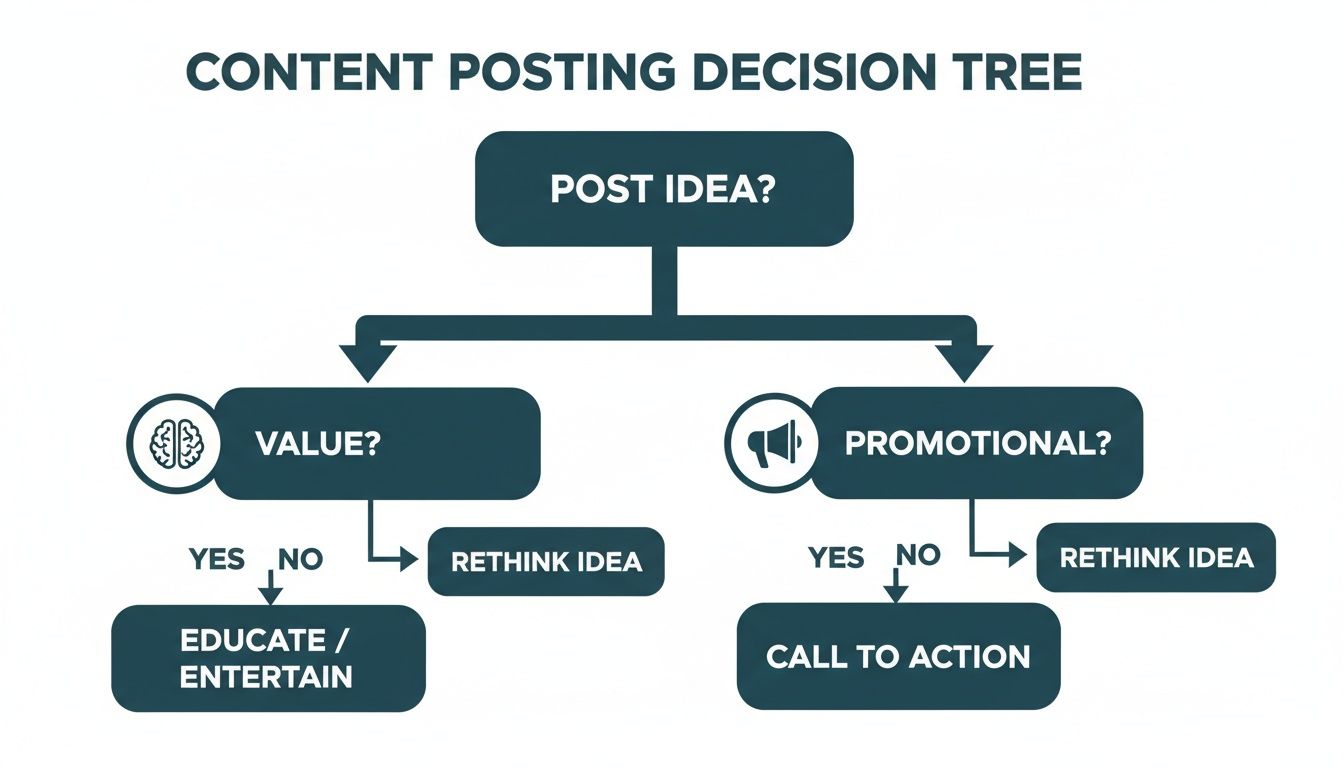
It’s a simple visual reminder that your first job is to give, give, give value. Only then should you ask for their attention.
Monitoring and Responding to Conversations
Growth isn’t just about broadcasting; it’s about listening. Keeping an ear out for brand mentions lets you jump into conversations as they happen, whether it’s answering a question or acknowledging feedback.
This kind of proactive engagement shows you’re an active, responsive brand, which is huge for building trust and a strong community. To make sure you never miss a beat, you might want to look into dedicated LinkedIn mention tracker tools that automate the monitoring for you. Staying on top of these conversations is a massive part of managing your brand’s reputation and grabbing those engagement opportunities when they pop up.
Of course. Here is the rewritten section, crafted to sound like an experienced human expert and match the provided examples.
Your Top LinkedIn Business Page Questions, Answered
Once you get your LinkedIn page up and running, the real work begins. You quickly move past the setup guides and into the messy, real-world questions that pop up daily. Things that make you stop and think, “Am I even doing this right?”
Let’s cut through the noise. I’ll walk you through the most common sticking points I see people struggle with, giving you straight, practical answers so you can get back to what matters: growing your brand.
Business Page vs. Showcase Page: What’s the Real Difference?
This one trips up a lot of people. The easiest way to think about it is this: your main Business Page is your corporate HQ. It’s the face of your entire company, where you share news, talk about your culture, and communicate your overall brand mission. Everything company-wide lives here.
A Showcase Page, on the other hand, is a specialised branch office. You’d create one to put a spotlight on a specific product line, a major long-term initiative, or a distinct sub-brand that needs its own voice. For instance, a big software company like Adobe might use its main page for corporate updates but have a dedicated Showcase Page for “Adobe Creative Cloud,” targeting a very specific user group with tailored content.
Don’t create a Showcase Page unless a part of your business has a truly unique audience and needs its own content stream. Otherwise, you just end up splitting your followers and watering down the impact of your main page.
How Do I Actually Get My Team to Engage?
Employee advocacy is probably the most powerful organic growth tool you have on LinkedIn, but it never just happens. You have to make it dead simple and genuinely worthwhile for your team to get involved.
First, lean on the “Notify Employees” feature for your most important posts. It’s a single click that sends a direct ping to your team, cutting through all the other noise in their feeds. Second, give them content they are genuinely proud to share. Think big team wins, spotlights on individual colleagues, and insightful articles written by people they actually work with.
Finally, make it a habit. Drop a link to a new post in your team’s Slack or Teams channel with a quick note like, “Hey team, would love your support on this one!” Most importantly, leadership has to walk the walk. When the C-suite is actively liking, commenting, and sharing, it sends a clear signal that this stuff matters, and everyone else will follow suit.
How Often Should I Really Be Posting?
Consistency will always beat frequency. It’s so much better to share three high-quality, genuinely helpful posts every single week than it is to post ten times one week and then go completely dark the next. That kind of sporadic activity makes your brand look unreliable and tells the algorithm to ignore you.
For most businesses, aiming for 3-5 thoughtful posts per week is a great, sustainable goal. It keeps your page active and consistently in front of your followers. Dive into your analytics to see which days and times your specific audience is most online, and tweak your schedule to match.
What Are the Most Common Mistakes to Avoid?
Even with the best of intentions, a few common slip-ups can completely stall your page’s growth. Just being aware of them is half the battle.
- Being Too Salesy: Your page is a community, not a constant sales pitch. If all you do is shout “buy our stuff,” people will tune you out fast. Focus on providing value first.
- Having an Incomplete Profile: A missing banner image, a vague “About Us” section, or outdated info looks unprofessional. It instantly kills trust before you’ve even had a chance to build it.
- Ignoring Your Comments: Not responding to comments is the digital equivalent of turning your back on someone. Acknowledge every single one, even if it’s just a simple ‘like’. It shows you’re listening.
- Posting Without a Plan: Throwing random content at the wall and seeing what sticks just doesn’t work. A simple content calendar will keep your messaging consistent and save you a ton of stress.
- Forgetting Relevant Hashtags: Stick to 3-5 highly relevant hashtags per post. This helps the right people discover your content. Using a dozen random, broad tags just looks spammy.
Ready to turn your LinkedIn content from a daily chore into a growth machine? With Postline.ai, you can brainstorm ideas, pull in real-time research, and schedule polished, on-brand posts in minutes. Stop guessing and start creating content that truly connects. Explore how Postline.ai can elevate your LinkedIn presence today.

Run every client pipeline in one place
Give each LinkedIn profile its own voice, calendar, approval flow, and analytics. Start in minutes.
Start free trial